



 0 Comment
 Customer Reviews

The cloud services industry once faced significant challenges. it was unable to fully meet client expectations due to numerous gaps that later Microsoft Azure’s Cloud Services filled. Microsoft’s cloud service transformed the landscape, bridging every shortfall the industry was grappling with.
Suddenly, clients gravitated toward companies harnessing the power of Azure. But what exactly changed? Was Azure’s success merely due to a product, or was there more behind the scenes?
The answer lies in a masterful blend of innovative products and meticulously crafted go-live strategies. Microsoft’s approach was rooted in extensive market research and user acceptance testing to understand its audience. The company ensured cross-functional collaboration, validated technical readiness and implemented rigorous testing protocols.
Today, global organizations rely on Azure for releasing new software, implementing ERP systems, and upgrading digital solutions.
Are you navigating a similar space, planning to launch your website, product, or service, while ensuring everything runs seamlessly?
The solution to these challenges lies in SlideTeam’s Go Live Plan Checklist Templates. These customizable presentation themes cover every stage of the go-live process, offering a structured framework to help your team focus on priorities, track progress, and avoid oversights.
Let’s explore these PowerPoint Slides and discover the perfect fit for your requirements. It’s time to simplify your go-live journey and deliver with confidence!
Template 1: Post-go-live Task Checklist PowerPoint Template
Our PowerPoint Theme is here to provide you with a powerful platform to streamline project management during the crucial post-launch phase. It has a professional layout that organizes key elements under one roof. These are task names, status updates, responsible individuals, progress, and priority levels.
Your team can easily perform quality checks, content reviews, user testing, bug fixing, etc., so that every detail can be looked at and assigned to the right person.
Furthermore, it would be easy for you to track tasks, identify bottlenecks, and maintain seamless communication with your various teams.
Download this PowerPoint Template from the link below and take your deployment strategy to the next level.

Template 2: Checklist For Successful Software Go Live PowerPoint Preset
Our PowerPoint Preset offers a powerful place where you can show the professional checklist to sort the go-live process for software launches. It breaks down essential elements into four key areas. These are planning, positioning, press releases, and website management.
As a matter of fact, each section presented on this tool helps you generate tasks, timelines, statuses, and responsibilities.
Furthermore, you can streamline your tracking progress for various purposes. These can be confirming launch dates, defining positioning strategies, or finalizing press releases.
Now, your team can use their efforts in the right manner to maintain transparency and achieve a smooth launch experience.
Download this PowerPoint Theme from the link below to enhance your software launch with powerful system testing.

Template 3: Formulating Go Live Preparedness Checklist PowerPoint Framework
Our PowerPoint Preset provides a detailed go-live preparedness checklist so that ERP systems are properly configured and integrated. You can highlight confirming hardware organization, reviewing final reports, validating data accuracy, and verifying all technical tests on this presentation theme.
Furthermore, there is an addition of columns for "Yes," "No," and "Comments" so that tasks are tracked with transparency and gaps can be addressed promptly.
As a matter of fact, your teams can streamline the deployment strategies to minimize risks associated with system readiness.
Download this PowerPoint Preset from the link below and focus on your backup and recovery strategies.

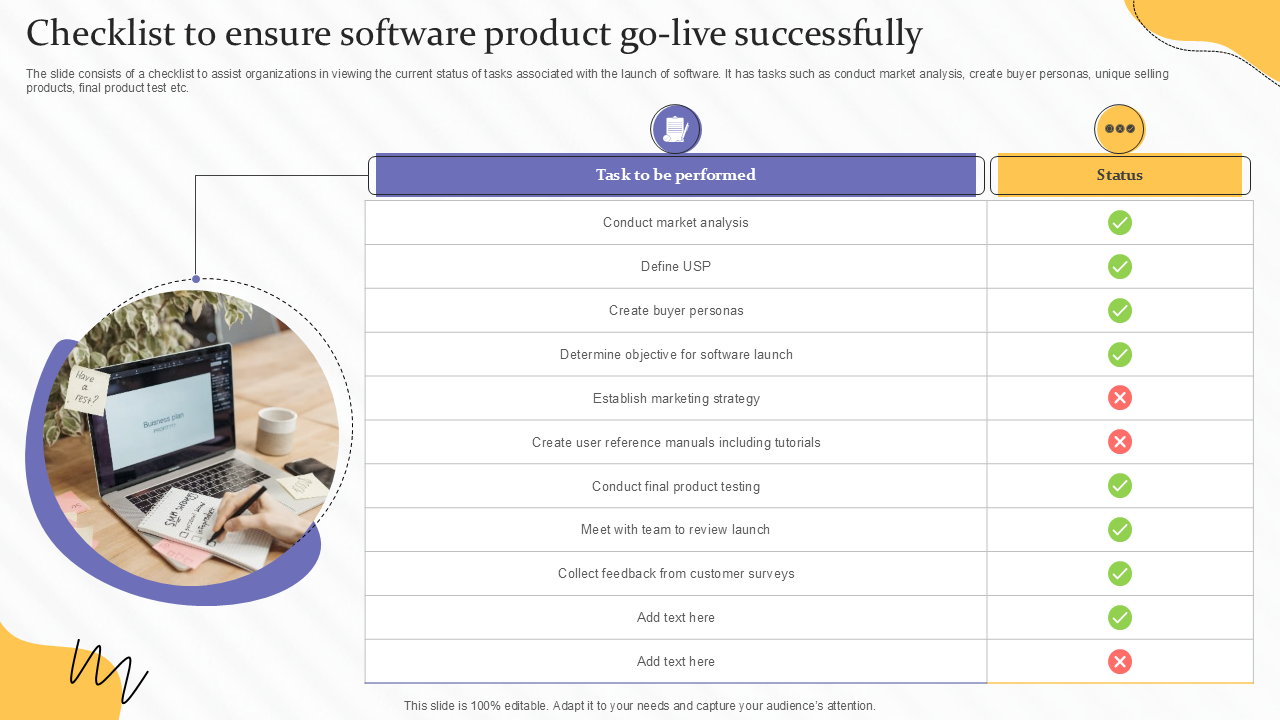
Template 4: Checklist To Ensure Software Product Go Live Successfully PowerPoint Preset
Our PowerPoint Theme works as an organized checklist so that your team can achieve a successful software product go-live process. It systematically breaks down various tasks. These include market analysis, defining the USP, creating buyer personas, establishing a marketing strategy, and many more.
Additionally, you can gather customer feedback, review the launch with the team, and prepare user reference manuals with this professional tool.
Undoubtedly, it has an easy-to-use format to track progress with a viewpoint that your teams can remain align to their efforts.
Download this PowerPoint Theme from the link below and enhance your data migration planning.
Launch your software with complete launch checklists using our PowerPoint Slides.
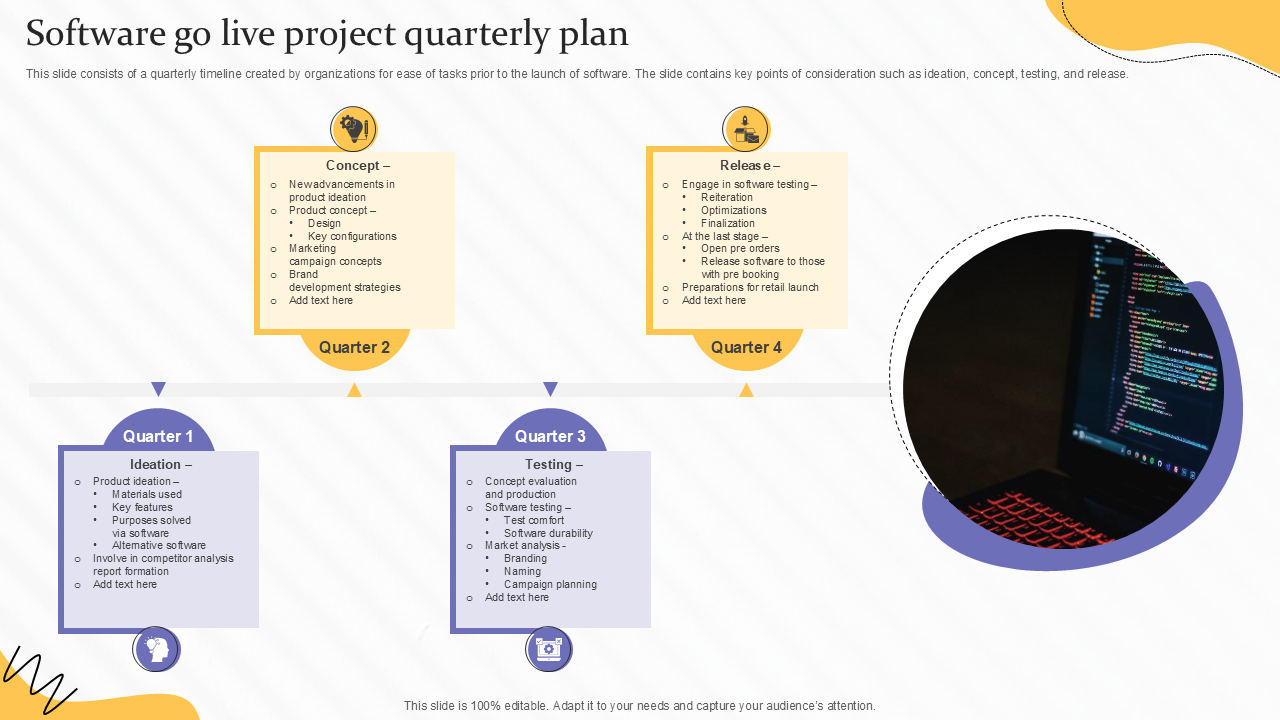
Template 5: Software Go Live Project Quarterly Plan PowerPoint Slide
Our PowerPoint Template helps you build a structured quarterly plan with a motive, i.e., your software go-live process without any challenge.
The complete presentation themes are divided into four clear phases. These are ideation, concept, testing, and release so that your team remains ready with their plans.
Furthermore, you can define product features and marketing strategies in the early quarters to know the concepts, conduct software durability tests, etc.
Moreover, there is a last quarter, where you can start the discussion towards optimization, pre-orders, and retail launch preparations.
Download this PowerPoint Slide from the link below and move towards efficient user acceptance testing.
Go Live with Ease
It is true that successful software launches are only achieved when there is meticulous planning, thorough testing, and smooth execution; for which you need the right tools.
SlideTeam’s Go Live Plan Checklist Templates can provide you access to structured frameworks that sort the go-live process.
These presentation templates are 100% customizable and have international appeal that will help you organize tasks, track progress, and align teams effectively across all phases.
Now, there is no place for any type of guesswork, and the only focus is to enhance collaboration to achieve an impactful launch.