


Checklist For Successful Software Go Live




Try Before you Buy Download Free Sample Product
 Impress Your
 Audience
 100%
100% Editable
 Save Hours
 of Time


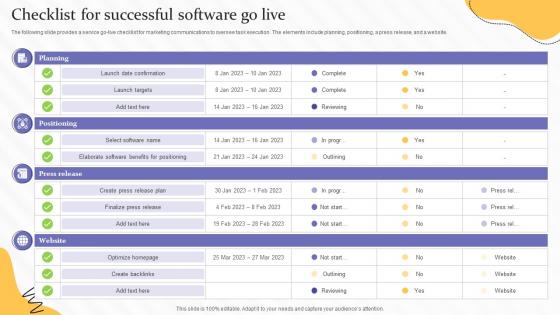
The following slide provides a service go live checklist for marketing communications to oversee task execution. The elements include planning, positioning, a press release, and a website.
People who downloaded this PowerPoint presentation also viewed the following :
Checklist For Successful Software Go Live with all 6 slides:
Use our Checklist For Successful Software Go Live to effectively help you save your valuable time. They are readymade to fit into any presentation structure.





FAQs for Checklist For Successful
Okay so for your go-live checklist, hit the main stuff first - test everything, backup your data, get user access sorted. Team-wise, make sure everyone knows their role and who to call when shit hits the fan (spoiler: it will). Have a rollback plan ready because Murphy's Law is real. Monitor everything closely the first few hours - honestly, I'd probably be glued to my screen refreshing dashboards like a maniac. Keep your support people on standby too. Oh and don't forget to tell stakeholders what's happening. They get cranky when left in the dark.
Think of a go-live checklist like a pilot's pre-flight routine - sounds boring but it literally prevents disasters. It catches problems before they blow up in your face by making sure systems are tested, data migration worked, users know what they're doing, and you've got backup plans ready. Honestly, launch day is pure chaos otherwise. The real value? It forces you to spot dependencies you'd totally miss when you're stressed and running around putting out fires. Short sentences work too. Start yours by writing down every single thing that has to work perfectly from minute one.
Dude, communication really is everything for launches. I've watched projects completely tank just because one person wasn't in the loop - it's wild how fast things spiral. Send regular updates about timelines and what could go wrong. People hate surprises, especially when they're scrambling to meet deadlines. Be upfront about any roadblocks too. Set expectations early about what "success" actually looks like because everyone has different ideas. Oh, and whatever communication schedule you pick? Actually stick to it. Sounds obvious but you'd be surprised how many people just... stop updating once things get hectic.
Handle your dependencies first - that's the stuff that blocks everything else. Critical infrastructure, data migration, security configs all need to happen before you touch anything user-facing. We completely screwed ourselves once by rolling out features while the database was still half-broken (never again lol). After that foundation's solid, move to UI changes and training docs. Bundle similar tasks together so you're not jumping around randomly. Give everyone clear deadlines but honestly? Add extra buffer time because something always goes sideways during launches. Trust me on that one.
Don't just grab some random template online - biggest rookie move ever. Your checklist needs to actually fit your specific project, not just be copy-pasted from last time. Spread the heavy lifting across weeks, not cramming it all into one panicked day (learned that the hard way). Test your rollback plan too, not just the launch itself. Oh, and definitely assign owners to each task with real deadlines, otherwise stuff just sits there. Include post-launch monitoring tasks since that's when things actually break. Get stakeholder buy-in early or you'll be redoing half of it later.
Honestly, using the right tech tools makes go-live checklists way less stressful. I'd grab something like Asana or Monday - they'll track tasks automatically and ping everyone when stuff gets done. No more digging through a million emails asking "wait, did this happen yet?" You can set up task dependencies too, which is clutch for keeping everything in order. The reporting features show you exactly where things stand at any moment. Oh, and make sure your whole team actually knows how to use whatever tool you pick before crunch time hits. Trust me on this one - it's worth the upfront effort.
Don't leave training until the last minute - that's where everything goes wrong. Start with overview sessions 2-3 weeks out, then do hands-on practice the week before launch. Right before go-live, quick refresher sessions work great. Record everything so people can watch later when they inevitably forget stuff. Find your super users early - they're lifesavers during the chaos. Oh, and definitely have trainers hanging around the first few days after launch because people will panic about the simplest things. Quick reference guides are clutch too.
Start with the basics - response times, error rates, server load. Those'll tell you if things are breaking. But honestly, don't ignore user stuff like login rates and how much people actually use your features. I've watched teams get obsessed with the technical side while users were totally lost. Support tickets spiking? Bad sign. Set up dashboards for the business metrics too - whatever "success" means for your specific launch. Transaction volume, conversions, whatever. Real-time monitoring is key so you can fix problems before they blow up your launch.
Honestly, update that checklist after every big release - or at least quarterly if you're doing regular deployments. We got burned once because ours still referenced some old database we'd ditched ages ago. Major changes to your architecture? Update it. New team members or tools? Same deal. I just set a recurring calendar thing to review mine - checking contact info, making sure processes haven't changed, that kind of stuff. The real key is fixing it right when you catch something missing during an actual go-live. Don't be like us and learn the hard way!
Give yourself at least 48 hours before launch - you'll need that buffer for whatever breaks. Get your whole team together and actually go through the checklist item by item. Don't skip the "obvious" stuff because that's honestly where things go wrong. Pick someone detail-oriented to run it and check things off as you go. Your test environment should look as close to production as possible (I know, easier said than done). Write down any workarounds or weird issues you find. Then do one final 30-minute walkthrough right before you flip the switch.
Look, feedback loops are huge for go-live checklists. Your team will catch stuff you'd never think of just from planning. Missing steps, confusing instructions, tasks in weird order - it all comes out when people actually use the thing during real deployments. Honestly, I've watched checklists that seemed bulletproof just completely break down in practice. So set up regular check-ins after each go-live. Ask what was unclear, what took forever, what they had to wing it on. Then actually update the checklist with their input. It becomes this living document that improves each time instead of just sitting there collecting dust.
Definitely need a solid rollback plan - that's your lifeline if things go completely wrong. Map out who's calling stakeholders when stuff breaks (and trust me, something always does). Back up your data obviously, and figure out workarounds for when key features crap out. I always plan for the worst-case scenarios too, like what happens if everything crashes at 2am on a weekend? Get everyone's contact info lined up with clear escalation steps. Oh, and actually test these backup plans first. You really don't want to be googling "how to rollback" while your users are panicking.
Oh absolutely, bigger projects = way more complicated checklists. You're juggling more systems, more people, more ways things can go sideways. Small stuff might need like 10-15 items but enterprise rollouts? Easily 100+. The meetings alone will kill you lol. Here's what works though - chunk your checklist into phases and make sure someone actually owns each section. Don't do one giant list or you'll lose your mind trying to track everything. Break it down so it's actually manageable.
Start with data protection stuff - GDPR, CCPA, whatever hits your users. Get your security audits documented and signed off. WCAG compliance is huge if you're customer-facing (seriously, accessibility lawsuits are brutal). Then there's industry rules: HIPAA for health stuff, PCI DSS for payments, SOX if you touch financial data. Your privacy policy better match what the app actually does - I've seen companies get wrecked over that gap. Legal needs to bless your terms of service too. Oh, and keep a compliance folder with all your certs and audit trails ready to go.
Dude, that go-live checklist is basically gold for onboarding new people. Walk them through what actually happened during launch - the critical systems, where docs live, all that stuff. Way easier than trying to remember everything months later when your brain's already moved on to other fires. Shows them what normal ops look like too, not just the launch craziness. Oh and definitely update it right after go-live while it's all still fresh in your head. Then just use that as your onboarding foundation - saves you so much time explaining the same things over and over.
-
Great quality slides in rapid time.
-
Presentation Design is very nice, good work with the content as well.