

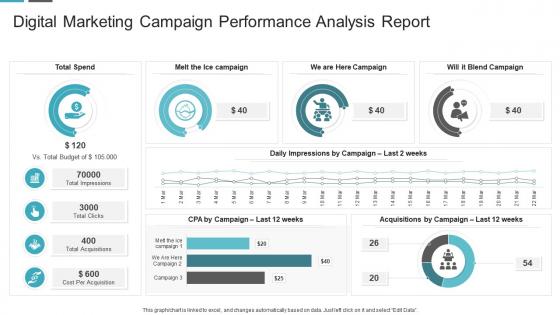
Digital marketing campaign performance analysis report




Try Before you Buy Download Free Sample Product
 Impress Your
 Audience
 100%
100% Editable
 Save Hours
 of Time


Our Digital Marketing Campaign Performance Analysis Report are topically designed to provide an attractive backdrop to any subject. Use them to look like a presentation pro.
People who downloaded this PowerPoint presentation also viewed the following :
Digital marketing campaign performance analysis report with all 10 slides:
Use our Digital Marketing Campaign Performance Analysis Report to effectively help you save your valuable time. They are readymade to fit into any presentation structure.








FAQs for Digital marketing campaign
Honestly, focus on the metrics that actually matter for your bottom line. Conversion rate and cost per acquisition are your bread and butter. ROAS tells you if you're making money or just burning cash. Click-through rates show if people care about your content - follower count is pretty much useless if nobody's buying. Customer lifetime value is huge for long-term planning, and don't sleep on basic website stuff like bounce rate. I'd stick to maybe 5-7 KPIs max. Tracking everything just makes you crazy and doesn't help decision-making.
So basically you gotta track what you're spending vs what's coming back in - easier said than done though. Make sure GA4 talks to your CRM or you're just guessing at everything. UTM parameters are your friend, put them on literally everything. The annoying part? People see your ad today but might not buy until next month through some random Google search. Start with last-click attribution since it's simple, then get fancy with the data models later. Oh and set up conversion tracking everywhere - sounds obvious but you'd be surprised how many people skip this step.
Google Analytics 4 is your starting point - free and covers all the website basics. SEMrush or Ahrefs cost a fortune but they're amazing for SEO stuff and spying on competitors. I personally think SEMrush has a better interface, but whatever. Facebook's native analytics work fine for social media. Don't overthink it there. Google Data Studio creates those fancy dashboards that make you look professional. Your email platform probably has decent analytics built in already. Pick GA4 plus maybe one paid tool based on what you need most. Going overboard with tools just makes everything confusing.
Honestly, social media analytics are like having a cheat sheet for your whole digital game. They'll show you what content actually hits with your audience and when people are scrolling most. You can catch trends early (or avoid dead ones), get real data on who's following you instead of just guessing, and figure out which campaigns are worth your money. The timing optimization alone is huge - I was posting at totally wrong times before I checked mine. Plus you'll spot content gaps you didn't even know existed. My advice? Find your top 3 post types that perform best and just repeat that formula everywhere else.
So customer segmentation is basically chopping up your data into groups that actually make sense. You'll stop looking at those blurry overall numbers and start seeing how different people really behave. Like, maybe millennials are crushing it on your Instagram ads while Gen Z just bounces immediately - who knew? Your email open rates might be totally different depending on where people live too. Honestly, it's kind of wild what you discover. Just pick your top 3 or 4 customer types first and compare their main metrics. Way easier than trying to segment everything at once.
Analytics are a game changer - they show you what's actually hitting vs what you think is working. I used to just wing it and was totally off most of the time lol. Check where people bounce, what content gets shared, which posts drive actual results. The patterns are wild once you start looking. Your top 5 posts this month? Look at what they have in common - topic, length, format, whatever. Then just do more of that stuff and drop what's flopping. Even posting times matter way more than I expected.
Oh this is actually pretty straightforward! SEMrush and Ahrefs are your best friends for seeing what keywords they're ranking for and their paid ad spend. I'd also just manually stalk their social media - sounds creepy but you learn so much about their messaging that way. Hootsuite shows engagement rates if you want to get fancy with it. SimilarWeb breaks down their traffic sources, which is super helpful. Facebook Ad Library is clutch for seeing their current campaigns. Honestly, pick like 2-3 main competitors and check on them monthly. You'll start noticing patterns in what they're doing.
Honestly, A/B testing is a game changer - it stops you from just guessing what works. You literally test two versions of the same thing (like email subject lines or button colors) and see which one gets better results. Way better than assuming you know what your audience wants based on old data. The trick is changing just one thing at a time, otherwise you won't know what actually made the difference. I'd start super simple - maybe test different CTA buttons first. It's kind of addictive once you see how much it improves your campaigns. Plus, your boss will love the concrete numbers.
So SEO data is like your reality check for whether your content actually works. I track keyword rankings to see if I'm showing up for stuff that matters, and organic traffic tells me if people are finding my site. Search console is where the magic happens though - it shows exactly what people searched before landing on your pages. Super helpful for spotting missed opportunities. Technical issues pop up there too, which can totally tank your performance if you ignore them. Honestly, I use all this to figure out what content to make next and find those easy wins that boost visibility fast.
Honestly, the data stuff is pretty eye-opening once you dig into it. You'll figure out exactly when your audience is scrolling and what content they actually click on. Plus you can see where people bail in your sales process - that part always stings a bit but it's super useful info. The timing insights are probably my favorite though. Once you know peak engagement windows, you can schedule posts way smarter. Oh and the channel preferences are huge too - like maybe your people hate Instagram but love email. Use all this to make your campaigns feel less generic and more like you actually know your customers.
Dude, seasonal stuff will mess with your marketing data big time if you don't watch out. I freaked out once when July numbers tanked - turns out everyone was just on vacation, whoops. Traffic, conversions, customer habits... they all go crazy during holidays and back-to-school madness. Instead of comparing this month to last month, look at this July versus last July, you know? Year-over-year is way more reliable. Set up some dashboards that actually make sense seasonally. That way you'll know if something's genuinely broken or if it's just people doing their usual seasonal weirdness.
Honestly, you've gotta get into your analytics and find where things are breaking down. Look at your conversion funnels first - see where people are bailing. Then compare which content actually performs vs what you think should work. Customer acquisition costs will tell you which channels are worth it too. Social media engagement is probably the easiest place to start though - those numbers don't lie about whether your messaging connects. I'd pick one thing that's clearly not working and just go deep on it this week. Way better than trying to fix everything at once.
Honestly, just lead with the good stuff - what actually matters to them. Nobody wants to dig through spreadsheets to find the point, so charts are your best friend here. I learned this the hard way after watching too many eyes glaze over during presentations. Make your data tell a story instead of just throwing numbers at people. Focus on metrics that connect to what they actually care about business-wise, not the flashy stuff that looks cool but doesn't really matter. And definitely come with recommendations ready to go - they want you to tell them what to do next, not just report what happened.
Dude, AI is a game-changer for marketing analysis. It crunches huge amounts of data way faster than you ever could and finds patterns that would take forever to spot manually. The predictive stuff is pretty wild - it can forecast customer behavior and automatically tweak your campaigns. Plus you get way better at segmenting audiences and figuring out what's actually driving conversions. Honestly, the personalization alone makes it worth it. My advice? Don't go crazy right away. Pick something specific like campaign optimization first and test out a tool there.
Honestly, just don't be sketchy about it. Get real consent first - not buried in some endless terms page nobody reads. Collect only what you actually need, not every piece of data you can grab. People should be able to see their info, delete it, or bail out completely. Security is huge obviously - lock that stuff down tight. I mean, the whole thing comes down to transparency and not being creepy. Would you want some company hoarding your personal details without telling you? Exactly. Treat their data how you'd want yours treated and you'll probably be fine.
-
Graphics are very appealing to eyes.
-
Innovative and Colorful designs.