

BPO Call Center Organizational Structure Guide To Performance Improvement




Try Before you Buy Download Free Sample Product
 Impress Your
 Audience
 100%
100% Editable
 Save Hours
 of Time


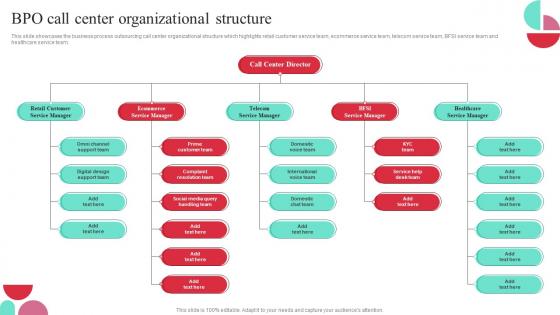
This slide showcases the business process outsourcing call center organizational structure which highlights retail customer service team, ecommerce service team, telecom service team, BFSI service team and healthcare service team.
People who downloaded this PowerPoint presentation also viewed the following :
BPO Call Center Organizational Structure Guide To Performance Improvement with all 6 slides:
Use our BPO Call Center Organizational Structure Guide To Performance Improvement to effectively help you save your valuable time. They are readymade to fit into any presentation structure.





FAQs for BPO Call Center Organizational Structure Guide
So most BPO centers work like this - agents take the calls, team leads watch over small groups, then ops managers handle multiple teams. Senior management sits at the top, obviously. There's also support stuff running alongside: IT, HR, training, quality assurance. It's basically your standard corporate ladder but everyone's obsessed with numbers and call volumes. Each level has their own metrics to hit, which can get pretty intense. If you need to escalate something or figure out who's in charge of what, just follow that chain upward. Makes troubleshooting way easier when you know the structure.
Honestly, team structure makes or breaks performance in call centers. Clear reporting lines are clutch - agents know exactly who to bug when things get messy, so calls move faster and customers aren't sitting there fuming. But don't go overboard with layers. Too many and you're playing telephone for every approval. I've seen teams where simple requests take forever because everything has to go up three levels. Smart move is having team leads who can handle most escalations themselves. Front-line agents fixing problems fast beats bouncing customers around departments any day.
So tech is basically what keeps the whole operation from falling apart. Your CRM gives agents all the customer info instantly, which is huge. Predictive dialers cut out that annoying dead time between calls. AI routing is actually pretty smart - it figures out which agent matches best with each customer's issue. Real-time dashboards are where you can watch all your metrics update live (kind of addicting tbh). IVR systems handle the basic stuff automatically so agents can focus on complicated problems. Don't just chase the flashy new stuff though - pick what actually fixes your biggest headaches.
So training's usually like 2-4 weeks depending on the company. First week you're cramming all their products and services - honestly feels like drinking from a fire hose sometimes. Then they teach you the computer systems and how to handle calls properly. The communication stuff is where they really focus though - listening skills, staying calm when customers are pissed, all that. You'll do practice calls and shadow other agents before going solo. Oh and seriously, write everything down during product training because you'll forget half of it otherwise and need those notes later.
Start with first call resolution, average handle time, and customer satisfaction - these three are your bread and butter. If your FCR is solid and customers aren't complaining, you're probably in good shape. Agent utilization and schedule adherence are worth watching too. Quality scores from call monitoring will catch issues early, and honestly? Keep tabs on turnover rates since agents usually start slipping before they bail. I'd pull FCR and CSAT reports weekly first, then dive into the other stuff if something looks off.
Yeah, uneven workload is a nightmare for customer satisfaction. Some agents get slammed while others sit around doing nothing - customers end up waiting forever and getting crappy service. The overwhelmed ones sound stressed (which customers pick up on immediately), and the idle ones get rusty from lack of practice. Honestly, finding that balance where everyone's busy but not drowning is tricky. You'll want to watch your real-time numbers and use smart routing to distribute calls based on who can actually handle what. Makes a huge difference when done right.
So basically inbound centers are all about reacting to whatever comes in - you're dealing with customers calling you, which means setting up good queue systems and training people for customer service stuff. Outbound is the opposite though, you're the one reaching out. That means focusing on lead management and having agents who can actually sell or do collections. The staffing needs are totally different too. It's kinda like defense versus offense if you think about it. Even your office setup will look different depending on whether calls are coming in or going out. Makes sense when you break it down like that.
Honestly? Start by actually asking your team what would make their jobs suck less - you'll probably be shocked at how simple some solutions are. Celebrate the small wins publicly, not just the big numbers. Give feedback that isn't just "your metrics are trash." Let people speak up in meetings without shutting them down. Most call center agents feel like disposable robots, so don't micromanage their bathroom breaks (seriously). Offer some flexible scheduling if you can swing it. Career growth opportunities help too. Oh, and actually listen when they complain about impossible customers or broken processes - there's usually truth there.
So remote work completely changed call centers, right? No more huge floors packed with agents - now everyone's scattered everywhere. You can hire from anywhere which is amazing, but managing distributed teams is tricky. Digital monitoring became huge since you can't just walk around checking on people. Infrastructure costs went way down, though you'll need better cybersecurity obviously. Honestly, a lot of managers are still figuring this whole thing out. Performance metrics had to change too. My advice? Focus on solid remote training programs from day one - that's where most companies mess up.
Dude, get your automation and training sorted first - that's what'll save you when things get crazy. Have your experienced people handle the messy stuff while newbies take basic calls. Document everything now before you forget how you do things. Regular coaching sessions are a must, plus real-time feedback tools. I've seen way too many companies try to grow super fast and just implode within months - it's brutal. Don't forget about seasonal rushes and people quitting. Oh, and throw in some AI chatbots for the simple stuff once you've got the basics down.
Look, most agents bail because they're either broke or miserable - sometimes both. Pay them fairly and actually review salaries regularly, don't just promise "we'll see." Create real advancement opportunities, like team lead positions or specialist tracks. Flexible schedules help tons with burnout too. Oh, and stop dumping people straight onto calls without proper training - that's just cruel. Yeah, investing in coaching costs money upfront, but you'll save way more not having to constantly hire and retrain people every other month. Trust me on this one.
So QA teams basically work between ops and management - they report to leadership but spend tons of time with your supervisors and agents. Most places assign QA analysts to specific teams so they actually know the agents pretty well. They're doing live call monitoring, pulling random samples, running those calibration meetings with leads. The whole point is translating those corporate quality standards into real feedback agents can actually use. Oh and honestly, the best QA teams aren't just there to score calls - they help supervisors spot training gaps and figure out where people need help. It's way more effective when they're actually coaching, not just judging.
Dude, feedback loops are seriously your best friend for catching problems early. Get input flowing from everywhere - your agents, supervisors, even customers. Otherwise you're just shooting in the dark hoping stuff works. The thing that really gets me is when companies collect all this feedback then do absolutely nothing with it. Such a waste! Your team actually cares more when they see their suggestions turn into real changes. Just don't forget the follow-up part - people need to know you heard them and what you're doing about it. Makes all the difference.
So offshore call centers end up being pretty massive - tons of agents, lots of supervisors, multiple management layers because you're juggling time zones and communication issues. Nearshore is way more chill since you're working with similar cultures and schedules, so the structure stays flatter. Onshore teams? They're usually smaller and everyone does a bit of everything. Honestly, the whole setup just depends on how much coordination headache you're willing to deal with. The further away your team is, the more layers you'll need to keep things running smoothly.
So your CRM is like the brain of your whole call center setup. All customer info lives there - past calls, what they bought, complaints, the works. When someone calls, their details pop up instantly so your agents aren't flying blind. No more "sorry, can you repeat that whole thing again?" moments that make people want to scream. It tracks everything afterward too - outcomes, schedules follow-ups, shows you when things get crazy busy. Honestly, the phone integration part is where it really shines. Just make sure your team knows more than the bare minimum features or you're wasting money.
-
Templates are beautiful and easy to use. An amateur can also create a presentation using these slides. It is amazing.
-
Thank you for offering such helpful pre-designed templates. They are really beneficial to me in my job.