


Clickup Investor Funding Elevator Pitch Deck Ppt Template





Try Before you Buy Download Free Sample Product
 Impress Your
 Audience
 100%
100% Editable
 Save Hours
 of Time


Check out our insightfully developed PPT titled, ClickUp Investor Funding Elevator Pitch Deck covering the Project Management and Collaboration software. This productivity tool helps teams to track, plan, and collaborate on any project. Additionally, our Investor Deck involves problem statements and key solutions offered to teams of all types across all industries. It also covers essential details such as key facts, unique selling points, and major milestones achieved. Further, our Project Management Company Pitch Deck covers client testimonials, business models, and revenue streams. It also showcases competitive analysis, financial performance, financial projections, and investment asks to create a strong message for investors to invest in business. Lastly, our Startup Presentation includes an exit strategy, a core team involved in managing the company, organizational structure, and shareholding pattern of the company after obtaining funding from potential investors. Get access now.
People who downloaded this PowerPoint presentation also viewed the following :
Content of this Powerpoint Presentation
Slide 1: This slide introduces ClickUp Investor Funding Elevator Pitch Deck. State Your Company Name and begin.
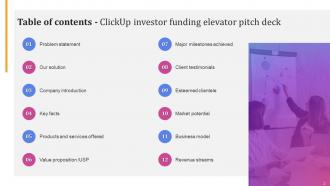
Slide 2: This slide shows a Table of Contents for the presentation.
Slide 3: This slide is in continuation with the previous slide.
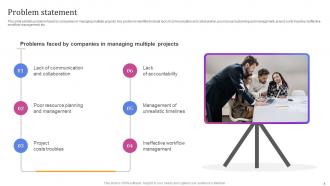
Slide 4: This slide exhibits problems faced by companies in managing multiple projects.
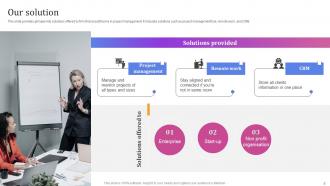
Slide 5: This slide provides glimpse into solutions offered by firm that assist teams in project management.
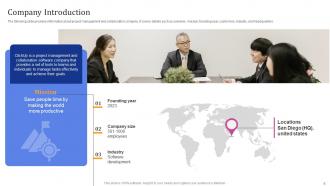
Slide 6: This slide entails information about project management and collaboration company.
Slide 7: This slide covers essential facts pertaining to productivity software.
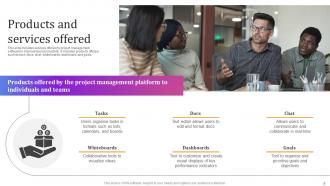
Slide 8: This slide includes services offered by project management software to improve team productivity.
Slide 9: This slide exhibits a unique selling proposition strategy.
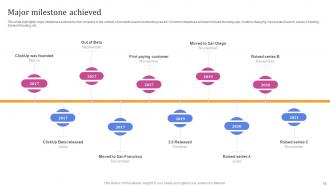
Slide 10: This slide highlights major milestones achieved by the company in the context of products launch and funding raised.
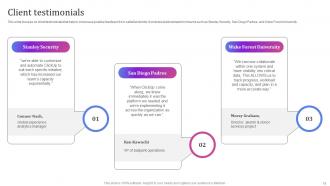
Slide 11: This slide focuses on client testimonials that help to showcase positive feedback from satisfied clients.
Slide 12: This slide emphasizes the successful partnerships and trusted relationships that the company has established with notable clients and customers.
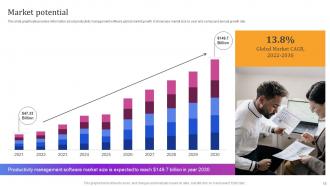
Slide 13: This slide graphically provides information about productivity management software global market growth.
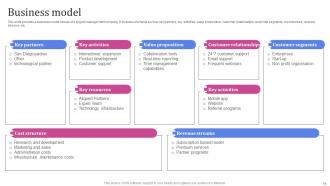
Slide 14: This slide illustrates a business model canvas of a project management company.
Slide 15: This slide entails the revenue model of the company.
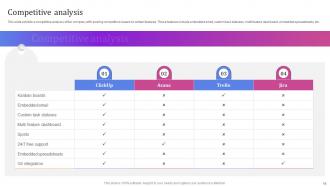
Slide 16: This slide exhibits a competitive analysis of the company with existing competitors based on certain features.
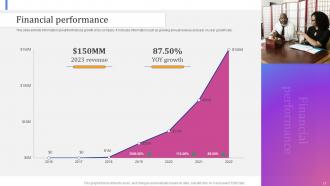
Slide 17: This slide elucidates information about the financial growth of an company.
Slide 18: This slide projects the anticipated annual revenue growth over the next two years of productivity management software.
Slide 19: This slide marks the strengths and compelling reasons for investors to invest in the company.
Slide 20: This slide puts the strengths and compelling reasons for investors to invest in the company.
Slide 21: This slide provides information to investors about the intended utilization of funds raised by the organization.
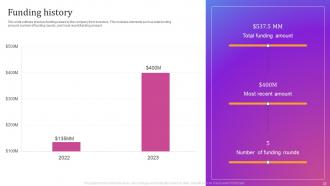
Slide 22: This slide outlines previous funding raised by the company from investors.
Slide 23: This slide displays the exit strategy of the organization which helps in reducing investor risk.
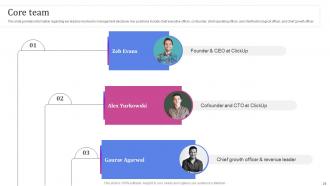
Slide 24: This slide offers the information regarding key leaders involved in management decisions.
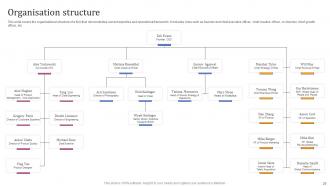
Slide 25: This slide covers the organizational structure of a firm that demonstrates current expertise and operational framework.
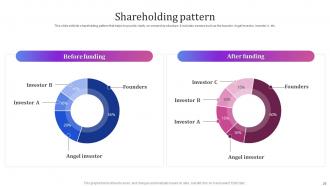
Slide 26: This slide exhibits shareholding pattern that helps to provide clarity on ownership structure.
Slide 27: This is a Contact Us slide. Add your Email Address, Contact, Social Media Handles, and Address.
Slide 28: This slide shows all the icons included in the presentation.
Slide 29: This slide is titled Additional Slides for moving forward.
Slide 30: This slide depicts a Venn diagram with text boxes.
Slide 31: This slide displays Mind Map with related imagery.
Slide 32: This slide is Our Mission slide with related imagery and text.
Slide 33: This slide is a Timeline slide. Show data related to time intervals here.
Slide 34: This slide is an Idea Generation slide to state a new idea or highlight information, specifications, etc.
Clickup Investor Funding Elevator Pitch Deck Ppt Template with all 42 slides:
Use our Clickup Investor Funding Elevator Pitch Deck Ppt Template to effectively help you save your valuable time. They are readymade to fit into any presentation structure.




















FAQs for Clickup Investor Funding Elevator Pitch
Honestly, what got me hooked on ClickUp was how you can flip between different views - like, if I'm feeling scattered I'll use the Kanban board, but when I need to see deadlines I switch to Gantt charts or calendar view. Most tools are pretty rigid about their setup, but ClickUp lets you customize basically everything - fields, automation, plus it has docs and time tracking built right in. The way you can organize projects is really flexible too. Oh and their free plan is actually decent, so definitely try that first before paying for anything. It's one of those tools that just... makes sense once you start using it.
Honestly, ClickUp's been a lifesaver for our team chaos. Instead of jumping between Slack, email, and like five other apps, everything just lives in one spot. Task assignments, comments, file sharing - it's all there. The proofing feature alone is worth it because those email screenshot threads are the worst. You can set up notifications that actually make sense instead of spam-bombing everyone's inbox. Oh, and definitely try it with just one project first - don't make the same mistake we did and migrate everything at once!
Honestly, the hierarchy thing is key - use Spaces for departments, Folders for projects, Lists for tasks. Otherwise you'll lose your mind trying to find anything. Create templates with custom fields for deadlines and who's doing what, saves so much time later. Notifications will drive everyone crazy if you don't dial them in per person's role (learned that one the hard way). The Calendar and Gantt views are clutch for timelines. @mentions work great for back-and-forth without endless meetings. Oh, and train people on your workflow upfront - it's annoying but totally worth it.
Yeah, ClickUp plays nice with basically everything - Slack, Google stuff, Teams, GitHub, Zapier. What's cool is these aren't just basic connections. You can sync calendars, pull emails right in, automate between apps. I actually love how you can embed tools directly in your workspace. The Slack thing works super well - comments sync both ways instantly, which honestly surprised me. Oh and definitely use their automations or Zapier to avoid copying data manually (learned that the hard way). Just start with whatever apps you use most.
So ClickUp lets you set priority levels - urgent, high, normal, low - which is super helpful. The time tracking feature is built right in, and honestly it's kind of shocking to see where your time actually goes. I love that you can switch between different views like Gantt charts or Kanban boards depending on your mood. Task dependencies are clutch for figuring out what order to tackle things. Oh, and you can customize the statuses to match how you actually work instead of being stuck with generic ones. I'd say start by flagging your current tasks by priority and track your time for a week - you'll probably be surprised by what you find.
Dude, ClickUp automations are seriously a lifesaver. They handle all that boring repetitive stuff - auto-assigning tasks, updating statuses, sending notifications. I got a little carried away when I first discovered them and automated like everything lol. But honestly? Best decision ever. Your projects just keep moving forward without you hovering over them constantly. I'd start with something simple like having tasks auto-assign based on priority. Once you see how smooth it makes things, you'll probably want to automate more. It's weirdly satisfying watching everything just... work.
ClickUp's honestly pretty great for adapting to however your team works. First thing I'd do is map out your workflow on paper - way easier than jumping straight in. You can set up custom statuses that actually match your process, add fields for whatever data matters to you, and switch between views like Kanban or Gantt depending on your vibe. The automation stuff is where it gets really useful though. Status updates, task assignments, notifications - you can automate based on whatever triggers make sense. Don't try building everything at once or you'll go crazy. Start simple and add pieces gradually.
Get them to set up their profile and workspace first. Then show them your folder structure and templates - but honestly, tell them to ignore like 90% of ClickUp's features at first because it's way too much. Just focus on tasks, due dates, and comments the first week or so. Give them something simple to practice on, maybe a fake project? Make sure they know your team's views and statuses too. Oh and definitely pair them with someone who actually knows ClickUp well for their first real projects. They'll pick it up way faster by doing stuff than watching tutorials.
Honestly, ClickUp's dashboard is a lifesaver for this stuff. You can see completion percentages and track time without having to constantly ask your team "hey, where are we on this?" The Gantt charts don't suck like most other tools (looking at you, [redacted project software]). Custom fields let you track whatever weird metrics your project needs. I'd set up automated reports for productivity and sprint stuff - saves you from scrambling before status meetings. Also do a weekly dashboard check so you're not blindsided. Pro tip: the milestone tracking actually works well too.
ClickUp can get pricey fast depending on your team size. Small teams? You're golden with the free plan (100MB storage) or maybe the $7/user Unlimited plan. But once you hit 50+ people, those per-user costs become brutal - we're talking $12-19 per person monthly for the Business or Enterprise tiers. Those higher plans do give you better permissions and integrations though, which bigger teams actually need. Honestly, I'd just start with the free version first. See if people even use it before dropping money on paid plans. No point paying for ghost users, you know?
Yeah ClickUp's Goals feature is actually pretty solid for this stuff. You can set up different types - number targets, true/false goals, currency amounts, whatever you need. The best part? Link them straight to your tasks and watch progress update automatically as work gets done. Honestly gets a bit addictive seeing those bars fill up lol. They've got weekly scorecards too for tracking metrics, plus you can roll everything from team goals up to company-wide ones. I'd start simple though - maybe just "tasks completed this week" to get a feel for it before diving deeper.
Yeah, ClickUp's pretty solid security-wise. They've got enterprise encryption and are SOC 2 Type II compliant, which is basically the good stuff for business apps. Two-factor auth is available too - definitely turn that on first thing, takes maybe 30 seconds. You can also set up SSO if your company uses that, and they do regular security audits. The permissions thing is actually really handy since you can pick exactly who sees what projects. Their security page kinda reads like a checklist but in a good way - seems like they've covered the important bases most teams would need.
Oh dude, ClickUp's templates are a game changer - seriously wish someone told me about this earlier. Instead of building everything from zero, just hit up their template center and grab whatever fits your project. Sprint planning, marketing stuff, product launches, they've got it all. The coolest part? Once you nail a project, turn it into your own template so you can just copy what actually worked. I probably sound like a broken record about this, but honestly try picking one template this week. You'll set up projects way faster and wonder why you were doing all that manual work before.
Get your team involved from day one - let them set up their own dashboards and views that match how they actually work. People hate tools that feel forced on them, but they'll totally buy into something they helped create. Don't go crazy with features right away though. Basic task lists first, then you can get fancy with automations later. Oh and definitely do regular check-ins to see what's clicking and what's driving them nuts. But honestly? The biggest thing is using it yourself consistently. Your team will call you out if you're not walking the walk.
Yeah ClickUp's actually pretty good about this! They have a public feature request board where you can submit ideas and vote on stuff. You can find it on their website or in the app itself. Honestly, I've been surprised by how responsive they are - I've voted for things that actually got built later. They also keep an eye on their forums and social media for feedback patterns. Oh, and they're decent about updating people on what's in development with rough timelines. I'd check their feature board first to see if someone already suggested what you want, then either vote it up or submit something new.
-
Superb! The innovative and inspiring template designs provide an edge to the presentation.
-
It saves your time and decrease your efforts in half.