


Zapier Investor Funding Elevator Pitch Deck Ppt Template





Try Before you Buy Download Free Sample Product
 Impress Your
 Audience
 100%
100% Editable
 Save Hours
 of Time


Explore our meticulously crafted PowerPoint Presentation titled, Zapier Investor Funding Elevator Pitch Deck. This Workflow Solutions Presentation covers a pitch deck for a leading automation platform that connects favorite apps and streamlines workflows effortlessly to help businesses and individuals save time and boost productivity. Additionally, It involves details such as products and services offered, key facts, unique selling points, and major milestones achieved. Our Multi-step Automation Presentation also includes client testimonials, the business model, revenue streams, competitive analysis, financial performance, projections, and an investment pitch deck for investor funding. Furthermore, the Data Automation Deck involves the exit strategy, and the team involved in managing the company. Lastly, our Cloud Integration PowerPoint presentation covers the organizational structure, and shareholding pattern of the company post-funding from potential investors. Get access now.
People who downloaded this PowerPoint presentation also viewed the following :
Content of this Powerpoint Presentation
Slide 1: This slide introduces Zapier Investor Funding Elevator Pitch Deck. State Your Company Name and begin.
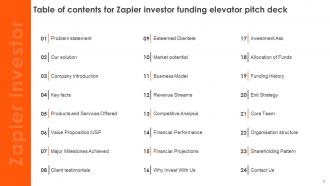
Slide 2: This slide shows a Table of Contents for the presentation.
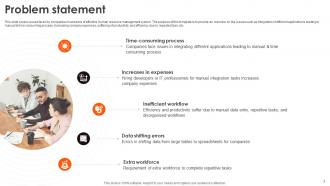
Slide 3: This slide covers issues faced by companies in absence of effective human resource management system.
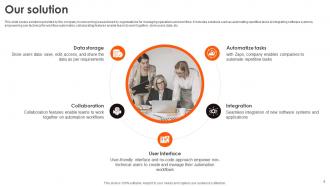
Slide 4: This slide contains solutions provided by the company in overcoming issues faced by organizations for managing operations and workflow.
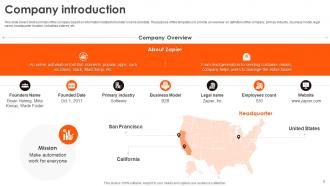
Slide 5: This slide presents brief summary of the company based on information related to founder’s name and date.
Slide 6: This slide puts key insights of the company that assists in attracting potential clients.
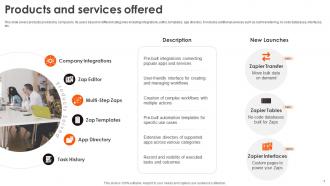
Slide 7: This slide highlights products provided by company to its users based on different categories including integrations, editor, templates, app directory.
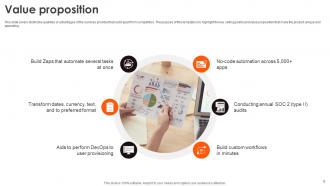
Slide 8: This slide covers distinctive qualities or advantages of the services provided that set it apart from competitors.
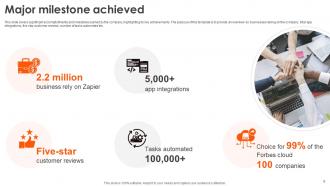
Slide 9: This slide contains significant accomplishments and milestones earned by the company, highlighting its key achievements.
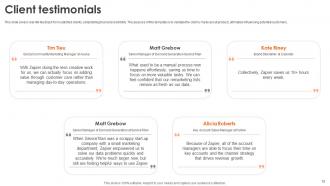
Slide 10: This slide denotes real-life feedback from satisfied clients, establishing trust and credibility.
Slide 11: This slide depicts a list of clients that the company has served or collaborated with by providing satisfactory services to them.
Slide 12: This slide covers overview of the market size, growth prospects, and opportunities for product.
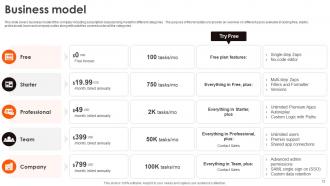
Slide 13: This slide entails business model of the company including subscription based pricing model for different categories.
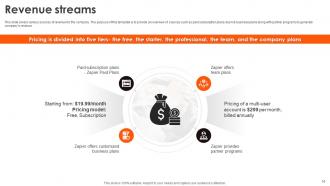
Slide 14: This slide shows various sources of revenue for the company.
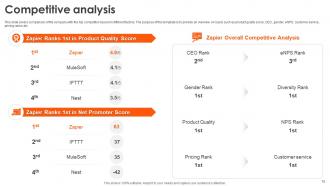
Slide 15: This slide marks comparison of the company with the top competitor based on different factors.
Slide 16: This slide presents financial performance of the company based on several revenues sources.
Slide 17: This slide represents financial projections for company’s progress in the market.
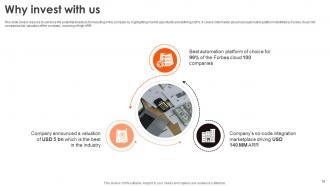
Slide 18: This slide covers reasons to convince the potential investors for investing in the company by highlighting market opportunity and defining USPs.
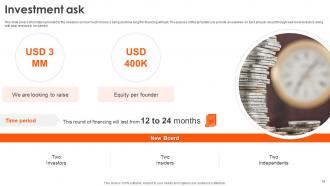
Slide 19: This slide caters to the information provided to the investors on how much money is being and how long the financing will last.
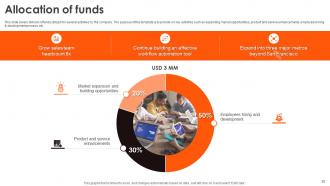
Slide 20: This slide portrays division of funds utilized for several activities by the company.
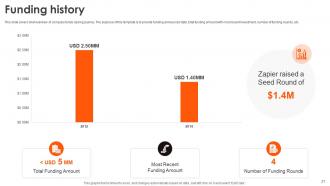
Slide 21: This slide projects brief overview of company funds raising journey.
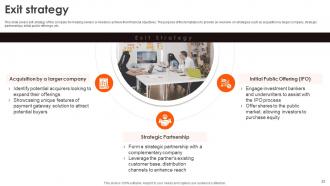
Slide 22: This slide elaborates exit strategy of the company for helping owners or investors achieve their financial objectives.
Slide 23: This slide covers brief introduction about founding team of the company.
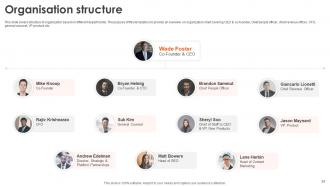
Slide 24: This slide mentions structure of organization based on different departments.
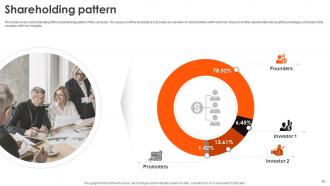
Slide 25: This slide puts an understanding of the shareholding pattern of the company.
Slide 26: This slide shows all the icons included in the presentation.
Slide 27: This slide is Our Goal slide. State your firm's goals here.
Slide 28: This slide contains a Puzzle with related icons and text.
Slide 29: This slide is Our Target slide. State your targets here.
Slide 30: This slide displays Mind Map with related imagery.
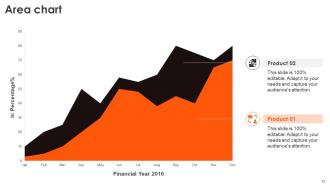
Slide 31: This slide shows the Area chart.
Slide 32: This slide showcases the Combo chart.
Slide 33: This slide is a thank-you slide with address, contact numbers, and email address.
Zapier Investor Funding Elevator Pitch Deck Ppt Template with all 42 slides:
Use our Zapier Investor Funding Elevator Pitch Deck Ppt Template to effectively help you save your valuable time. They are readymade to fit into any presentation structure.




















FAQs for Zapier Investor Funding Elevator Pitch
Dude, Zapier is basically magic for connecting apps that refuse to play nice together. No coding required either. You set up these "Zaps" that automatically do stuff across platforms - new website leads go straight to your CRM, blog posts hit social media without you lifting a finger. I got a little carried away when I first discovered it, honestly. The time you save is insane once you stop copying data around manually. Just pick one annoying task you do daily and automate that first.
Look, Zapier basically handles all the boring stuff that eats up your day. Set it up so when someone updates an Asana task, it automatically pings your Slack channel. Or have new Trello cards show up on your team calendar without lifting a finger. The cool part is connecting multiple apps together - suddenly everything talks to each other and your team stays updated without playing phone tag. I probably should've started using it way sooner than I did. Just pick two tools you're already using daily and automate something simple between them first.
Dude, Zapier connects with basically everything - Salesforce, Gmail, Trello, Mailchimp, you name it. We're talking thousands of apps here. No coding required either, which is clutch since I can barely handle HTML. You can link up apps that would never work together otherwise. Like, I set up this workflow where my Shopify orders automatically create Slack notifications - saves me so much time checking manually. Social media stuff, accounting tools, project management apps... they've got it all covered. Just peek at their app directory first to double-check your specific tools are there before you start building anything crazy.
Honestly, Zapier's pricing is pretty average - nothing crazy but not cheap either. Starts around $20/month for 750 tasks, which adds up fast if you're automating a lot. IFTTT and Power Automate are way cheaper options, though IFTTT can be kinda limited. Make (used to be Integromat) might save you money on complex stuff since they charge per operation instead of per "Zap." But here's the thing - Zapier connects to literally everything. That's why people pay for it. I'd definitely test their free tier first (100 tasks) before jumping into paid plans. See if it even fits your workflow.
Honestly, start with email stuff - automating sequences and adding leads from your website straight into your CRM. Data syncing between apps is clutch too. Social media scheduling will save your sanity (I swear I used to waste an hour daily just posting). For service businesses, invoice workflows are money. Oh, and lead management obviously. But here's the thing - just pick whatever repetitive task makes you want to scream. Usually it's something where you're copying info from one app to another. That's your goldmine right there.
Honestly, Zapier's a game-changer for lead management. All those repetitive tasks your sales team hates? Gone. Forms, social media, website leads - they'll automatically flow into your CRM with proper tags and assignments. Follow-ups trigger themselves, team notifications happen instantly, and lead scoring updates based on what people actually do. The cool thing is connecting tools that usually don't play nice together (looking at you, random marketing platforms). I'd start with whatever's driving everyone crazy first - probably lead capture - then expand once you see how much time it saves. Trust me, you won't go back.
Oh man, Zapier is a lifesaver! It connects all your marketing apps so they work together automatically. Like when someone fills out your Facebook lead form, boom - they're instantly added to Mailchimp AND your CRM creates a task. No more copying data between platforms (which I used to hate doing). You don't need coding skills either - just set up these "Zaps" between whatever tools you're using. I'd start simple, maybe just two apps you already have. Once you see how much time it saves, you'll get addicted to automating everything.
Turn on two-factor auth for Zapier and every app you connect - seriously, most people just ignore this step. Check your Zap permissions every few months to make sure you're not sharing more data than needed. I also clean out my connected apps quarterly because honestly, half of them I'm not even using anymore. If you're moving sensitive stuff around, use Zapier's formatter tools to strip out personal info first. And yeah, make sure whatever services you connect actually meet your company's compliance standards. Treat it like any other tool that has access to your data.
Alright, so multi-step Zaps are where things get interesting - you can build these crazy complex workflows with branching logic. Filters are clutch too, they'll only fire when your conditions are met. Oh, and formatters clean up messy data before it moves around (trust me on this one). Webhooks are honestly a game changer once you figure them out. Storage lets you batch stuff together, and sub-Zaps are perfect for reusing workflows you've already built. I'd start with filters and multi-step Zaps first though - those two alone will completely change how you think about automation. The webhook rabbit hole can wait until later.
Dude, start with connecting your store to an email tool - new customers automatically join your welcome sequence. Game changer. Then sync orders with inventory so you're not manually updating stock levels all day. I'd also set up automatic order forwarding to your fulfillment team. Review requests after delivery are huge too, plus syncing sales data to your accounting software saves hours of data entry. Oh, and definitely notify your team about big orders so nothing slips through. The setup takes a bit of work upfront but you'll wonder how you survived without it.
Honestly, the data mapping part will mess with your head at first - field names are weird and nothing matches up like you'd expect. Getting all the authentication stuff sorted is annoying too, especially when some apps are super picky about what they'll let you access. I'd definitely start with just connecting two apps and see how that goes before you try anything fancy. Testing takes forever but you gotta do it or you'll break something later. Once you get the hang of how data actually moves between things, the multi-step workflows make way more sense.
Dude, Zapier is perfect for this stuff. Set it up so emails automatically turn into tickets - saves so much time. The routing feature is honestly amazing, it'll send tickets to the right people based on keywords instead of you having to sort everything manually. Plus it syncs your helpdesk with your CRM so customer info stays updated. You can even auto-send those follow-up surveys after closing tickets (though honestly customers probably hate those lol). I'd start simple with just the email-to-ticket thing first, then add more automations once you get the hang of it.
Check your task history first - you'll see exactly what broke and why. Those red error messages are usually pretty clear about the issue. Honestly, it's often just missing required fields or expired connections being annoying. Test each step one by one to figure out where things go sideways. Your app connections might need refreshing too. If data's mapping weird, the formatter tools can clean that mess up. Oh, and flip on detailed logging for now so you can actually see what's passing between steps - makes debugging way less of a headache.
Zapier pushes out updates constantly - new apps get added weekly, sometimes daily even. Major features usually drop monthly or quarterly though. They're really good about keeping up with whatever's trending, which honestly saves you from broken workflows later. Most stuff happens behind the scenes anyway, so you won't notice it. The timing depends on what their partners are doing too - like if Slack changes something, Zapier has to catch up. Oh, and they have a changelog if you're curious, but I never check it lol. Everything just... works.
Dude, start with Zapier University - their free courses are actually worth your time. The Help Center has solid step-by-step stuff too. Their blog's where I find the best real-world examples, honestly way more useful than generic tutorials. Oh, and definitely bookmark their community forum. Saved my butt so many times when integrations got wonky. They do webinars regularly if you're into that. If you're totally new, hit up "Automation Basics" first. Already know the basics? Jump straight to advanced workflows. You'll pick it up quick.
-
SlideTeam makes creating presentations easy. Unlimited products, premium quality designs and affordable.
-
The ease of modifying templates is just superb! Also, the vast collection offers plenty of options to choose from.