

Clickup Investor Funding Elevator Pitch Deck Ppt-Vorlage





Try Before you Buy Download Free Sample Product
 Impress Your
Audience
 100%
Editable
 Save Hours
of Time


Sehen Sie sich unsere aufschlussreich entwickelte PPT-Vorlage mit dem Titel „ClickUp Investor Funding Elevator Pitch Deck“ an, die die Software für Projektmanagement und Zusammenarbeit abdeckt. Dieses Produktivitätstool hilft Teams, jedes Projekt zu verfolgen, zu planen und zusammenzuarbeiten. Darüber hinaus enthält unser Investor Deck Problemstellungen und Schlüssellösungen, die Teams aller Art und aus allen Branchen angeboten werden. Darüber hinaus werden wesentliche Details wie wichtige Fakten, Alleinstellungsmerkmale und wichtige erreichte Meilensteine behandelt. Darüber hinaus deckt unser Pitch Deck für Projektmanagement-Unternehmen Kundenmeinungen, Geschäftsmodelle und Einnahmequellen ab. Darüber hinaus werden Wettbewerbsanalysen, Finanzergebnisse, Finanzprognosen und Investitionsaufforderungen präsentiert, um eine starke Botschaft für Investoren zu vermitteln, in Unternehmen zu investieren. Abschließend umfasst unsere Startup-Präsentation eine Exit-Strategie, ein Kernteam, das an der Leitung des Unternehmens beteiligt ist, die Organisationsstruktur und die Beteiligungsstruktur des Unternehmens nach Erhalt der Finanzierung durch potenzielle Investoren. Erhalten Sie jetzt Zugang.
People who downloaded this PowerPoint presentation also viewed the following :
Inhalt dieser Powerpoint-Präsentation
Folie 1 : Auf dieser Folie wird das ClickUp Investor Funding Elevator Pitch Deck vorgestellt. Geben Sie Ihren Firmennamen an und beginnen Sie.
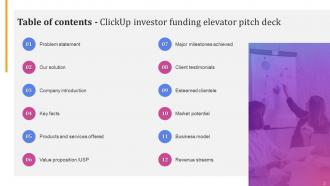
Folie 2 : Diese Folie zeigt ein Inhaltsverzeichnis für die Präsentation.
Folie 3 : Diese Folie ist eine Fortsetzung der vorherigen Folie.
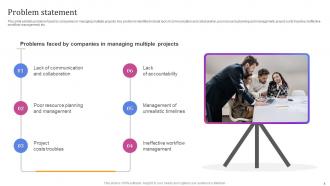
Folie 4 : Diese Folie zeigt Probleme, mit denen Unternehmen bei der Verwaltung mehrerer Projekte konfrontiert sind.
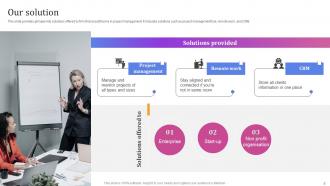
Folie 5 : Diese Folie bietet einen Einblick in die von Unternehmen angebotenen Lösungen, die Teams beim Projektmanagement unterstützen.
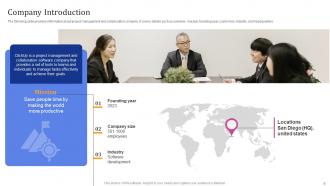
Folie 6 : Diese Folie enthält Informationen zum Projektmanagement- und Kollaborationsunternehmen.
Folie 7 : Diese Folie behandelt wesentliche Fakten im Zusammenhang mit Produktivitätssoftware.
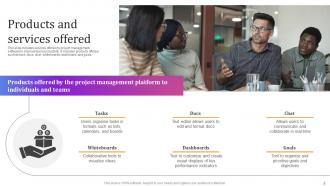
Folie 8 : Diese Folie enthält Dienste, die von Projektmanagement-Software zur Verbesserung der Teamproduktivität angeboten werden.
Folie 9 : Diese Folie zeigt eine Alleinstellungsmerkmalsstrategie.
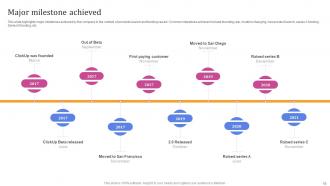
Folie 10 : Diese Folie hebt wichtige Meilensteine hervor, die das Unternehmen im Zusammenhang mit der Produkteinführung und der Beschaffung von Finanzmitteln erreicht hat.
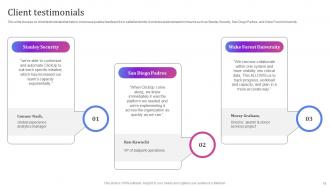
Folie 11 : Diese Folie konzentriert sich auf Kundenreferenzen, die dabei helfen, positives Feedback zufriedener Kunden zu präsentieren.
Folie 12 : Diese Folie hebt die erfolgreichen Partnerschaften und vertrauensvollen Beziehungen hervor, die das Unternehmen mit namhaften Kunden und Kunden aufgebaut hat.
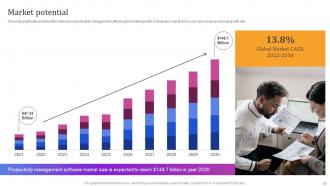
Folie 13 : Diese Folie bietet grafische Informationen zum globalen Marktwachstum für Produktivitätsmanagementsoftware.
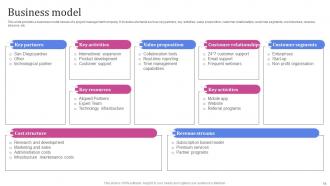
Folie 14 : Diese Folie veranschaulicht ein Geschäftsmodell-Canvas eines Projektmanagementunternehmens.
Folie 15 : Diese Folie zeigt das Umsatzmodell des Unternehmens.
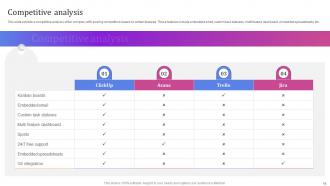
Folie 16 : Diese Folie zeigt eine Wettbewerbsanalyse des Unternehmens mit bestehenden Wettbewerbern basierend auf bestimmten Merkmalen.
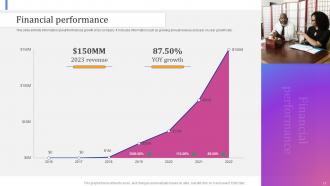
Folie 17 : Diese Folie erläutert Informationen über das finanzielle Wachstum eines Unternehmens.
Folie 18 : Diese Folie prognostiziert das erwartete jährliche Umsatzwachstum der Produktivitätsmanagementsoftware in den nächsten zwei Jahren.
Folie 19 : Diese Folie zeigt die Stärken und überzeugenden Gründe für Investoren auf, in das Unternehmen zu investieren.
Folie 20 : Diese Folie stellt die Stärken und überzeugenden Gründe für Investoren dar, in das Unternehmen zu investieren.
Folie 21 : Diese Folie informiert Anleger über die beabsichtigte Verwendung der von der Organisation eingeworbenen Mittel.
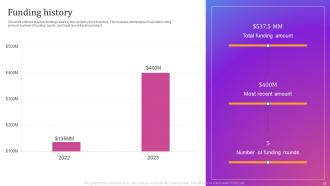
Folie 22 : Diese Folie beschreibt frühere Finanzierungen, die das Unternehmen von Investoren erhalten hat.
Folie 23 : Diese Folie zeigt die Ausstiegsstrategie der Organisation, die zur Reduzierung des Anlegerrisikos beiträgt.
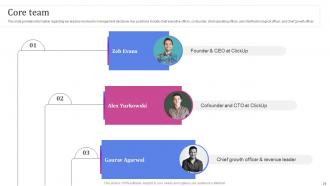
Folie 24 : Diese Folie bietet Informationen über wichtige Führungskräfte, die an Managemententscheidungen beteiligt sind.
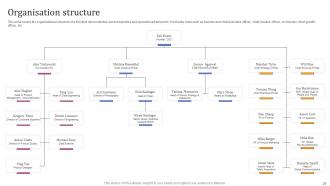
Folie 25 : Diese Folie deckt die Organisationsstruktur eines Unternehmens ab, die das aktuelle Fachwissen und den betrieblichen Rahmen demonstriert.
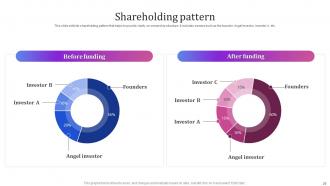
Folie 26 : Diese Folie zeigt das Aktienbesitzmuster, das hilft, Klarheit über die Eigentümerstruktur zu schaffen.
Folie 27 : Dies ist eine Kontaktfolie. Fügen Sie Ihre E-Mail-Adresse, Ihren Kontakt, Ihre Social-Media-Handles und Ihre Adresse hinzu.
Folie 28 : Diese Folie zeigt alle in der Präsentation enthaltenen Symbole.
Folie 29 : Diese Folie trägt den Titel „Zusätzliche Folien für den weiteren Weg“.
Folie 30 : Diese Folie zeigt ein Venn-Diagramm mit Textfeldern.
Folie 31 : Auf dieser Folie wird eine Mindmap mit zugehörigen Bildern angezeigt.
Folie 32 : Diese Folie ist unsere Mission-Folie mit zugehörigen Bildern und Texten.
Folie 33 : Diese Folie ist eine Timeline-Folie. Zeigen Sie hier Daten zu Zeitintervallen an.
Folie 34 : Bei dieser Folie handelt es sich um eine Folie zur Ideengenerierung, auf der Sie eine neue Idee darlegen oder Informationen, Spezifikationen usw. hervorheben können.
Clickup Investor Funding Elevator Pitch Deck Ppt-Vorlage mit allen 43 Folien:
Nutzen Sie unsere Clickup Investor Funding Elevator Pitch Deck Ppt-Vorlage, um effektiv wertvolle Zeit zu sparen. Sie sind gebrauchsfertig und passen in jede Präsentationsstruktur.


















FAQs for Clickup Investor Funding Elevator Pitch
Honestly, what got me hooked on ClickUp was how you can flip between different views - like, if I'm feeling scattered I'll use the Kanban board, but when I need to see deadlines I switch to Gantt charts or calendar view. Most tools are pretty rigid about their setup, but ClickUp lets you customize basically everything - fields, automation, plus it has docs and time tracking built right in. The way you can organize projects is really flexible too. Oh and their free plan is actually decent, so definitely try that first before paying for anything. It's one of those tools that just... makes sense once you start using it.
Honestly, ClickUp's been a lifesaver for our team chaos. Instead of jumping between Slack, email, and like five other apps, everything just lives in one spot. Task assignments, comments, file sharing - it's all there. The proofing feature alone is worth it because those email screenshot threads are the worst. You can set up notifications that actually make sense instead of spam-bombing everyone's inbox. Oh, and definitely try it with just one project first - don't make the same mistake we did and migrate everything at once!
Honestly, the hierarchy thing is key - use Spaces for departments, Folders for projects, Lists for tasks. Otherwise you'll lose your mind trying to find anything. Create templates with custom fields for deadlines and who's doing what, saves so much time later. Notifications will drive everyone crazy if you don't dial them in per person's role (learned that one the hard way). The Calendar and Gantt views are clutch for timelines. @mentions work great for back-and-forth without endless meetings. Oh, and train people on your workflow upfront - it's annoying but totally worth it.
Yeah, ClickUp plays nice with basically everything - Slack, Google stuff, Teams, GitHub, Zapier. What's cool is these aren't just basic connections. You can sync calendars, pull emails right in, automate between apps. I actually love how you can embed tools directly in your workspace. The Slack thing works super well - comments sync both ways instantly, which honestly surprised me. Oh and definitely use their automations or Zapier to avoid copying data manually (learned that the hard way). Just start with whatever apps you use most.
So ClickUp lets you set priority levels - urgent, high, normal, low - which is super helpful. The time tracking feature is built right in, and honestly it's kind of shocking to see where your time actually goes. I love that you can switch between different views like Gantt charts or Kanban boards depending on your mood. Task dependencies are clutch for figuring out what order to tackle things. Oh, and you can customize the statuses to match how you actually work instead of being stuck with generic ones. I'd say start by flagging your current tasks by priority and track your time for a week - you'll probably be surprised by what you find.
Dude, ClickUp automations are seriously a lifesaver. They handle all that boring repetitive stuff - auto-assigning tasks, updating statuses, sending notifications. I got a little carried away when I first discovered them and automated like everything lol. But honestly? Best decision ever. Your projects just keep moving forward without you hovering over them constantly. I'd start with something simple like having tasks auto-assign based on priority. Once you see how smooth it makes things, you'll probably want to automate more. It's weirdly satisfying watching everything just... work.
ClickUp's honestly pretty great for adapting to however your team works. First thing I'd do is map out your workflow on paper - way easier than jumping straight in. You can set up custom statuses that actually match your process, add fields for whatever data matters to you, and switch between views like Kanban or Gantt depending on your vibe. The automation stuff is where it gets really useful though. Status updates, task assignments, notifications - you can automate based on whatever triggers make sense. Don't try building everything at once or you'll go crazy. Start simple and add pieces gradually.
Get them to set up their profile and workspace first. Then show them your folder structure and templates - but honestly, tell them to ignore like 90% of ClickUp's features at first because it's way too much. Just focus on tasks, due dates, and comments the first week or so. Give them something simple to practice on, maybe a fake project? Make sure they know your team's views and statuses too. Oh and definitely pair them with someone who actually knows ClickUp well for their first real projects. They'll pick it up way faster by doing stuff than watching tutorials.
Honestly, ClickUp's dashboard is a lifesaver for this stuff. You can see completion percentages and track time without having to constantly ask your team "hey, where are we on this?" The Gantt charts don't suck like most other tools (looking at you, [redacted project software]). Custom fields let you track whatever weird metrics your project needs. I'd set up automated reports for productivity and sprint stuff - saves you from scrambling before status meetings. Also do a weekly dashboard check so you're not blindsided. Pro tip: the milestone tracking actually works well too.
ClickUp can get pricey fast depending on your team size. Small teams? You're golden with the free plan (100MB storage) or maybe the $7/user Unlimited plan. But once you hit 50+ people, those per-user costs become brutal - we're talking $12-19 per person monthly for the Business or Enterprise tiers. Those higher plans do give you better permissions and integrations though, which bigger teams actually need. Honestly, I'd just start with the free version first. See if people even use it before dropping money on paid plans. No point paying for ghost users, you know?
Yeah ClickUp's Goals feature is actually pretty solid for this stuff. You can set up different types - number targets, true/false goals, currency amounts, whatever you need. The best part? Link them straight to your tasks and watch progress update automatically as work gets done. Honestly gets a bit addictive seeing those bars fill up lol. They've got weekly scorecards too for tracking metrics, plus you can roll everything from team goals up to company-wide ones. I'd start simple though - maybe just "tasks completed this week" to get a feel for it before diving deeper.
Yeah, ClickUp's pretty solid security-wise. They've got enterprise encryption and are SOC 2 Type II compliant, which is basically the good stuff for business apps. Two-factor auth is available too - definitely turn that on first thing, takes maybe 30 seconds. You can also set up SSO if your company uses that, and they do regular security audits. The permissions thing is actually really handy since you can pick exactly who sees what projects. Their security page kinda reads like a checklist but in a good way - seems like they've covered the important bases most teams would need.
Oh dude, ClickUp's templates are a game changer - seriously wish someone told me about this earlier. Instead of building everything from zero, just hit up their template center and grab whatever fits your project. Sprint planning, marketing stuff, product launches, they've got it all. The coolest part? Once you nail a project, turn it into your own template so you can just copy what actually worked. I probably sound like a broken record about this, but honestly try picking one template this week. You'll set up projects way faster and wonder why you were doing all that manual work before.
Get your team involved from day one - let them set up their own dashboards and views that match how they actually work. People hate tools that feel forced on them, but they'll totally buy into something they helped create. Don't go crazy with features right away though. Basic task lists first, then you can get fancy with automations later. Oh and definitely do regular check-ins to see what's clicking and what's driving them nuts. But honestly? The biggest thing is using it yourself consistently. Your team will call you out if you're not walking the walk.
Yeah ClickUp's actually pretty good about this! They have a public feature request board where you can submit ideas and vote on stuff. You can find it on their website or in the app itself. Honestly, I've been surprised by how responsive they are - I've voted for things that actually got built later. They also keep an eye on their forums and social media for feedback patterns. Oh, and they're decent about updating people on what's in development with rough timelines. I'd check their feature board first to see if someone already suggested what you want, then either vote it up or submit something new.
-
Superb! The innovative and inspiring template designs provide an edge to the presentation.
-
It saves your time and decrease your efforts in half.