

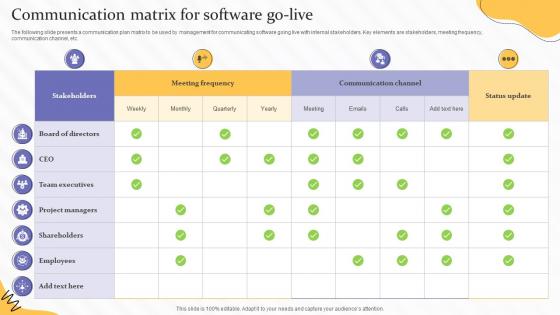
Communication Matrix For Software Go Live




Try Before you Buy Download Free Sample Product
 Impress Your
 Audience
 100%
100% Editable
 Save Hours
 of Time


The following slide presents a communication plan matrix to be used by management for communicating software going live with internal stakeholders. Key elements are stakeholders, meeting frequency, communication channel, etc.
People who downloaded this PowerPoint presentation also viewed the following :
Communication Matrix For Software Go Live with all 6 slides:
Use our Communication Matrix For Software Go Live to effectively help you save your valuable time. They are readymade to fit into any presentation structure.





FAQs for Communication Matrix For
So there's five main pieces: stakeholders, messages, channels, frequency, and owners. Start with your stakeholders - who needs to know what? Then figure out how to reach them (email, meetings, whatever works). How often makes sense? Who's actually doing this? Here's the thing though - they're all connected. Add more stakeholders and suddenly you might need Slack instead of just email. Or maybe weekly updates become daily ones. It's honestly like dominoes sometimes. I'd map out your people first, then work backwards from there. What does each group actually need to hear and when? Don't overthink the channels part initially.
Honestly, a communication matrix is a game-changer - it maps out who talks to who and when. No more of those awkward "I thought you were doing that" moments because everyone knows their role upfront. Think of it as your team's communication GPS. The best part? You can spot gaps before they bite you, and new people get up to speed way faster since they see the whole picture right away. My old manager swore by these things. Start small though - just write down your current team's main touchpoints and grow it from there.
Think of it like this - you wouldn't talk to your boss the same way you talk to your coworkers, right? Same deal with project communication. A communication matrix helps you figure out who needs what info and when. Executives want the big picture stuff and risk alerts. Your team needs all the nitty-gritty technical details. Customers? Just hit them with major milestones - they don't care about your internal drama. Map out each group's needs so you're not drowning people in useless updates or accidentally keeping someone out of the loop on something that actually matters to them.
Honestly, just start with Excel or Google Sheets - everyone already knows how to use them and they work great for most teams. If you want something fancier later, check out Asana, Monday.com, or Notion since they'll send automatic updates and all that. There's also specialized stuff like Lucidchart if you're into making things look super polished, but that's probably overkill at first. My advice? Don't overthink it with the fancy tools right away. Build a basic spreadsheet first, see how your team actually uses it, then you can always upgrade once you figure out what you actually need versus what sounds cool in theory.
You definitely need columns for communication channels and time zones in that matrix. Spell out when to use what - like Slack for quick stuff, email for non-urgent things, video calls when it's complicated. Half your team being scattered across time zones makes the async vs sync thing way more critical than it used to be. Document people's actual working hours and response time preferences too. Oh, and decide upfront which convos need to be recorded somewhere vs what can just be casual chat. I'd revisit it every few months since remote teams always seem to shift how they want to work together.
Think of a communication matrix as your cheat sheet for who gets what info and when. List out all your stakeholders first - like, everyone who has a say or needs updates. Then figure out what each group actually needs to know (not everything, just relevant stuff). Honestly, most people hate being flooded with random project emails. So match your delivery method to the audience - some want quick Slack updates, others need formal reports. Set realistic frequencies too. Work backwards from the decisions each person makes - that'll tell you exactly what info they need. Saves you from those "why didn't anyone tell me?" disasters later.
Oh man, cultural stuff totally changes your whole communication game. What's perfect in one culture can be a disaster somewhere else - learned that the hard way once! You've gotta think about formality levels, how often people want updates, and even which platforms they prefer. Some folks want super direct feedback while others need you to be way more subtle about it. Different holidays and time zones obviously mess with timing too. Honestly? Just ask your team what they prefer first - way easier than guessing. Then build all that into your planning matrix.
Don't overcomplicate it - that's the
-
Great product with highly impressive and engaging designs.
-
The templates are the best in class. Very clear and innovative graphics! I am excited to explore and download more presentations.