


Compliance Dashboard Powerpoint Ppt Template Bundles




Try Before you Buy Download Free Sample Product
 Impress Your
 Audience
 100%
100% Editable
 Save Hours
 of Time


Our Compliance Dashboard Powerpoint Ppt Template Bundles are topically designed to provide an attractive backdrop to any subject. Use them to look like a presentation pro.
People who downloaded this PowerPoint presentation also viewed the following :
Compliance Dashboard Powerpoint Ppt Template Bundles with all 20 slides:
Use our Compliance Dashboard Powerpoint Ppt Template Bundles to effectively help you save your valuable time. They are readymade to fit into any presentation structure.
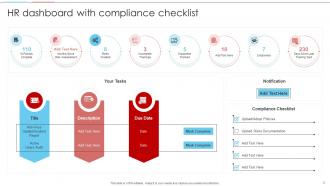
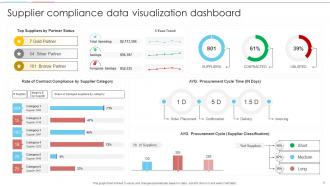
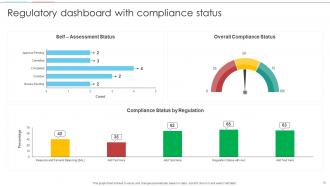
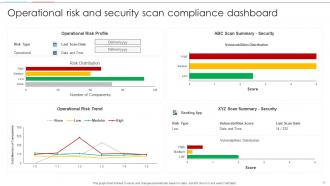








FAQs for Compliance Dashboard Powerpoint
Focus on compliance rate percentages first - that's your bread and butter. Track outstanding violations, how long issues take to resolve, and audit trends over time. Risk severity levels are clutch because everyone loves those colorful heat maps (seriously, stakeholders eat that stuff up). Don't forget upcoming regulatory deadlines and training completion rates if they apply to your area. Maybe toss in incident frequency too. Honestly though, keep it simple - like 6-8 key metrics max. You can always add more later if people actually use what drives real decisions.
Honestly, it's a game-changer for staying on top of compliance stuff. You get real-time visibility into where your risks are instead of just guessing. The dashboard pulls everything into one spot, so you can actually see patterns and figure out what needs fixing first. Plus - and this part's kind of genius - when the higher-ups can see clear metrics, they're way more likely to give you budget for improvements. You'll catch problems before they turn into those nightmare scenarios that cost a fortune. Makes resource planning so much easier too, though I guess that sounds boring when I put it like that.
Honestly, data viz is what turns your compliance dashboard from a total mess into something you'll actually want to look at. Charts and graphs help you catch issues way faster than digging through spreadsheet hell. Heat maps are clutch for spotting problem areas instantly. Trend lines? They're solid for predicting where your next headache might come from - though obviously not foolproof. Start simple with bar charts showing violations by department, maybe some line graphs for tracking stuff over time. Your team can handle fancier visualizations once they get the hang of it.
Daily updates are your minimum - that's what most teams do anyway. Honestly though, real-time is way better if you can pull it off. Financial services and healthcare folks usually go for hourly refreshes since regulatory stuff moves so fast. You don't want to get blindsided by something that changed three hours ago. Retail companies can probably get away with less frequent updates. I'd start daily and see how it feels, then ramp up if you need to. Oh, and definitely automate the refreshes - manually updating that stuff gets old real quick.
Start with clear visual hierarchy - your non-experts should instantly see what's urgent versus just FYI stuff. Red/yellow/green indicators work great. Skip the compliance jargon completely and lead with "here's why this matters" instead of dumping raw numbers on them. Honestly? Most dashboards I've seen look like auditors designed them for other auditors. It's painful. Put your critical metrics at the top where people can't miss them. Someone should glance at it for 10 seconds and know if they need to do something. Oh, and definitely test with real users first - you'll catch things you never thought of.
So basically you just configure the dashboard around whatever regulations actually matter for your business. Healthcare folks focus on HIPAA stuff and patient data. Financial companies care more about SOX controls and money laundering alerts. Manufacturing tracks safety incidents and environmental regs - you get the idea. Honestly, most vendors make this pretty straightforward once you know what you're looking for. Just list out your top 5 compliance headaches first, then work with whoever built your dashboard to create custom views. Way easier than trying to force some generic setup to work for your specific industry.
Tableau and Power BI are your best bets for heavy visualization stuff. If you're dealing with crazy regulatory requirements, maybe check out MetricStream or ServiceNow's GRC platforms. Excel dashboards actually work pretty well for smaller teams - I know it sounds old school but whatever works, right? The main thing is picking something that plays nice with your current compliance systems. Start simple with tools your team already knows instead of jumping into some fancy enterprise solution. You can always upgrade later when things get more complicated. Way easier than trying to learn everything at once.
So compliance dashboards basically gather all your messy data from different systems and put it in one spot - formatted properly too. No more digging through random spreadsheets every month (thank god). You'll get real-time updates on where you stand with all your requirements. They catch potential problems early and can spit out reports already formatted for whatever regulator needs them. Honestly, the best part is setting up those automated deadline alerts. Nothing worse than suddenly realizing you've got a filing due tomorrow and scrambling to pull everything together last minute.
Honestly, the hardest part is getting all your data to actually play nice together. Most companies have compliance info spread across like 5 different systems that barely communicate. Then you've got finance tracking things their way, legal doing something completely different - it's a mess. Getting everyone to agree on what actually matters? Good luck with that lol. People also forget to use the dashboard once you build it, which is super frustrating. My advice would be pick your most critical areas first and nail those down. Don't try to build some massive system right away or you'll go crazy.
Honestly, real-time data is a game changer for compliance stuff. Instead of finding out about violations weeks later (ugh), you catch them right when they happen. Live alerts when something goes wrong, plus you can actually fix issues before they blow up into major problems. Auditors love seeing continuous monitoring too - way better than those random snapshots. Oh, and it's like having a steering wheel instead of just staring in the rearview mirror, if that makes sense. I'd start with your biggest risk areas first and get real-time feeds set up there.
Honestly, you've got to get your data governance sorted first - figure out who owns what data sources and stop letting people pull from random spreadsheets. Set up automated validation checks and standardized entry processes across teams. I learned this the hard way when our entire quarterly dashboard was wrong because someone updated the wrong file. Build alerts for weird anomalies or missing data so problems pop up right away. Make data accuracy everyone's job, not just something IT deals with. Regular quality checks will save you from those "wait, this can't be right" moments during important meetings.
So compliance dashboards are pretty solid at catching the main stuff - data privacy violations, regulatory reporting gaps, and security issues. Real-time monitoring beats those quarterly audits by miles, honestly. You'll see alerts for GDPR breaches, missing SOX controls, failed audit requirements, that kind of thing. They're also good at spotting weird patterns, like unusual access or recurring policy violations that manual reviews miss. Just don't go crazy with alerts or you'll drown in false positives (learned that the hard way). Focus on your highest-risk areas first.
Dude, you really need to talk to the people who'll actually use your dashboard. I've watched so many teams build these gorgeous things that nobody touches because they missed what users actually wanted. Get feedback from your auditors, managers, compliance folks - they'll tell you which metrics matter and how they want stuff organized. Short sentences work. But also let them guide you on visual formats that fit their daily grind. Monthly check-ins are clutch for catching issues early, plus you can ask about their biggest headaches. Trust me, what you think they need and what they actually need are probably two different things entirely.
Look, automation is what keeps your compliance dashboard from becoming a total time suck. Real-time data feeds connect all your compliance tools, risk systems, and audit platforms so everything updates automatically. No more manually hunting down info from five different places - trust me, been there and it's awful. Set up alerts for when deadlines hit or metrics go wonky. The trick is nailing those data connections from the start. Yeah, it takes some upfront work configuring everything properly. But once you've got it dialed in? Your dashboard basically runs itself and you can actually focus on the important stuff.
Honestly, mobile access is a game-changer for remote compliance work. Your team can jump on issues instantly, whether they're at home or grabbing coffee somewhere. Push notifications are clutch for critical deadlines - compliance stuff waits for nobody, right? Quick status checks become second nature. Approving documents from your phone while waiting in line? Totally doable. Just don't do it while driving obviously! The real win is catching problems before they blow up. When auditors come knocking, everyone can respond fast instead of scrambling to find someone at their desk.
-
Much better than the original! Thanks for the quick turnaround.
-
Much better than the original! Thanks for the quick turnaround.