

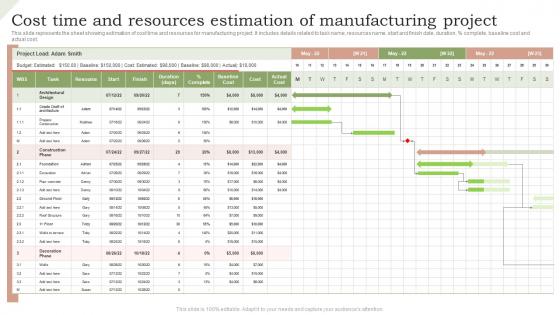
Cost time and resources estimation of manufacturing project




Try Before you Buy Download Free Sample Product
 Impress Your
 Audience
 100%
100% Editable
 Save Hours
 of Time


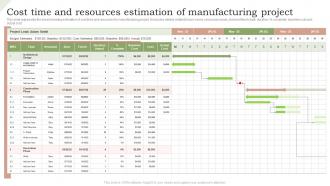
This slide represents the sheet showing estimation of cost time and resources for manufacturing project. It includes details related to task name, resources name, start and finish date, duration, parcent complete, baseline cost and actual cost.
People who downloaded this PowerPoint presentation also viewed the following :
Cost time and resources estimation of manufacturing project with all 6 slides:
Use our cost time and resources estimation of manufacturing project to effectively help you save your valuable time. They are readymade to fit into any presentation structure.





FAQs for Cost time and resources estimation
Okay so first thing - map out your whole production process step by step. Then you can assign real costs and timelines to each part instead of just guessing. Break it down into materials, labor hours/wages, equipment needs, facility overhead, and how everything connects timeline-wise. Quality control is huge too, I've literally watched projects crash because people thought they could skip testing (don't be those people). Add buffers for each piece - like 10-20% depending on how complex things get. The trick is getting specific with your numbers rather than throwing out random estimates.
Honestly, historical data is like having cheat codes for project estimates. Pull up your last 5-10 similar projects and see what actually went down vs what you planned. The patterns you'll find are crazy - labor hours, material waste, where things always get stuck. I've watched teams slash their estimation mistakes in half just by doing this homework instead of winging it. Look for projects with similar scope and complexity. Your past screwups (and wins) are basically a roadmap for realistic timelines and resource needs. Way better than just throwing numbers at the wall and hoping they stick.
So your BOM is basically the blueprint for figuring out costs - it lists every part, material, and how much you need. Use it to price out raw materials and spot potential supply chain headaches before they happen. Plus it helps you map out labor for each assembly step. Honestly, most people think BOMs are super boring but they'll save your ass from budget disasters. More detail = better estimates, obviously. Oh and double-check you've got the latest version because finding out you're missing parts mid-production is the worst.
Dude, labor's gonna be like 20-40% of your whole manufacturing budget - it's massive. You've got your direct workers actually building things, then supervisors, QC people, all their benefits and overhead costs. Map out every production step first and figure out who does what. That gives you a solid starting point. Oh, and don't forget overtime pay when deadlines get tight (they always do). Training costs for new processes too. Honestly, productivity always sucks at first while people learn the ropes. This is where most estimates totally fall apart if you're not thinking it through properly.
For manufacturing timeframes, I'd go with bottom-up estimation first - just break everything into smaller tasks and estimate each piece. Three-point estimation is solid too since you can factor in best case, worst case, and realistic scenarios. If you've done similar projects before, analogical estimation works great (wish more people used their old data honestly). Critical path method is a lifesaver when you've got dependencies all over the place. Oh, and whatever method you pick, definitely pad it with buffer time. I learned that the hard way on my last project when suppliers got weird about lead times.
Ugh, tech changes mess with cost estimates so badly. New automation cuts labor costs but then you're hit with massive upfront investments you never budgeted for. Your team has to learn everything from scratch too, which tanks productivity temporarily. I watched one project promise 30% savings but actually go 20% over budget because of implementation disasters. Honestly, vendors always oversell how smooth it'll be. Build in extra time and money when you're adopting new tech - it's going to take longer and cost more than anyone tells you upfront.
Dude, setup always takes longer than you think. Quality control will bite you too - stuff fails testing constantly. Material lead times are brutal, especially weird specialized parts. Nobody plans for regulatory approvals either and those drag on forever. Here's the thing though - just because equipment looks free on the schedule doesn't mean it actually is when you need it. Resource conflicts happen all the time. Oh, and that "everything goes perfect" assumption? Yeah, toss that out the window immediately. Build in buffer time and double-check your materials are actually available before you promise any dates.
Honestly, just bake the risk stuff right into your estimates from day one. Look at what could go wrong - suppliers flaking, equipment breaking, team members who don't actually know what they're doing. Then figure out how likely each thing is and how much it'd hurt. I throw 15-25% extra time/budget at medium-risk projects because I'd rather look overly cautious than completely screwed later. Make little risk maps for each phase so you can see your danger zones coming. Oh, and definitely track how wrong you were on past projects - that's how you get better at this whole guessing game.
Honestly, vendor quotes are a game-changer for project estimates. Real pricing beats guessing every time. Most estimation screw-ups happen when you're flying blind on materials and components you can't make yourself. Get multiple quotes early - you'll see lead times, minimum orders, all that supply chain stuff that'll mess with your timeline if you ignore it. Plus you can actually negotiate once you have options to compare. Oh, and double-check the quote expiration dates match your project timeline. Learned that one the hard way when prices jumped right before we ordered.
Market trends mess with your material costs big time - it's all about supply and demand. Steel or lumber gets popular? Boom, prices shoot up fast. Weather, inflation, trade stuff - it all screws with your estimates. I always build in buffer percentages based on how crazy the market's acting. Usually I tack on 10-20% extra for the sketchy materials. Honestly, your suppliers are goldmines for this info - they'll give you heads up about price jumps before they hit. Check commodity forecasts too, but talking to people beats reading reports any day.
Build your scope change process right into the estimate from the start. What you include in the original quote? Write it down clearly. Then create a system where any changes need written approval and new estimates. Honestly, I've watched so many projects completely derail because someone thought a "quick adjustment" wouldn't be a big deal. Everything gets documented - no exceptions. Make sure stakeholders know upfront that changes mean timeline and budget shifts. Being proactive about this stuff beats scrambling later when things go sideways. Set these rules early so when changes come (and they will), everyone knows exactly how it works.
Honestly, start simple or you'll get overwhelmed by all the bells and whistles. Microsoft Project's solid for basic project management stuff. Primavera P6 if you're dealing with really complex scheduling - though it can be overkill sometimes. For manufacturing, you might want something that connects to production planning like SAP or Oracle MRP systems. CostX and Sage Estimating are good for detailed cost breakdowns too. My advice? Pick whatever plays nice with your current systems first. You can always add more tools later once you figure out what you actually need versus what looks cool in demos.
Honestly, stakeholders are everything when it comes to getting estimates right. Clear requirements upfront? Game changer. But half the time they're like "just ballpark it" then freak out when costs shift. You need them committed to realistic timelines and budgets - not changing priorities every week. The ones who actually show up for check-ins and give honest feedback about resources make your job so much easier. I always push for proper documentation now and formal change processes, even though it feels bureaucratic. Trust me, it saves your ass later when scope creep hits.
Get your teams talking early - engineering, procurement, production, quality, everyone. Can't tell you how many times I've watched projects blow up because people made assumptions in isolation. Weekly stand-ups during estimation are clutch. Set up shared docs so everyone sees the constraints and inputs in real-time. Oh, and define clear hand-off points between phases - this part's huge. Regular check-ins will save your ass when issues pop up before they get expensive. Trust me, the upfront coordination feels like extra work but it's worth it.
So lean manufacturing actually makes you way more realistic about timelines - no more assuming everything goes perfectly on the first try. You'll break things into smaller chunks instead of one massive rollout. Map your current process first, then figure out what gaps need fixing. The whole continuous improvement thing means built-in feedback loops, which honestly just makes sense. Value stream mapping takes time, finding waste takes time - but you're working with way more predictable pieces. It's almost like lean forces you to be smarter about estimates instead of just crossing your fingers and hoping.
-
SlideTeam is very efficient when it comes to saving time. I am happy that I chose them for my presentation.
-
The designs are very attractive and easy to edit. Looking forward to downloading more of your PowerPoint Presentations.