


Cyber Security Incident Response Process Flow Chart Cyber Security Attacks Response Plan





Try Before you Buy Download Free Sample Product
 Impress Your
 Audience
 100%
100% Editable
 Save Hours
 of Time


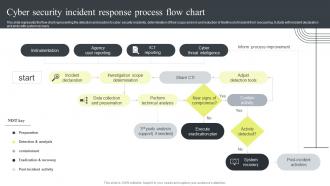
This slide represents the flow chart representing the detection and reaction to cyber security incidents, determination of their scope and risk and reduction of likelihood of incident from reoccurring. It starts with incident declaration and ends with system recovery.
People who downloaded this PowerPoint presentation also viewed the following :
Cyber Security Incident Response Process Flow Chart Cyber Security Attacks Response Plan with all 6 slides:
Use our Cyber Security Incident Response Process Flow Chart Cyber Security Attacks Response Plan to effectively help you save your valuable time. They are readymade to fit into any presentation structure.





FAQs for Cyber Security Incident Response Process Flow Chart Cyber Security
So you've got six main pieces to nail down: preparation (policies, tools, who does what), spotting incidents, containing them, getting rid of the actual threat, recovery, and - this is where most places totally blow it - actually reviewing what went wrong afterward. Communication protocols are huge too. Like, who calls who when everything's on fire? Document what you're already doing first though, because I bet you guys handle some of this stuff informally already. Oh, and don't forget escalation paths - nothing worse than not knowing if you should wake up your boss at 2am or handle it yourself.
Just use an impact vs urgency matrix - super straightforward. Impact = how many users or critical systems get hit. Urgency = how fast things go south. Most teams overthink this stuff but a basic 3x3 grid does the job. High impact + high urgency? Drop everything. Low/low? It can wait. The weird middle ones are high impact but low urgency - those still need your best people, just not at 3am. Oh and definitely write down what qualifies for each category beforehand. Trust me, you don't want people arguing about priorities when everything's on fire.
So threat intelligence gives your incident response team the context they actually need when shit hits the fan. You're not just guessing anymore - you get real insights into how attackers operate, their known signatures, and what happened to other companies who got hit. Honestly, it's like having the answers before the test. This stuff helps you figure out which alerts matter most and predict their next moves. Oh, and definitely get those threat feeds into your SIEM if you haven't already. Otherwise you'll always be three steps behind these guys.
Honestly, monthly tabletop exercises are your best bet - run ransomware scenarios, data breaches, whatever nightmare keeps hitting your industry. Cross-train everyone so you're not toast when Karen from IT picks that exact week to go to Cabo. Get your key people certified (GCIH, GCFA, that stuff). But here's what actually matters: document every screw-up during drills and fix them. I've seen too many teams just go through the motions without addressing the gaps they find. Short drills work better than these marathon 4-hour sessions nobody wants to do anyway.
Honestly, alert fatigue is brutal - your team just starts tuning out after getting buried in false alarms. Then you miss the real stuff. People also get tunnel vision and fixate on whatever they spot first instead of stepping back. Documentation goes to hell when everyone's panicking, which bites you later. Don't assume you know how big this thing is right away either. Communication between teams falls apart fast, and everyone wants to jump straight into damage control mode before they actually understand what's happening. Oh, and figure out who's doing what upfront or it'll be chaos.
Automation's a game changer for incident response - cuts hours down to minutes. Set up playbooks that auto-trigger based on threat types, and you'll see immediate results. The boring stuff like alert triage, log collection, and blocking malicious IPs happens instantly while you focus on actual investigation work. Honestly, manually gathering screenshots and evidence is such a time sink. Your automated tools can isolate systems and start forensic collection before you even finish your coffee. I'd start small though - pick your most frequent incidents first, then build out from there. Way less overwhelming that way.
Track MTTD and MTTR first - those are your core metrics for detection speed and resolution time. Also watch containment effectiveness, recovery times, and cost per incident. The soft metrics matter too though, like stakeholder satisfaction and whether people actually follow through on those post-incident action items (spoiler: they usually don't). Monthly dashboards work better than looking at individual incidents since trends show you way more about how your program's really doing. Recovery times can be tricky to measure consistently, but it's worth the effort.
Honestly, you've gotta have your communication plan sorted before anything happens. Pick who's gonna speak and how approvals work. Schedule regular updates - even if it's just "still looking into it" because radio silence freaks people out way more than actual bad news. Hit multiple channels: email, website, phone calls for your big clients. Stay factual but show you get that this sucks for everyone. Don't get too deep into technical stuff that might help the bad guys though. The whole thing is about staying ahead of the story instead of always playing catch-up. Oh, and write template messages now while you can think straight - trust me on this one.
First thing - check your breach notification laws. Most states want you notifying people within 72 hours, though it varies by industry. Your legal team needs to be in this conversation like yesterday, honestly. They'll help with privilege stuff and what you can actually say publicly. Document everything with timestamps. Seriously, keep detailed logs of every step. You might need that evidence later for lawsuits or regulatory stuff. Also don't forget - check any contracts with customers or partners. Sometimes those have their own notification requirements that are even stricter than state law. Pain in the ass but better than getting sued twice.
Tabletop exercises are basically practice runs for when everything goes to hell. Your team sits around and walks through fake attack scenarios - ransomware, data breaches, whatever keeps you up at night. Way better than learning during an actual crisis, trust me. You'll find all the holes in your response plan without the panic. Who should be making decisions? How long does approval take? Is your documentation actually helpful or just corporate nonsense? Do these every few months with different scenarios. Honestly, it's like fire drills but for cybersecurity - sounds boring but saves your ass later.
First thing - figure out what systems absolutely cannot go down vs what you can live without temporarily. Isolate the infected stuff but keep your core business running through backups or whatever workarounds you've got. Communication is everything here, seriously. Tell everyone what's still working so they're not panicking or making bad calls. This is literally why we do those annoying disaster recovery drills that everyone complains about! Set up decision trees beforehand for different scenarios. Test this stuff regularly so when chaos hits, people aren't scrambling around asking "wait, who's supposed to handle this?"
Integration with your current security setup is huge - make sure whatever you pick talks to your SIEM properly. Speed's obviously critical when you're chasing down threats. Automation helps with the boring stuff like initial triage and collecting evidence. Most of the "AI-powered" claims are total marketing BS, but focus on real features: forensic analysis, threat hunting, collaboration tools. Don't overcomplicate things either - if your team needs a manual just to get started, it's probably overkill. I'd map out your current workflow first and figure out where you're wasting the most time.
Honestly, quarterly reviews are your best bet, plus anytime something major goes down. Threat intel feeds help but man, keeping up with all the new attack methods is like drinking from a fire hose. Run tabletop exercises based on whatever's blowing up in the security news lately. Don't forget to update your contact lists - people leave, roles change, you know how it is. Your playbooks need refreshing too as your tech stack evolves. Treat the whole thing like it's alive, not some dusty binder. Block some time next month to start.
Dude, post-incident reviews are seriously worth doing. You'll spot gaps in your response plan that you never saw coming - like communication falling apart or tools that just weren't there when you needed them. We found out we were missing entire playbooks during one of these sessions, which was... embarrassing but useful. The trick is being completely honest about what sucked without turning it into a blame game. Document everything you find. Then actually fix your procedures based on what you learned, otherwise you're just wasting time in meetings that won't help next time something breaks.
Honestly, you've gotta get everyone bought in, not just dump it on IT. Skip those awful PowerPoint sessions - nobody learns from those anyway. Use actual examples or those phishing simulations that feel real. Create a culture where people aren't scared to report weird stuff. I've seen places where employees get paranoid about looking dumb, which defeats the whole point. When someone catches a sketchy email, celebrate it! And seriously, if leadership doesn't care, nobody else will either. Monthly lunch sessions work great - just keep the threat examples short and relatable, not some technical nightmare.
-
The way SlideTeam professionals work is exceptional. Thanks for being so helpful!
-
“I required a slide for a board meeting and was so satisfied with the final result !! So much went into designing the slide and the communication was amazing! Can’t wait to have my next slide!”