


Dashboard To Track Reporting And Billing Time Deploying Digital Invoicing System




Try Before you Buy Download Free Sample Product
 Impress Your
 Audience
 100%
100% Editable
 Save Hours
 of Time


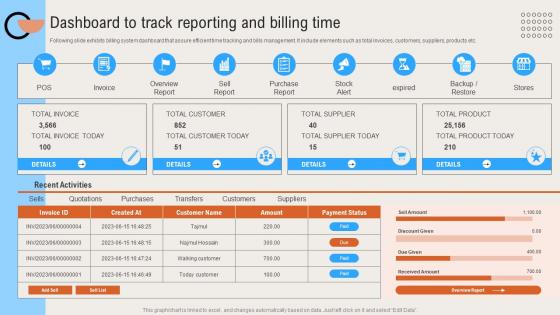
Following slide exhibits billing system dashboard that assure efficient time tracking and bills management. It include elements such as total invoices, customers, suppliers, products etc.
People who downloaded this PowerPoint presentation also viewed the following :
Dashboard To Track Reporting And Billing Time Deploying Digital Invoicing System with all 10 slides:
Use our Dashboard To Track Reporting And Billing Time Deploying Digital Invoicing System to effectively help you save your valuable time. They are readymade to fit into any presentation structure.









FAQs for Dashboard To Track Reporting And Billing Time Deploying
Honestly, start with the basics - real-time invoice tracking so you know what's paid and what isn't. Automated reminders are a lifesaver because chasing payments is the worst part of freelancing. Make sure your dashboard shows everything at a glance instead of making people dig through menus. Custom templates that don't look generic help too. Built-in payment processing is pretty much required now - clients expect to pay right from the invoice. Don't forget expense tracking and decent reporting for taxes. Oh, and solid client management tools because you'll need those eventually.
Dude, real-time analytics are a game changer for cash flow. You can see payment delays right as they happen instead of finding out weeks later when it's too late. I used to be glued to spreadsheets constantly refreshing - what a waste of time! The dashboard shows you which customers pay fast and which ones... well, don't. Set up alerts for overdue invoices first, then track your average payment times. Those two things alone will totally change how you handle money coming in. You'll actually know where you stand instead of guessing based on old reports.
First things first - encrypt everything, both stored data and when it's moving around. Multi-factor auth is a must for everyone accessing the system. Set up role-based permissions so people can't peek at stuff they shouldn't. I'd definitely run regular security audits and pen testing - you'd be shocked how many companies skip this and get burned later. Your hosting needs to hit compliance standards like SOC 2. Automated monitoring catches sketchy activity early, which honestly saves you so much stress down the road. Oh, and don't forget solid backup systems.
Honestly, these dashboards are game-changers for invoice stuff. They handle all the boring data entry and math automatically, plus route everything to whoever needs to approve it. You know how you always mess up numbers or forget to chase people for payments? Yeah, it fixes that. Pulls info straight from your existing systems too - no more copy/paste nonsense. I've seen companies cut their processing time by like 60-70%, which is pretty solid. Oh, and start with your most common invoice types first. That's where you'll actually notice the difference right away.
Honestly, mobile access can make or break your invoice dashboard. Your team won't use it if they can't approve stuff on their phones - they'll just find workarounds instead. Picture this: you're at lunch and a vendor calls about an urgent payment. Do you really want to say "call me back Monday when I'm at my computer"? That's awkward. Being able to check payment statuses and approve invoices from anywhere keeps everything moving. Cash flow doesn't stop for office hours, right? Just make sure the mobile version actually works well, not some janky scaled-down mess.
Dude, just strip out all the clutter first. Most dashboards are a hot mess with too much stuff crammed everywhere. Put your "create invoice" button and payment tracking right up front where you can't miss them. Use colors that actually mean something - like red for overdue, green for paid, whatever makes sense. Group similar stuff together so people aren't clicking around randomly. Your search function better work smoothly too, because broken search makes everyone want to throw their laptop out the window. Oh, and make those unpaid amounts pop visually - that's what people care about most. Test it with real users if possible.
Honestly, I'd go with QuickBooks and Xero right off the bat - they're what most small businesses actually use. Wave is clutch too since it's free and freelancers love it. Don't forget Sage and FreshBooks if your audience skews that way. Enterprise stuff like SAP and Oracle? That's a whole different beast but worth it if you're targeting bigger companies. Focus on getting real-time sync working for invoices and payments first - that's where the magic happens. My advice? Figure out who you're actually building for, then just pick their top 2-3 platforms and nail those.
Charts and graphs are honestly a game-changer for invoicing dashboards. Nobody wants to scroll through endless spreadsheet rows - that's just painful. With visual data, your team can instantly spot payment delays or see which clients are your biggest earners. The cool thing is you can set up different views for different people. Your CEO probably just wants the high-level cash flow picture, while accounting needs all the nitty-gritty details. It's way better than everyone trying to make sense of the same boring data table.
Audit trails are huge - log every transaction change with timestamps and user IDs. Auditors eat that up. Your invoice data needs encryption for storage and transit, plus proper user access controls. Can't have everyone seeing everything, you know? Data retention is another big one - some industries require 7+ years of records (ugh). Set up automated backups and have a solid process for generating compliance reports. Oh, and definitely figure out which regulations actually apply to your industry first. That'll save you time.
Honestly, a digital invoicing dashboard is a game-changer for tracking your cash flow. It shows all your outstanding invoices and payment patterns in one spot - no more digging through spreadsheets (thank god). You'll quickly see which clients are reliable versus the ones who always pay late. The thing tracks payment cycles and spots seasonal trends too. Plus it alerts you before cash gets tight, so you're not panicking last minute. I'd set up automatic reminders for overdue invoices. That way you can bug people proactively instead of scrambling when money's low.
Honestly, just watch what your users actually do vs what you think they should do. Track which features get ignored completely - that'll tell you everything. Support tickets are goldmine too. If everyone's asking "where's my payment status?" then boom, that needs to be super obvious on the main screen. I'd run some user testing sessions where you literally watch people click around. You'll be shocked at how differently they navigate compared to what you expected. Pretty designs mean nothing if people can't find basic stuff. Oh, and check where they're getting stuck in your invoice flow - those friction points will tank your user experience fast.
Honestly, ML can totally transform your invoicing setup. Start with automated data extraction - that's where you'll see huge time savings immediately. It pulls all the info from invoices so you don't have to type everything manually. Then you've got predictive stuff for cash flow forecasting and fraud detection that catches weird transactions. The smart routing feature is pretty neat too - learns who approves what and sends invoices to the right person automatically. Oh, and it'll catch duplicate payments which... trust me, happens way more than you'd think. Payment timing optimization is another bonus based on your past data.
So yeah, companies totally customize their invoicing dashboards based on what they actually need. Healthcare companies are all about tracking insurance claims and patient billing. Construction? They're obsessed with project payments and retention stuff. Retail gets crazy - their dashboards look nuts during the holidays compared to like, dead January. Manufacturing needs all these approval workflows because everything has to go through ten people apparently. Honestly, the trick is figuring out your industry's weird payment cycles and compliance stuff, then making your dashboard show that info front and center instead of some boring template.
Oh man, you're gonna hit two big walls right away. Staff will hate it - people get so attached to their paper routines it's almost funny. Then there's the nightmare of moving all your old invoice data over, which always takes way longer than you think. Your accounting software might not play nice with the new system either. I'd honestly run both systems at the same time for a couple weeks, just to be safe. Don't cheap out on training though. That's where most people mess up.
Honestly, these dashboards are a game changer for tracking payments. Everything's color-coded - red means overdue, yellow's getting close, green means you're good. You can see which invoices are stuck in approval hell or where amounts don't match your records. I check mine every week (sometimes more if things get crazy). The automated alerts are clutch too - set them up for deadlines or when payments hit certain amounts. Best feature? Those filters let you dig into specific problems fast instead of scrolling through everything. Real-time visibility means you catch issues before they blow up into bigger headaches.
-
“Excellent information with easy access.”
-
Perfect template with attractive color combination.