

Data Migration Strategy Strategies To Implement Cloud Computing Infrastructure




Try Before you Buy Download Free Sample Product
 Impress Your
 Audience
 100%
100% Editable
 Save Hours
 of Time


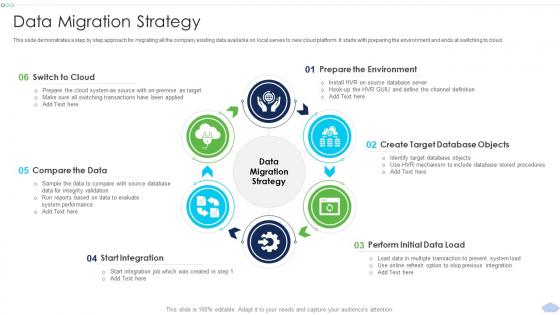
This slide demonstrates a step by step approach for migrating all the company existing data available on local serves to new cloud platform. It starts with preparing the environment and ends at switching to cloud.
People who downloaded this PowerPoint presentation also viewed the following :
Data Migration Strategy Strategies To Implement Cloud Computing Infrastructure with all 6 slides:
Use our Data Migration Strategy Strategies To Implement Cloud Computing Infrastructure to effectively help you save your valuable time. They are readymade to fit into any presentation structure.





FAQs for Data Migration Strategy Strategies To Implement
Honestly, most people skip the data audit and then wonder why everything's broken. You'll need five things: assess what you're actually moving, map how it transforms between systems, create a realistic timeline, test in phases with real scenarios, and have rollback plans ready. The assessment phase is where everyone screws up - they don't know their current data quality before jumping in. Buffer time is non-negotiable because migrations always go sideways somehow. Oh, and test with actual user workflows, not just dummy data. Can't stress enough - audit first or you're flying blind.
Okay so first thing - do a full data audit. Map everything: sources, volumes, formats, all the messy quality issues. I always make this giant spreadsheet that looks absolutely chaotic at first but trust me on this one. Interview people about how they actually use the data (not what's written down somewhere). Figure out which systems talk to each other and flag anything sensitive. Oh, and grab your current performance numbers while you're at it. You've gotta know what you're working with before moving stuff around. Start with whatever keeps the lights on business-wise, then branch out.
Honestly, Python with pandas is my favorite for smaller stuff - super flexible and easy to work with. If you're dealing with bigger migrations though, check out Talend or Informatica. Azure Data Factory's solid if you're already in Microsoft land. Database transfers? SSIS and Oracle Data Pump are pretty reliable. AWS DMS is clutch for cloud moves since it does most of the work for you. Oh, and definitely map out your source and target systems first - saves you headaches later. The tool really depends on how much data you're moving and how messy it is.
Dude, trust me - check your data before, during, AND after you migrate it. We totally screwed up last year and lost a bunch of customer records because we didn't validate properly. Run checksums and row counts to catch issues early. Always test with a small batch first (seriously, don't skip this step). Set up scripts that automatically compare your source data to what ends up in the target system. Oh, and have a rollback plan ready because something WILL break - it's like Murphy's Law with data migrations. Test everything twice before touching production.
Think of data governance as your migration insurance policy - skip it and you're basically playing Russian roulette with your data. Before moving anything, map out who owns what, set quality standards, and lock down access controls. Otherwise you'll migrate a bunch of junk and deal with compliance headaches later (trust me on this one). Smart governance also shows you what actually needs migrating vs what you can just dump or archive. Start with auditing your current mess - I mean data landscape - then create solid rules for quality, retention, and permissions. Way less painful than fixing it after the fact.
Start with whatever directly hits your revenue and daily ops - that's the stuff that'll bite you if it goes wrong. Customer data, live transactions, core business processes. I make a basic spreadsheet (nothing fancy) ranking everything by business impact vs how much of a pain it'll be to move. Dependencies are huge though - some random-looking data might be feeding into something critical. Talk to your department heads early because what they say they need vs what they actually use daily can be wildly different. Migration order should be: mission-critical first, then work down based on real business needs instead of just grabbing the low-hanging fruit.
Honestly, most people screw up by rushing the planning part and skipping proper testing. Clean your data first - trust me on this one, migrating garbage will make you want to scream later. Buffer time is everything because you'll need way more than expected. Dependencies are sneaky too, there's always some weird system connection nobody remembers until it breaks. Oh and talk to stakeholders early or they'll come out of nowhere with complaints. After everything moves, double-check your data actually transferred right. Test twice, migrate once.
Dude, map your data fields first thing and write down every transformation rule. Trust me on this one. Figure out what source systems you're dealing with, then nail down which fields go where in the new system. Define how you'll handle format changes, value conversions, all that fun stuff. Honestly, I've watched so many migrations crash and burn because people rushed past the mapping part - it's painful to see. Test your transformations with actual data samples before you go live. Way better to spend extra time getting the mapping right upfront than scrambling to fix broken data later.
So first thing - check your row counts and basic stuff. Seriously catches most problems right off the bat. Then get into the weeds with data sampling, compare your source vs destination records. Test your business logic too, especially the weird edge cases that always break things. Oh and definitely get your end users involved early - they'll spot issues you'd never think of. I'd set up some monitoring for the first couple weeks after you flip the switch, just in case. Make yourself a checklist though, trust me on this one. When you're stressed about going live you'll forget the obvious stuff.
Get your stakeholders involved from day one - figure out who owns what data and who'll freak out when things change. IT, business users, compliance people, the works. Skip the boring status meetings (honestly, those put everyone to sleep). Instead, show them actual migrated data samples so they can see their stuff working in the new system. Makes them feel like they're part of the process, not just along for the ride. Set up clear ways to escalate problems and don't lie about timelines. Train everyone before launch or you'll have chaos.
Honestly, break that migration into chunks - don't try to move everything at once or you'll hate your life. Run both systems side by side so people can keep working while you make sure nothing got screwed up in the transfer. Do it on weekends or super late nights when nobody's around. Set up real-time sync between the old and new systems during the switch. Always test on just a small piece first to catch whatever weird stuff will definitely go wrong. And have a rollback plan ready because Murphy's Law is basically a guarantee with this stuff.
Honestly, structured data is so much simpler - it's already sitting in databases with clear formats, so you can just use ETL tools to map everything over. Unstructured stuff though? Total nightmare. Documents, images, emails - there's no standard way to handle any of it. You'll probably need to analyze content first, add tags, maybe even sort some manually before moving anything. Oh and definitely don't try shoving both types through the same process - that never works. Start by figuring out what data types you've got, then build separate migration paths for each. Trust me on this one.
Document everything during your first migration - seriously, every detail matters. Build some standard playbooks and audit your data regularly so it doesn't become a mess later. Automated monitoring tools are your friend for tracking data quality. Train at least 2-3 people on the whole process because someone always quits at the worst possible time, I swear. Oh, and set up governance policies that people will actually follow (easier said than done). The big thing is thinking of migrations as ongoing work, not just one project. Trust me, future you will thank you.
Track these four things: data completeness, accuracy, timeline, and how the system performs after. Error rates during transfer are huge too. We totally botched our last migration by skipping data integrity checks - learned that lesson fast! User acceptance is key once people actually start using the migrated stuff. Oh and downtime duration if you had any. Before calling it done, set up automated checks that compare record counts between your old and new systems. Trust me, it's way better than finding missing data later when everyone's already mad at you.
Honestly, cloud migration is so much easier than the old server-to-server nightmares we used to deal with. You've got way more options now - lift-and-shift if you're in a rush, or completely rebuild stuff if you have time. The bandwidth alone makes it worth it. Start with mapping out what depends on what first (learned that one the hard way). Then you can pick whether to go all-in or migrate piece by piece. Hybrid setups work great if you can't afford much downtime. Way less stressful than those weekend cutovers we used to pull.
-
Informative presentations that are easily editable.
-
Great quality product.