

Data warehouse it basic architecture of data warehouse ppt slides samples




Try Before you Buy Download Free Sample Product
 Impress Your
 Audience
 100%
100% Editable
 Save Hours
 of Time


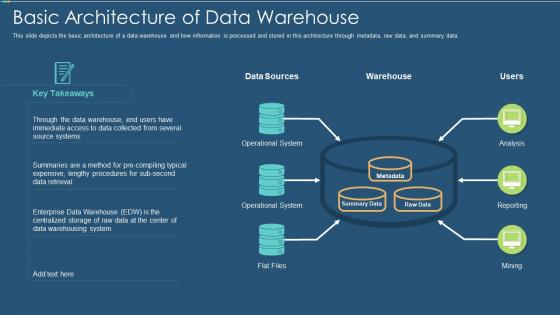
This slide depicts the basic architecture of a data warehouse and how information is processed and stored in this architecture through metadata, raw data, and summary data.
People who downloaded this PowerPoint presentation also viewed the following :
Data warehouse it basic architecture of data warehouse ppt slides samples with all 6 slides:
Use our Data Warehouse IT Basic Architecture Of Data Warehouse Ppt Slides Samples to effectively help you save your valuable time. They are readymade to fit into any presentation structure.






FAQs for Data warehouse it basic architecture of data warehouse
So you've got a few key pieces to think about. Data sources first - your databases, APIs, whatever files you're pulling from. Then there's the ETL layer that does all the grunt work of extracting and transforming everything (honestly this is where you'll spend most of your time debugging). Storage for your actual warehouse, plus tools so people can actually use the data. Oh, and you'll want some staging area where raw data sits before processing - learned that one the hard way. Metadata management helps track everything, monitoring keeps things running. Just map out how data flows from start to finish first, makes it way clearer what you actually need.
So basically star schema keeps everything flat - your fact table connects straight to dimension tables without breaking them down further. Way easier to work with IMO. Snowflake schema takes those dimensions and splits them up into normalized tables. Like instead of one fat Customer table, you'd have separate Customer, City, State tables all linked together. Bit of a pain but saves storage space. Star runs faster since fewer joins, but eats more disk space. Snowflake's the opposite - slower queries, less storage. I'd just go with star unless you're really hurting for space or your boss is weird about normalization.
So ETL is basically how you get data into your warehouse without it being a total mess. Extract grabs stuff from databases, APIs, whatever sources you've got. Transform is honestly where you'll lose your mind debugging - it cleans everything up, fixes formats, applies business rules so nothing's inconsistent. Then Load dumps it all into your warehouse tables. The transform step is brutal but super important. Without decent ETL, you'll just have a warehouse full of garbage data that nobody wants to touch.
So basically you've got two main options - lambda or kappa architecture. Lambda runs batch and streaming together, which honestly can be a pain to manage but it works well. Your batch layer does the historical stuff while streaming handles live data with Kafka or Spark Streaming. Kappa's way cleaner since it's just streaming for everything. You'll need real-time ETL pipelines too. Tools like Flink or AWS Kinesis are solid choices. Oh and here's the thing - figure out what actually needs real-time processing first. Most data doesn't, and you'll save yourself headaches by being selective about it.
Definitely go with the dimensional model approach - fact tables in the center, dimensions around them. Slowly changing dimensions are your friend for tracking history. Honestly, Kimball's methodology is still the best way to do this stuff, even though it's been around forever. Don't normalize your dimensions too much or you'll hate yourself later when queries are slow. One thing - pick naming conventions now and stick with them religiously. Trust me on this one. Start with just your main business processes instead of trying to boil the ocean right away. You can always add more later, but if you try to model everything upfront you'll never actually finish anything.
So basically a data lake is where you dump all your messy raw stuff first - logs, IoT feeds, social media data, whatever. No schema needed, no cleaning required upfront. Your warehouse stays organized for actual reporting while the lake holds everything else cheap. Think messy garage vs. organized closet, you know? Later you can grab what you need from the lake and move it to the warehouse. Honestly it's pretty liberating not having to structure everything immediately. Start by figuring out what raw data you're just tossing right now.
Partitioning is probably your biggest win - just slice up those massive fact tables by date or whatever makes sense. Indexing helps tons too, especially on columns you're always querying. Oh, and if you're running lots of analytics stuff, columnstore indexes are seriously amazing for aggregations. Materialized views can save you from recalculating the same complex joins over and over. Honestly though, sometimes just rewriting a crappy query beats throwing hardware at the problem. I'd start with partitioning first since that's where you'll see the most dramatic improvement right away.
Honestly, cloud computing totally flips data warehouse architecture on its head. Instead of being stuck with fixed on-premise stuff, you get elastic resources that scale up or down as needed. Those crazy workload spikes? Not a problem anymore since you can spin up compute power whenever. Storage and compute scale separately too, which is huge - no more buying expensive hardware you might not even use. The managed services handle most of the annoying operational stuff automatically. Best part though? You can actually test different architectures without dropping serious cash upfront. I'd start by checking which cloud services match your current data pipeline setup.
Start with figuring out what data you actually have - can't secure stuff you don't know exists. Role-based access is huge, though setting it up with weird org charts is honestly a pain. Encrypt everything, both stored and moving around. PII stuff especially needs this. Audit logs are your friend for tracking who touched what. Network segmentation matters too since these systems are basically candy stores for hackers. Oh, and data masking helps when people need to work with production-like data but shouldn't see the real thing. It's tedious work but beats explaining a breach to your boss.
Honestly, build those quality checks straight into your ETL pipeline - it'll save you so much headache later. Set up validation rules for duplicates, missing data, all that stuff before it reaches your warehouse. Trust me, fixing quality issues after the fact is brutal (learned this the hard way lol). Data profiling helps you actually understand your source systems better. Automated monitoring that pings you when something's weird is clutch too. Oh and document your data lineage so you can trace problems back to where they started. But here's the thing - make sure someone actually owns data quality as their real job, not just a side task.
So basically, regular databases handle your day-to-day stuff - customer orders, inventory, all that. Data warehouses? Totally different beast. They're built for analyzing tons of historical data from different places. Regular databases are super fast for transactions but warehouses make complex reporting way quicker. The structure's different too - warehouses use dimensional modeling instead of those normalized tables. Think of it like... a busy kitchen vs a research library, I guess? If you're doing serious analytics, you'll definitely want the warehouse setup. Way better performance for that kind of work.
Metadata management tracks what data you have, where it came from, and what it actually means. It's like having documentation that doesn't go stale immediately. You'll want it running across all your layers - source systems, ETL, data marts, the whole thing. Without it? Good luck spending forever hunting down data lineage issues. Analysts will constantly bug you about cryptic column names too. Honestly, that project wiki from 2019 that nobody touches anymore is a perfect example of what happens without proper metadata. Set up a metadata repository early. Trust me, future you will be grateful when data quality problems pop up.
Honestly, most setups now mix cloud and traditional stuff. Snowflake's crushing it right now - way more flexible than AWS Redshift or Google BigQuery, though those are solid too. For ETL you've got Informatica, Talend, or if you're doing transformations, dbt is pretty sweet. Oracle and SQL Server are still hanging around but... eh, they're losing steam. Oh and here's the thing - start with whatever your cloud provider offers natively. Way easier to deal with since everything just talks to each other without you having to figure out weird integration issues.
So basically, your BI tools (Tableau, Power BI, whatever) just plug into your data warehouse using standard connections - ODBC, JDBC, APIs, that stuff. They pull from the same clean data but show it however they want. Works great with Snowflake, BigQuery, all the usual suspects. Here's the thing though - you better have your permissions sorted out first. And definitely optimize those queries or your analysts will literally hate you when their dashboards take 10 minutes to load. Trust me on that one. It's like having multiple apps all tapping into the same organized database, just displaying things differently.
Honestly, data drift will be your biggest headache - source systems constantly change fields and formats. Performance tanks as volumes grow (happens every single time). You'll spend forever updating ETL processes when business rules shift. Stakeholders love throwing new requirements at you mid-project too. Build monitoring from day one, seriously. Change management processes save your sanity later. Oh, and document everything because you'll totally blank on why you built certain transformations. The complexity just keeps snowballing, but good monitoring catches issues before they explode.
-
Informative design.
-
Really like the color and design of the presentation.
-
Excellent template with unique design.