

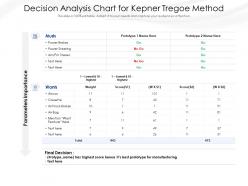
Decision analysis chart for kepner tregoe method





Try Before you Buy Download Free Sample Product
 Impress Your
 Audience
 100%
100% Editable
 Save Hours
 of Time


Our Decision Analysis Chart For Kepner Tregoe Method are topically designed to provide an attractive backdrop to any subject. Use them to look like a presentation pro.
People who downloaded this PowerPoint presentation also viewed the following :
Decision analysis chart for kepner tregoe method with all 2 slides:
Use our Decision Analysis Chart For Kepner Tregoe Method to effectively help you save your valuable time. They are readymade to fit into any presentation structure.
FAQs for Decision analysis chart for
You'll need three main pieces: decision nodes (those are squares), chance nodes (circles), and branches showing probabilities plus payoffs. Decision nodes = where you pick between options. Chance nodes represent stuff that's uncertain. Think of it like building a "what if" tree - honestly saved my butt on some tough choices! Oh, and don't forget to calculate expected monetary value at each spot so you can work backwards to find the best route. I'd start basic with your first attempt, then get fancier once you've got the hang of it. The structure clicks pretty quick.
Honestly, decision charts are game-changers for stopping those endless meetings where the loudest person wins. You break everything down into actual pieces instead of just winging it. Map out your options, weigh pros and cons, see what could happen before you're stuck with something terrible. Everyone stays on the same page too - no more "wait, I thought we agreed on this other thing" drama later. The visual part is clutch for catching blind spots. I swear by sketching options on a whiteboard first. Try it next time you're facing something big.
For decision charts, focus on stuff you can actually measure - costs, timelines, resources, that kind of thing. But don't forget the softer factors too, like risk or how happy stakeholders will be. Just make sure you can rank everything consistently across your options. Honestly, I see people overthink this all the time and try to include like 20 different criteria. Bad idea. Stick to 5-7 things that really matter for your specific decision. Here's what works: figure out what success looks like first, then work backwards to find the data points that'll predict those results. Way easier than starting with random metrics.
Totally depends on your audience, dude. C-suite folks want the high-level stuff - just key criteria and final scores. Don't dump technical details on them, trust me on this one. Engineering teams are the opposite - they'll want all your methodology and weightings so they can double-check everything. I've watched so many presentations crash because someone showed spreadsheet-level detail to executives who just wanted the bottom line. Oh, and always throw in a simple summary section no matter what. Stakeholders care most about how it affects them specifically.
Honestly, Visio's your best bet if you have it - makes really clean flowcharts without much fuss. Lucidchart's solid too, especially when you're working with other people since everyone can edit at once. PowerPoint works in a pinch for basic stuff, though it gets annoying pretty fast if you're doing anything complex. Oh, and Google Drawings is free if you're on a budget. For hardcore decision trees with all the probability math, TreeAge Pro is what the consultants use, but it's pricey. I'd just start with whatever you already have installed and see how far that gets you.
So there's a few ways to handle this. Probability ranges work well - just show the spread instead of one number. Error bars are solid too. I've had good luck with Monte Carlo sims where you run like thousands of scenarios and see how everything spreads out. Confidence intervals around your main variables are probably the easiest starting point though. Tornado diagrams exist but they're kind of a pain honestly. Oh, and sensitivity analysis overlays can be helpful - lets people see how changing one thing affects the whole decision. Really just depends on what your stakeholders can actually digest.
Honestly, these charts are lifesavers when you've got a messy decision with tons of moving parts. Use one when you're comparing multiple options against different criteria - like picking vendors or choosing project approaches. They're clutch for getting your whole team on the same page too. No more arguing about which factor matters most since everyone can see the weighted scores laid out visually. Way better than just winging it based on feelings. I probably should've used one last month when we were debating software platforms - would've saved us hours of back-and-forth meetings.
Okay so first make a list of what actually matters to you - cost, how long it'll take, how risky it is, all that stuff. Give each one a weight from 1-10 based on importance. Then score your options against each criteria and multiply by the weights. Add everything up and boom, highest number theoretically wins. But honestly? Don't just go with whatever scores highest automatically. The real value is using those numbers to figure out why something scored poorly - like maybe you forgot to consider something important, or one of your criteria isn't weighted right.
Risk assessment is what makes your decision chart actually useful - without it you're just drawing pretty boxes with no real meaning. Start by figuring out your main risk factors first, then build the chart around those. You'll need to assign probabilities to different scenarios and estimate how each risk could mess with your outcomes. This stuff feeds right into your expected value calculations and helps with sensitivity analysis too. Honestly, it's where everything clicks together because you can finally see which option makes sense when you factor in all the uncertainty. The whole process works backwards from risks to chart structure, which feels weird at first but makes total sense once you try it.
Oh totally! Decision charts are actually perfect for groups. What I love about them is everyone can see the same criteria laid out - no more arguing in circles about random gut feelings, you know? Get your team to agree on what factors matter most first, then score the options together. The visual aspect really helps too since people can actually see why option A beat option B instead of just wondering. Only thing is you gotta get everyone on board with the criteria before you start scoring stuff, otherwise it gets messy. Makes the whole thing feel way more collaborative.
So I always start by double-checking my sources and dates - half the time it's just old data mixed with new stuff. But if it's actually conflicting? Weight everything by how reliable and recent it is. Honestly, I just make separate scenarios for each dataset in my chart. Saved my ass more times than I can count. Then you can run your analysis both ways and see if the conflict even matters for your final rec. The trick is just being upfront about the uncertainty instead of trying to massage everything into one neat little package that'll probably mislead people anyway.
Start by walking them through your thinking - what decision you're making and how you ranked your criteria. Seriously, don't just slap the chart up there and hope for the best. I've watched too many presentations where people squint at tiny text they can't even read. Make your fonts big enough! Use color to highlight which option you're pushing for. Be ready to explain why you scored things the way you did - someone's definitely gonna challenge you on that. Oh, and this sounds obvious but you'd be surprised how often people forget: actually tell them what you recommend and what happens next.
Honestly, these charts are game-changers for strategic planning. They make you map out every possible path and outcome - super helpful for seeing 3-5 years ahead. What I love most? You can assign probabilities to different market scenarios and actually visualize how decisions might unfold. Plus they're amazing at catching those "oh crap, what if this happens" moments that stress you out at 2am. The visual aspect really shows which strategies will hold up versus the ones that just sound impressive in meetings. My advice? Start with your biggest strategic decision first. You'll get clarity way faster than you'd expect.
Don't make your criteria too vague or they'll overlap and become useless. I learned this the hard way lol. Also resist marking everything as "super important" - if everything's important, then nothing is. Try to catch yourself if you're unconsciously scoring higher for the option you're already leaning toward. Define your scale upfront (like what does a 3 vs 4 actually mean?). Honestly, the biggest mistake is overthinking it. You can get so deep in spreadsheets that you ignore your gut completely. Start with maybe 3-4 solid criteria first, then add more if needed.
Here's what works for me: set your criteria and scoring weights before you even look at the options. Otherwise you'll just game the system to match what you already want. Get someone else to eyeball it too - I swear, other people spot your blind spots instantly. Score everything the same way and actually write down why you gave each score. Oh, and try this weird trick - flip it around and think what advice you'd give a friend facing the exact same choice. That distance really helps. The whole point is catching yourself before you get too attached to one answer.
-
Awesome presentation, really professional and easy to edit.
-
Really like the color and design of the presentation.
-
Really like the color and design of the presentation.
-
Good research work and creative work done on every template.
-
Topic best represented with attractive design.