

Delivery plan powerpoint ppt template bundles




Try Before you Buy Download Free Sample Product
 Impress Your
 Audience
 100%
100% Editable
 Save Hours
 of Time


Our Delivery Plan Powerpoint PPT Template Bundles are topically designed to provide an attractive backdrop to any subject. Use them to look like a presentation pro.
People who downloaded this PowerPoint presentation also viewed the following :
Delivery plan powerpoint ppt template bundles with all 12 slides:
Use our Delivery Plan Powerpoint PPT Template Bundles to effectively help you save your valuable time. They are readymade to fit into any presentation structure.

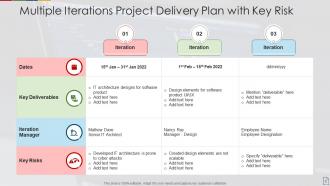
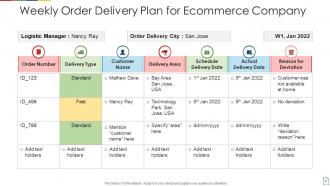
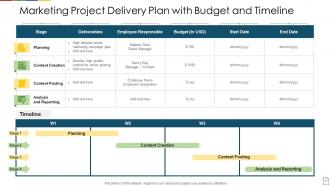
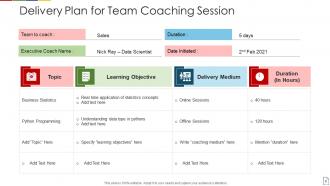
FAQs for Delivery plan powerpoint
Hit the main stuff: timeline with milestones, scope, team roles, and budget breakdown. Risk assessment is huge - something always breaks, so call it out upfront. Success metrics matter too, plus how you'll communicate with everyone. Honestly, the contingency plan section is what separates good PMs from great ones. Shows you're not just winging it. Break down who's doing what and when. Dependencies are key since they're usually where things get messy. Keep sections tight but clear enough that your stakeholders actually get what you're planning.
Nobody wants to read through massive text blocks, so visuals are your best friend here. Timelines and Gantt charts make complex stuff instantly clear - plus they actually look professional. I'm obsessed with the "3-second rule" where someone should get your main point in one quick glance. Color coding is clutch for showing different phases or risk levels. Oh, and throw in some icons because plain slides are just depressing. Progress bars work great for milestones too. The trick is keeping everything simple but tied to what you're trying to say. Trust me, stakeholders will thank you.
Make it interactive - ask questions and get them talking about decisions. Visuals work way better than text-heavy slides (seriously, no one reads those). I'd throw in quick polls or "concerns?" breaks during longer sections. Stories from similar projects help too, just tie them back to their specific goals. Oh, and here's the thing - actually use that Q&A time at the end. Don't just say "any questions?" and move on. Stakeholders stay way more engaged when they feel like they can actually shape the plan. Works every time.
Focus on timeline milestones and budget burn rate first - those always grab attention. Risk scores with mitigation plans are huge too. I can't tell you how many presentations I've watched crash because they forgot dependency mapping... executives hate surprises about blockers. Charts beat spreadsheets every time, so go visual with dashboards if you can. Your delivery confidence percentage matters way more than people think for getting buy-in. Oh, and definitely create a simple one-pager summary they can keep - something about having it in their hands later just works better.
Executives want the big picture - outcomes, risks, business impact. Save the technical stuff for your team meetings. I learned this the hard way watching a colleague bore the C-suite with 40 slides of implementation details! Your team needs those nuts and bolts though - dependencies, timelines, who's doing what. Switch up your language too. Business speak for executives, real talk for the people actually doing the work. Honestly? Make two decks. Practice both. You'll thank me later when you're not watching eyes glaze over in that boardroom.
Don't dive too deep into the technical stuff - people want to know when and what, not how you'll code it. Give yourself buffer time because optimistic dates will come back to haunt you (trust me on this one). Skip showing every tiny task and dependency - it just makes everyone's eyes glaze over. Stick to the big milestones instead. You'll want to call out what could go wrong and have backup plans ready. Honestly, the worst thing you can do is pretend everything's perfect. Being upfront about risks actually makes you look more credible, not less.
Dude, you absolutely need a solid timeline in there. People get so lost without dates - I've watched entire rooms of stakeholders just zone out when someone rambles through features with zero context about when stuff's happening. Make it visual if you can. Even a basic roadmap beats a wall of text every time. Call out your big milestones and anything that might create bottlenecks. Don't forget buffer time either - projects always hit weird snags. The goal is showing dependencies so everyone can actually plan their work around what you're delivering. Otherwise they'll walk out confused about next steps.
Honestly, tell stories instead of just rattling off dates and milestones. Like "by March, Sarah in accounting won't deal with those annoying error messages anymore" - way more engaging than spreadsheet data. I love throwing in random analogies too (building a house or whatever makes sense). Toss in some "what if" scenarios to keep everyone awake. People connect with real user stories, not project metrics. Oh, and paint the picture of what success actually looks like for your users. Stories beat boring charts every time.
Honestly, just stick with PowerPoint or Google Slides for most stakeholder meetings - they're boring but they work. Prezi's cool if you want something flashy, though some old-school execs hate anything too fancy. Canva's another solid option. Oh, and if you're doing heavy project timelines, Monday.com or Asana can spit out visual schedules you can drop right into slides. Super handy. Need flowcharts? Miro or Lucidchart are your friends there. But real talk - figure out what your audience already knows first. Don't make them learn a new tool just to follow your presentation.
Dude, presentation feedback is seriously your best friend for figuring out what actually works. I always track the patterns - like when people keep asking about timelines or budgets, that's your cue to lead with those details next time. Used to think the small comments didn't matter much, but honestly? Those tiny details are what get executives nodding yes. Questions that pop up over and over mean you've got blind spots to fix upfront. Just keep a basic log of wins, fails, and what to try differently. Way better than starting from scratch every single time and hoping for the best.
Honestly, showing you've thought about what could go wrong is what makes executives actually trust your plan. I learned this the hard way after watching a "foolproof" project get derailed by server issues nobody saw coming. You want to call out the big risks upfront - dependencies, budget stuff, technical problems. Then show your backup plans. Short sentences work great for this section, btw. Leadership loves seeing you're not just being overly optimistic. They'll greenlight your proposal way faster when they see you've mapped out the "oh shit" scenarios and how you'd handle them.
Okay so first thing - chunk your budget into clear sections tied to actual deliverables. Personnel, tech, contingency, that kind of stuff. Then get specific for each phase. Honestly, even a crappy chart helps SO much when you're trying to get approval. Don't just dump numbers on them though. Explain why the big expenses matter and be super honest about your assumptions. Oh and definitely build in buffer for scope creep because it'll happen, trust me. Also mention any risks that could mess with costs. End with clear next steps for getting the green light.
Actually listen to what they're saying instead of just planning your comeback - makes a huge difference. Take a second to think before you respond (trust me, I learned this the hard way after way too many awkward meetings). When they object to something, ask questions first to figure out what's really bugging them. Then hit them with specific examples from your plan. Don't know the answer? Just admit it and tell them when you'll get back to them. Keep things short and sweet, but always tie it back to solving their actual problem.
Grab feedback right after your presentation - surveys about clarity, feasibility, whether people are actually bought in. The real test though? How things go when you're executing. Are you hitting those milestones you promised? Staying on budget? If you're constantly having to revise major stuff, that's probably a sign your presentation missed the mark. I'd say set up check-ins at 30, 60, and 90 days to see how reality matches what you pitched. Oh, and watch for any pushback or scope creep - that tells you a lot about whether stakeholders truly understood what you were proposing.
Dude, check out how Spotify and Airbnb do their delivery presentations - they're actually solid. They focus on realistic timelines and always show what could go sideways. Buffer time is huge too, plus they map out team dependencies super clearly so nobody's left guessing who they're waiting on. Honestly, most presentations I've seen totally bomb because they skip the "what if" scenarios. The good ones tell an actual story instead of just throwing dates at you. You want that balance between being optimistic but not delusional about risks. Look up some examples online - you'll see what I mean about mixing confidence with real talk about potential problems.
-
Helpful product design for delivering presentation.
-
I discovered this website through a google search, the services matched my needs perfectly and the pricing was very reasonable. I was thrilled with the product and the customer service. I will definitely use their slides again for my presentations and recommend them to other colleagues.
-
Excellent products for quick understanding.
-
Innovative and Colorful designs.
-
Awesome use of colors and designs in product templates.