

Devops Branching Strategy Powerpoint Ppt Template Bundles





Try Before you Buy Download Free Sample Product
 Impress Your
 Audience
 100%
100% Editable
 Save Hours
 of Time


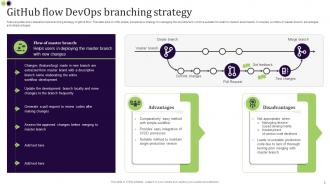
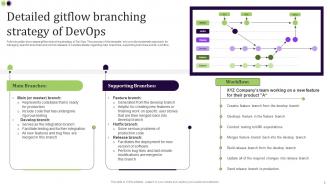
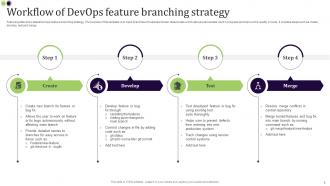
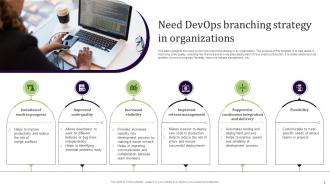
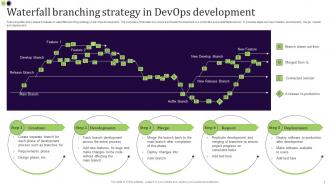
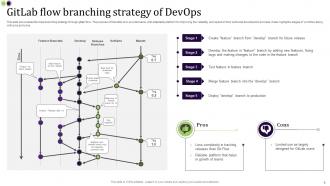
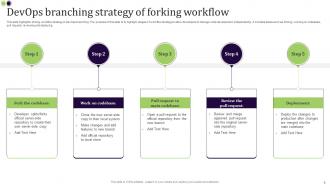
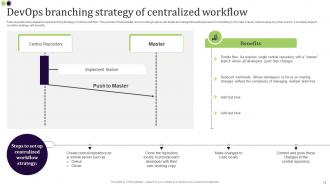
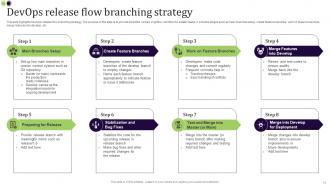
Introducing our comprehensive and insightful PPT on DevOps Branching Strategy, designed to revolutionize your software development process. Embrace the power of Feature Branching, Release Branching, and Git Flow to enhance collaboration, streamline workflows, and boost productivity. Dive into the intricacies of each strategy, understanding how Feature Branching enables isolated feature development, while Release Branching facilitates seamless deployment cycles. Uncover the elegance of Git Flow, a robust model that optimizes code management and simplifies version control. With our PPT, master the art of selecting the perfect branching strategy, aligning it with your teams unique requirements, and ensuring a smooth DevOps journey. Empower your team today and witness accelerated development cycles with this invaluable resource.
People who downloaded this PowerPoint presentation also viewed the following :
Devops Branching Strategy Powerpoint Ppt Template Bundles with all 14 slides:
Use our Devops Branching Strategy Powerpoint Ppt Template Bundles to effectively help you save your valuable time. They are readymade to fit into any presentation structure.


FAQs for Devops Branching Strategy Powerpoint
So GitFlow has all these different branches - develop, feature, release, hotfix - with formal merging rules. Pretty structured but honestly can bog you down. Trunk-based is way simpler: everyone just commits to main with maybe some short feature branches. But you'll need rock-solid CI/CD and feature flags to pull it off safely. Really comes down to how often you ship. Daily deployments? Trunk-based for sure. Quarterly releases where you need that extra control? GitFlow makes more sense. I've seen teams struggle when they pick the wrong one for their workflow.
Honestly, your branching strategy can make or break your delivery speed. Complex setups with a bunch of long-lived branches? They'll slow you down every time. I've seen teams get stuck in merge hell for days. Trunk-based development or GitHub flow work way better - less drama, fewer headaches. Those feature branches that hang around for weeks are productivity killers. More branches floating around means your team's constantly fighting conflicts instead of actually building stuff. Keep branches short-lived and merge often. Trust me, your deployment pipeline will thank you for it.
Dude, feature flags are seriously underrated. You can merge code to main without users seeing unfinished features - no more nightmare merge conflicts from those massive branches. Just hide stuff behind flags and merge daily in small chunks. CI/CD becomes way faster, plus you get gradual rollouts and A/B testing basically for free. I used to hate branching until I tried this approach. Start with something simple on your next feature and you'll wonder why you waited so long. Your branch management will be so much cleaner.
Honestly? Most teams think they need long-lived branches but just need better habits around smaller commits. Short-lived branches are the way to go if your team can push small, tested changes daily and you've got decent CI/CD set up. You'll dodge merge hell later, trust me. Long-lived makes sense for huge features, newer teams, or when you need tight release control. But here's the thing - start by tracking how long your branches actually live right now, then try cutting that time in half. It's wild how much smoother things get.
Honestly, GitHub Flow is killer if you're shipping code all the time. Works amazing for teams pushing to prod daily or weekly - just make sure you've got solid automated tests running. The beauty is there's only one main branch, so none of that GitFlow merge nightmare stuff. Perfect for web apps where you can quickly roll back if things go sideways. You will need decent CI/CD though, since you're basically always deploying straight from main. I'd say go for it if your team cares more about moving fast than having fancy release ceremonies.
So basically you want your CI/CD to run different tests depending on which branch you're working on. Feature branches should just get unit tests and maybe some basic integration stuff - keeps things moving fast. But when you merge to main or develop? That's when all hell breaks loose with the full test suite, security scans, performance checks, everything. Oh and definitely set up branch protection rules so nobody can merge without passing tests first. Trust me on this one - I've been burned too many times by broken builds making it to production. The whole trick is keeping feedback quick during development but being thorough when it actually matters.
Honestly, most teams just overthink the hell out of it. They'll set up these crazy complex branching models with like 5 different branch types when you really only need 2-3 max. Then they forget to decide on merge rules upfront, so code quality gets all over the place. GitFlow sounds cool but if you're shipping daily it's total overkill - I learned that one the hard way. Start with something basic like GitHub Flow first. See how your team actually works, then maybe add stuff if you need it. But seriously, simple beats fancy every time.
Honestly, the best thing you can do is keep your branches small and merge often - way less painful that way. When conflicts hit (because they will), VS Code's merge tool is pretty solid for seeing what's happening side by side. Quick team check-ins save so much headache later if you're touching the same files. I've learned this the hard way lol. Set up some automated tests so you catch weird integration stuff early. Oh, and don't let conflicts sit around - deal with them right away or they just get worse. Rebase can give you cleaner history too if you're into that.
Honestly, your branching strategy can totally make or break how smoothly you work with ops. I learned this the hard way at my last job - ops kept getting blindsided by random merges they weren't expecting. You want something predictable. Feature branches for dev stuff, staging for testing, main for prod releases. That way ops can actually plan deployments and set up automation around your workflow instead of scrambling. The whole point is making it obvious when code's ready for different environments. Pick something simple and don't deviate from it. Seriously, consistency beats complexity every time.
Honestly, separate repos work way better than shoving everything into a monorepo - unless you're Google or something. Pick either trunk-based development or GitFlow based on how often you deploy, but whatever you choose, stick with it across all services. Your devs will hate switching between different workflows. Make sure your CI/CD can deploy services independently without breaking stuff downstream. Semantic versioning is non-negotiable here, and your tagging needs to be consistent. Oh, and actually document your branching strategy - I've seen too many teams wing it and create chaos later.
Okay so atomic commits are your best friend - write clear messages that explain WHY you changed something, not just what you did. Before merging to main, squash all those embarrassing "oops forgot semicolon" commits because honestly nobody needs that chaos in the history. Keep rebasing your feature branches so they stay current. I always use a format like "feat: add user authentication" - makes everything searchable later. Oh and definitely clean up with interactive rebase before pushing. Trust me, you'll appreciate having a clean timeline when you're debugging at 2am trying to figure out when everything broke.
So CI/CD tools are game changers - they basically run all your tests and builds automatically when you push code. No more "works on my machine" disasters! You can set up branch protection so nothing gets merged without passing tests first. Feature branches can auto-deploy to staging, main branch goes straight to prod. Honestly, once you get used to that instant feedback loop, you'll never want to go back. The whole thing just catches problems way earlier instead of finding out about them during some awful midnight deployment. Super worth setting up to match however you're already branching.
So I'd focus on deployment frequency first - how often you're actually shipping stuff. Lead time for changes and merge conflicts are huge too. Mean time to recovery is critical because production breaks happen, it's just reality. Honestly, cycle time data gets me way too excited but it really shows you where things get stuck. Branch lifetime matters more than people think - if you've got branches sitting around for weeks or like 30+ active ones, something's wrong. Oh and track how many branches are floating around at once. Start simple with these, then maybe add complexity metrics down the road.
Honestly, I'd say every 3-6 months unless things are breaking down faster. When your team's drowning in merge conflicts or deployments take forever, don't wait - fix it now. We stuck with Git Flow way too long when trunk-based would've been so much easier. Team size changes everything too. Three devs can handle complexity that'll destroy a team of ten. Look at your real problems: PRs stuck in review hell? Hotfixes turning into nightmares? Releases making everyone panic? Those are your answers right there. Don't just copy what some other team does - their mess isn't your mess.
Honestly GitKraken and Sourcetree are pretty solid for visualizing branches - way cleaner than staring at command line output all day. GitHub Desktop works too if you're keeping it simple. Azure DevOps and GitLab have decent pipeline diagrams built right in, which is nice since you're probably already using one of those anyway. Even `git log --graph` isn't terrible for quick checks, though it looks kinda janky. I'd just start with whatever git client your team's already got installed, then add your CI/CD platform's visuals on top. Main thing is picking something everyone will actually open and look at regularly.
-
Great quality slides in rapid time.
-
Professional and unique presentations.