

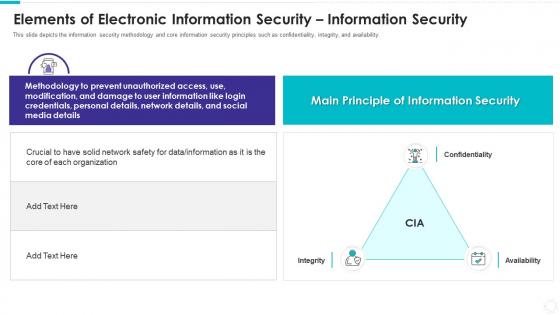
Elements of electronic information security information security




Try Before you Buy Download Free Sample Product
 Impress Your
 Audience
 100%
100% Editable
 Save Hours
 of Time


Our Elements Of Electronic Information Security Information Security are topically designed to provide an attractive backdrop to any subject. Use them to look like a presentation pro.
People who downloaded this PowerPoint presentation also viewed the following :
Elements of electronic information security information security with all 6 slides:
Use our Elements Of Electronic Information Security Information Security to effectively help you save your valuable time. They are readymade to fit into any presentation structure.





FAQs for Elements of electronic information
So there's this thing called the CIA triad - confidentiality, integrity, availability. Honestly the name cracks me up every time. Basically you want to keep sensitive stuff away from people who shouldn't see it, make sure nobody's messing with your data, and actually be able to access everything when you need it. Authentication is huge too - proving you're really you. Oh and non-repudiation stops people from going "wasn't me!" later. I'd start by figuring out what you're protecting and who gets access. Encryption's your friend for most of this.
Start by making a list of all your data - sounds boring but you gotta know what you have first. Then figure out what could go wrong with each piece and how likely that is. Most companies way overcomplicate this stuff initially, trust me. Look at your current security setup and spot the holes. Prioritize fixes based on what'll actually hurt your business, not whatever sounds the most dramatic. Document everything (I know, I know) and review it regularly since threats keep evolving. Don't try to fix everything at once - pick your most important data and build out from there.
Think of encryption like a really fancy safe for your digital stuff. It scrambles your data into complete nonsense that hackers can't read even if they get their hands on it. Your files, emails, databases - whatever you encrypt becomes gibberish without the right key to unlock it. Works whether your data's just sitting around or traveling over the internet. Honestly, it's probably the best bang for your buck security-wise. I'd start with your most sensitive files first, then gradually work through everything else. Super straightforward to set up too.
Look, AI and ML cut both ways when it comes to security. Defense-wise, they're incredible - you can catch threats and weird patterns way faster than old-school methods. Plus the automation saves tons of time. But criminals are using the exact same tech against us, which honestly keeps me up at night sometimes. They're building smarter malware and those deepfakes are getting scary good. It's turning into this endless arms race. My advice? Get some AI security tools running ASAP, but also make sure your team knows what these new AI-powered attacks actually look like.
Phishing's still the biggest pain - people keep falling for those fake emails that look super real now. Ransomware will literally lock up your whole system until you pay (which sucks), and don't forget about insider threats from your own employees being sketchy or just careless. Social engineering tricks are getting crazy sophisticated too. Oh, and patch your software regularly - I can't stress that enough. Running security training for your team helps a ton. Those two things alone stop most of the bad stuff from happening. Honestly, it's wild how many companies skip the basics and then act surprised when they get hit.
Okay so first thing - map out what personal data you're actually collecting and where it lives. Then set up proper access controls and encryption. The documentation part is huge too, like having solid policies and training your team on this stuff. GDPR wants you to have clear consent processes and vendor agreements, while HIPAA is all about healthcare protections and how fast you report breaches. Honestly, the paperwork can be more of a pain than the tech side sometimes. I'd do a compliance assessment first to see where you're most screwed, then tackle those gaps.
Honestly, skip the boring PowerPoint presentations - nobody pays attention anyway. Do interactive training sessions instead, covering phishing, passwords, basic stuff like that. Those fake phishing tests work pretty well, just give people feedback right when they mess up. Monthly tips through email or whatever you use for communication. Oh, and actually write policies people can understand and find easily (shocking concept, I know). The main thing is keeping it consistent throughout the year. Maybe get someone in each department to be your "security person" who reminds everyone about this stuff daily.
First thing - get a security audit done, both internal and external pen testing. Run vulnerability scans on everything you've got. Check who has access to what (this part's usually a mess tbh). Phishing simulations are super revealing too - you'd be surprised how many people click random links. Your third-party vendors? They're probably your biggest risk. If you can swing it budget-wise, hire an outside firm. They'll spot stuff you missed. Oh and don't just do this once - make it regular. Most breaches happen because someone got lazy with updates.
Dude, you should definitely set up multi-factor authentication everywhere. It's like having backup locks on your accounts - even if someone steals your password, they still can't get in without your phone or fingerprint. I learned this the hard way after almost getting hacked last year (long story). Your bank accounts and work stuff especially need it. Yeah, it's slightly annoying to grab your phone every time you log in, but honestly? It's saved me from so much stress. Hackers might crack passwords through those data breaches, but they can't clone your phone.
Honestly, just encrypt everything - AES-256 for storage, HTTPS/SFTP for sending stuff around. Multi-factor auth is a pain but you've gotta do it these days. VPNs help too if you're accessing things remotely. First thing though? Figure out what data actually matters most - like customer info vs random spreadsheets. That way you're not going crazy trying to lock down everything equally. Keep your software updated (boring but necessary), back everything up regularly, and maybe do some basic training so your team doesn't accidentally mess things up. Access controls are huge too - not everyone needs admin rights to everything.
Start with figuring out what assets you actually need to protect and what could go wrong. Build response procedures around realistic scenarios - not the crazy stuff that'll never happen. Map out who's doing what when shit hits the fan, plus how you'll communicate internally and with customers. Here's the thing though - most plans completely crumble during real incidents. That's why you gotta test everything through tabletop exercises and simulations. Document what happens during actual incidents so you can fix the process later. Treat your plan like it's alive and changing. I'd say review it quarterly and update based on new threats or whenever your org structure changes.
So remote work basically turns your whole house into a potential security nightmare. Home networks are sketchy, people use personal devices for everything, and honestly? Most folks get way too relaxed about data when they're in pajamas. Biggest issues I've seen are crappy router security and people working from Starbucks like it's no big deal. You'll want everyone on VPNs for work stuff. Good endpoint protection is clutch too. Coffee shop work sessions might seem productive, but they're basically handing hackers a golden ticket. Kids interrupting calls is annoying enough without adding malware to the mix.
So basically, insider threats are people who already work at your company and have legit access. External ones are hackers trying to break in from the outside. Honestly, insiders scare me more because they already know your systems and have passwords. External attackers still need to find ways to get through your security first. What makes insiders tricky is their behavior looks totally normal at first - like, of course Sarah from accounting is accessing files, right? You've gotta watch for weird access patterns and limit who can see what data. Same goes for protecting against outside attacks too.
So firewalls are like having a bouncer at your network's front door - they decide what gets in and out based on rules you set up. Then you've got intrusion detection systems watching everything that's happening inside, flagging weird stuff like sketchy login attempts. Honestly, most people set these up and forget about them, which is pretty useless. You need both working together. One prevents problems, the other catches what slips through. Just remember to actually check those IDS alerts regularly and update your firewall rules, or you're basically just pretending to have security.
Honestly, don't dump this all on IT - security works best when everyone owns a piece of it. Skip the death-by-PowerPoint training sessions. Instead, use real examples your team actually deals with daily. When someone spots a phishing email, celebrate that win! Make them feel smart, not stupid for asking questions. Show people how security connects to their specific role, because generic scare tactics just don't stick. Oh, and your policies? Keep them simple enough that people will actually follow them. I've seen too many companies write these impossible-to-remember rules then wonder why nobody follows them.
-
Helpful product design for delivering presentation.
-
Very unique and reliable designs.