

End User Support Powerpoint Ppt Template Bundles





Try Before you Buy Download Free Sample Product
 Impress Your
Audience
 100%
Editable
 Save Hours
of Time


Empower your organization with our PPT on End User Support. Dive into the world of end user IT support and discover the essential role it plays in ensuring smooth and efficient end user computing services. This presentation provides a comprehensive guide to delivering top-notch end user support services, covering a range of topics from troubleshooting to enhancing user experiences. Explore the strategies and best practices that make a significant difference in end user satisfaction and productivity. Whether you are an IT professional, a support specialist, or a business leader, our End User Support PPT equips you with the knowledge and tools needed to optimize end user IT support. Elevate your support services and provide exceptional end user experiences. Get your copy today.
People who downloaded this PowerPoint presentation also viewed the following :
Content of this Powerpoint Presentation
Slide 1: This slide introduces End User Support. State your company name and begin.
Slide 2: This slide showcases the major types of end user support system which helps an organization to effectively provide better solutions for troubleshooting technical issues faced by consumers.
Slide 3: This slide presents the potential advantages of employing end user support which helps an organization to improve productivity, enhance customer satisfaction etc.
Slide 4: This slide showcases the comparison between effective tools employed for end user support which helps an organization to carefully use the best software that reduce operational costs.
Slide 5: This slide presents the potential solutions for resolving end user support bottlenecks which helps an organization to enhance scalability and ensure providing cost effective techniques.
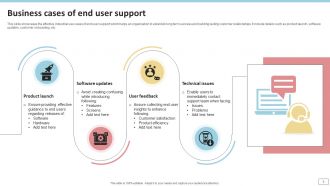
Slide 6: This slide showcases the effective industrial use cases of end user support which helps an organization to establish long term success and building lasting customer relationships.
Slide 7: This slide presents the four major tiers of end user support which helps an organization to provide effective assistance and troubleshooting for technology related issues quickly.
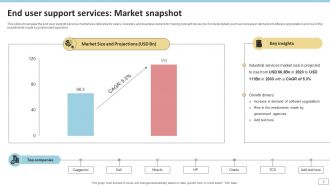
Slide 8: This slide showcases the end user support services market size referable for users, investors and business owners for making relevant decisions.
Slide 9: This slide presents the top three most important areas of end user support which helps an organization to create security exposures and reduce threats that hinder customer satisfaction.
Slide 10: This slide showcases the end user technical issues managed by information technology support team which helps an organization to reduce downtime and improve productivity.
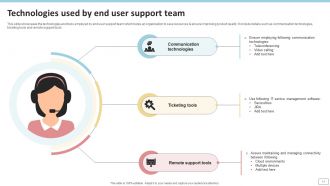
Slide 11: This slide presents the technologies and tools employed by end user support team which helps an organization to save resources & ensure improving product quality.
Slide 12: This slide showcases the comparison between key performance metrics employed by end user support teams which helps an organization to measure and analyze help desk efficiency.
Slide 13: This slide displays the important characteristics of end user support which helps an organization to ensure business success by increasing consumer satisfaction that raises brand loyalty.
Slide 14: This slide showcases the potential ways that offers efficient and great end user support which helps an organization to reduce information technology costs and improves customer retention.
Slide 15: This slide presents the end user support framework for solving major technical bottlenecks which helps an organization to improve employee problem solving skills.
Slide 16: This slide showcases the role of artificial intelligence in end user support which helps an organization to enhance customer satisfaction and retention & reduce operational costs.
Slide 17: This slide displays the statistical graph highlighting end user support channels which helps an organization to offer assistance and troubleshooting for technological issues.
Slide 18: This slide showcases the relevant statistics related to end user support which helps an organization to gain insights over consumer data that aids in reducing customer churn.
Slide 19: This slide showcases the end user support dashboard illustrating overdue tickets which helps an organization to resolve problems, reduce downtime and enhance productivity.
Slide 20: This slide displays Customer support icon for end user issues.
Slide 21: This slide presents End user support icon for resolving IT issues.
Slide 22: This slide displays Technical support solving end users issues icon.
Slide 23: This is a Thank You slide with address, contact numbers and email address.
End User Support Powerpoint Ppt Template Bundles with all 31 slides:
Use our End User Support Powerpoint Ppt Template Bundles to effectively help you save your valuable time. They are readymade to fit into any presentation structure.














FAQs for End User Support Powerpoint
Honestly, just give people options for reaching you - chat, email, phone, whatever works. Quick responses are everything (way more than you'd think). Get a decent ticketing system so you're not losing track of stuff. FAQs and video tutorials will save your sanity - seriously, they cut ticket volume in half. But don't just sit there waiting for fires to start. Send updates about system issues before people notice. Yeah, it feels like extra work, but you'll thank me when you're not drowning in "wait, is this broken?" messages all day. Trust me on this one.
Track the usual stuff - resolution times, first-contact fixes, satisfaction scores from surveys. But here's the thing: those numbers don't tell you everything. Look at repeat tickets too. Same user coming back with identical issues? Your solutions probably suck. Also check if people actually use your self-help resources (spoiler: they usually don't). Monthly reviews help, but honestly? Just talk to your support team regularly. They'll spot patterns in complaints before any metric does.
Okay so presentation templates are honestly a game changer for training stuff. You can whip up professional-looking slides and materials without rebuilding everything from zero each time. Super helpful when you're drowning in tickets but still need to put together decent training. They keep your messaging consistent too - nobody's getting wildly different info depending on who trained them. I'd start making templates for whatever scenarios you deal with most. Trust me, future you will be so grateful. Oh and they work great whether people are there in person or just reviewing slides later on their own.
Set up feedback collection everywhere - surveys when tickets close, regular check-ins, forms on your portal. But here's the thing: actually DO something with what people tell you. We've all filled out those surveys that just vanish, right? Look for patterns in complaints to spot where you're failing. Positive feedback shows what's working, so do more of that stuff. The real magic happens when you circle back - tell users "hey, we changed this because of your suggestion." People love knowing they were heard. Short surveys work better than long ones, by the way.
Honestly, the worst part is when you're drowning in tickets but half your team can only handle basic stuff. Volume gets crazy fast. Then you've got users expecting help at like 2am on weekends - good luck with that. Quality's all over the place too since Bob knows the server issues but Sarah handles the database stuff, and if either's out sick you're screwed. Plus IT people are terrible at explaining things without using twenty acronyms. Get a decent ticketing system first, then focus on training everyone to cover more ground. Documentation saves your butt too.
Dude, personalization is a game-changer for user support. Track their past issues and adjust how you talk based on whether they're tech-savvy or need more help. Nobody wants to feel like just another ticket number, you know? Even small stuff makes a difference - use their name, mention their specific setup. I've seen support teams completely turn around their satisfaction scores just by ditching the robotic responses. Reference previous conversations too. It shows you actually remember them as a person, not just another problem to solve.
Honestly, chatbots with AI are crushing it right now - they're actually smart enough to handle real questions instead of just being annoying. Automated ticket routing is huge too. Those self-service portals finally work properly now, like you can search for something and it'll actually find what you need. The AR remote assistance stuff is wild - you can literally draw on someone's screen to show them what to do. Oh, and predictive analytics can spot problems before customers even complain about them. I'd probably start with whatever's driving you most crazy right now and work from there.
Search is everything - seriously, if people can't find stuff, your whole knowledge base is useless. Build good filtering and tagging from day one. Write FAQs based on what users actually ask, not what makes sense to you (learned that one the hard way). Plain language beats jargon every time. Keep things current because old info just pisses people off. Here's the real trick though: track searches that come up empty, then create content for those gaps. That's where you'll see the biggest wins.
Honestly, just hit up new users within 24 hours with something personal - none of that generic "welcome aboard" stuff. Give them a simple checklist they can work through whenever, and please make your docs readable (seriously, who has time for massive PDFs?). I'd do a quick check-in call after week one to catch problems early. You want to be helpful but not annoying, you know? Set up a dedicated Slack channel for their questions so they're never stuck wondering who to ask. The whole thing is about being accessible without breathing down their necks.
Dude, visuals make such a huge difference - like 65% better retention than just throwing text at people. Screenshots and flowcharts help users actually scan and remember stuff instead of getting lost in paragraphs. Our onboarding docs were kinda terrible until we added consistent icons and layouts. Now people can spot what matters vs background fluff way easier. Your brain processes the same info through multiple channels, which honestly just makes sense when you think about it. Start with simple visuals on your most common support issues - I bet you'll see way fewer "wait, how do I do this again?" messages.
Honestly, just telling people stuff before it breaks makes such a huge difference. Users hate getting blindsided by outages or slowdowns - but if you give them a heads up? They're way more chill about it. Even something quick like "email's acting weird, we're on it" works wonders. I think teams skip this because they're always putting out fires, but it's literally the easiest win. The trick is getting ahead of it - don't wait until people start complaining. Oh, and planned maintenance notices are gold. People can actually work around stuff if they know it's coming.
Start with clear tiers - Level 1 handles basic stuff, Level 2 takes technical issues, Level 3 gets the nightmare cases. Your team needs to know exactly when to bump things up, usually based on time limits or complexity. Document everything during handoffs because customers hate repeating their sob story to three different people. Templates help but honestly, speed matters most. Don't let issues sit in limbo between levels - that's where you lose customers fast. Oh, and always circle back to confirm the escalated problem actually got fixed. Nothing worse than assuming it's handled when it's not.
Honestly, role-playing is your best bet here. Have them practice with fake angry customers - it's awkward at first but works. Cross-training between departments helps a ton since they need to know different systems. I always make new people shadow experienced reps before handling tickets solo (learned that the hard way). Soft skills training for de-escalation is huge. Weekly team sessions where everyone shares their weirdest solved cases? Gold. Oh, and start those role-play sessions next week if you can.
So I'd start by pulling reports on your most common issues - like your top 10 or whatever. Data analytics can show you ticket trends, response times, all that stuff to see where your team's actually struggling. Which problems keep popping up? When do you get slammed with volume? Customer satisfaction by agent is pretty telling too, honestly. The numbers don't lie about where you need to focus. You can even predict your crazy busy periods and staff up ahead of time. Plus it'll show you knowledge gaps - like if everyone's stumbling on the same type of issue, that's a training opportunity right there.
Honestly, the trick is making self-service way easier than just emailing support. Build a knowledge base that actually works - good search, videos for common problems. People are weirdly into gamification so throw in some ratings and "most helpful" badges. Your support team should always end tickets with "btw, here's where to find this next time." Track how many people actually use it. The whole point is users feeling smart and capable, not like you're trying to ditch them. Oh, and test your search function yourself - half of them are completely useless.
-
Stunning collection! With a wide variety of options available, I was able to find a perfect slide for my presentation. Thank you, SlideTeam!
-
SlideTeam makes creating presentations easy. Unlimited products, premium quality designs and affordable.