


Flowchart For Retail Store Self Checkout System Analysis Of Retail Store Operations Efficiency




Try Before you Buy Download Free Sample Product
 Impress Your
 Audience
 100%
100% Editable
 Save Hours
 of Time


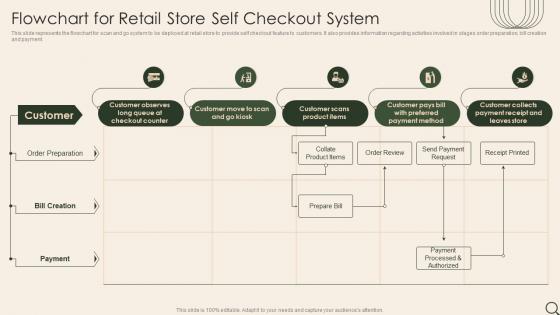
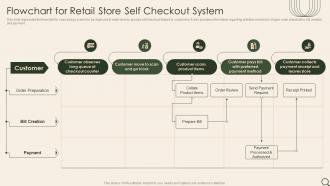
This slide represents the flowchart for scan and go system to be deployed at retail store to provide self checkout feature to customers. It also provides information regarding activities involved in stages order preparation, bill creation and payment.
People who downloaded this PowerPoint presentation also viewed the following :
Flowchart For Retail Store Self Checkout System Analysis Of Retail Store Operations Efficiency with all 6 slides:
Use our Flowchart For Retail Store Self Checkout System Analysis Of Retail Store Operations Efficiency to effectively help you save your valuable time. They are readymade to fit into any presentation structure.





FAQs for Flowchart For Retail Store Self Checkout System Analysis Of Retail
Honestly, the biggest thing is you'll move customers way faster and need fewer people at registers. People love skipping lines, especially when they're just grabbing a few things and don't want to get stuck behind someone with like 50 items. Your staff can actually help customers or restock instead of just scanning barcodes all day. Labor costs drop too since you're not paying as many cashiers. The catch though? Make sure the system isn't confusing or you'll just piss people off and slow everything down even more.
Honestly, self-checkout is great because people love having control over their shopping. No more waiting behind someone with 50 coupons! You can bag everything exactly how you want - heavy stuff on bottom, fragile things safe on top. Works best for quick trips though, like when you just need milk and cereal. Some folks still want to chat with cashiers (my mom's one of them lol), so don't get rid of regular lanes completely. Just market it as the fast option for people who are in a rush.
Most self-checkout machines have barcode scanners (handheld and built-in ones), weight sensors, touchscreens, and payment terminals for cards/mobile/cash. Weight sensors are honestly the most annoying part - they're always checking that what you scanned matches what you bagged. RFID readers show up in newer systems too. Oh, and there's cameras everywhere for security, though they kinda make you feel like you're being watched while you fumble around trying to scan bananas. If you're picking systems for your store, definitely test the weight stuff with lightweight products first. Those "unexpected item" errors will drive your customers crazy otherwise.
Oh yeah, so basically what happens is the scanner recognizes age-restricted stuff and immediately locks everything up. You'll get this "ID check required" message and a light starts flashing to get an employee's attention. Alcohol, tobacco, certain meds, even spray paint - anything with restrictions triggers it. The whole system's actually pretty clever but honestly super annoying when there's a line behind you. An employee has to walk over, check your ID, then use their badge thingy to unlock it. Then you can finally keep going with your shopping.
Definitely go with weight sensors first - they catch the biggest cheaters by flagging when items don't match expected weight. AI cameras are solid too for spotting sketchy behavior like fake scanning motions. Honestly, I've noticed stores with good staffing ratios do way better than ones relying purely on tech. One person watching 4-6 stations works great. Some places install cameras everywhere which feels overkill to me. The smart move? Start with weight sensors and proper staffing since that combo gives you the most impact for your money.
Yeah you'll definitely need fewer cashiers, but don't expect it to be 1:1. Still gotta have someone watching every 4-6 machines - trust me, customers will find ways to break things you didn't know could break. Honestly the bigger win is moving your staff to do more useful stuff like restocking or helping customers find things. My store basically turned half our cashiers into floor support and it worked way better. Just don't expect to slash payroll completely - you're swapping cashier wages for tech maintenance costs. Oh and some people absolutely hate self-checkout, so keep a few regular lanes open.
Oh man, you're gonna hate those weight sensors - they break constantly and customers get that annoying "unexpected item" error like every five minutes. Barcode scanners fail at the worst times too. Payment processing is another nightmare, especially when the network goes down and takes out half your machines. Don't even get me started on the alcohol verification backups during busy periods. Software crashes right when you need it most, obviously. Keep staff close by for troubleshooting and get those weight sensors recalibrated regularly or you'll lose your mind.
Big colorful buttons work best - throw icons next to the text too. Walk people through each step on screen, maybe use different colors for scan vs pay vs whatever. Audio feedback is clutch for the barcode stuff. My mom still gets flustered at these things lol. Have someone nearby who can jump in fast when people look lost. Oh and if you can swing it, set up a practice station? Each step should be dead obvious without reading anything. During rush times definitely keep staff close by to help first-timers through it.
Honestly, UI design can make or break those self-checkout machines. Customers bail so fast when they can't figure out the interface - I've literally watched people just walk away from full carts. You want big, obvious buttons and super clear step-by-step prompts. Keep layouts consistent so people don't have to relearn everything each time. When errors happen (and they will), make the messages actually helpful instead of cryptic. The whole flow needs to feel predictable, otherwise everyone just heads to the regular checkout lanes instead. Oh, and test with real people early - you'll catch weird issues you'd never think of.
Hey! So the self-checkout machines hook up to your current POS system through APIs or database connections - pretty straightforward actually. Everything gets tracked together: inventory, sales, customer info, the whole deal. It's like having extra registers that feed into the same system. Most POS companies already partner with self-checkout vendors which is honestly a lifesaver. Payment processing and receipts happen automatically. Your team can watch all the stations from one screen too, which is nice. Oh, just double-check your POS can handle more transactions before installing - learned that one the hard way!
Honestly, maintenance is gonna be your biggest headache. Clean those touchscreens and scanners religiously - customers are gross and everything gets sticky fast. Daily wipes, deep clean weekly. Get service contracts with both your hardware people and payment folks since problems usually hit multiple systems at once. Stock up on receipt paper, scanner glass, cleaning stuff. Train your team on basic fixes so they're not panicking every time the machine beeps weird. Oh, and keep a log of what breaks when - you'll spot the problem units real quick that way.
Your POS software grabs everything - what people scan, transaction times, voids, payment types. But honestly? The behavioral stuff is way more interesting. You'll see which products confuse customers, when people bail mid-checkout, busy times of day. Most systems feed into your main analytics platform anyway. Peak hours data is super useful for staffing decisions too. Just make sure someone's actually looking at those reports regularly instead of letting them pile up unused.
Dude, self-checkout totally changes your whole store layout. You need way wider aisles by checkout since people move like snails when they're scanning stuff themselves. The whole area becomes this weird mix of shopping space and work zone - customers are basically doing the job for you lol. Position the stations where your staff can watch multiple units at once, and honestly? Leave way more room for lines because it takes forever compared to regular checkout. Oh and make sure sight lines are clear for security and helping confused customers. More space per transaction is just the reality now.
So younger people absolutely crush it at self-checkout - they're quick and honestly prefer not talking to anyone. Older folks though? They usually hate the whole thing, miss chatting with cashiers or get frustrated when the machine acts up. Middle-aged shoppers are hit or miss depending on how comfortable they are with tech stuff. Those stupid "unexpected item in bagging area" alerts make everyone want to scream though lol. Put up good signs and have someone nearby during busy times to help out. Keeps the tech-challenged people from getting too annoyed while the speed demons can still zoom through.
First thing - make sure your staff actually uses the machines themselves before helping customers. Can't troubleshoot what you've never done, right? Have them practice scanning stuff, entering produce codes, the whole deal. Those "unexpected item" sensors are ridiculously touchy, so they need to know that pain firsthand. Role-play the annoying scenarios - payment glitches, age verification, barcode issues. Tell them to jump in when they see someone looking confused, don't wait around. Main thing is showing customers step-by-step instead of just explaining it. Oh, and make little cheat sheets they can keep handy.
-
SlideTeam’s readymade presentations have landed my unique images with my bosses in the past and it continues to reward me.
-
It is my first time working with them and that too on a friend's recommendation. I would say, I am not expecting such a worldly service at this low price.