


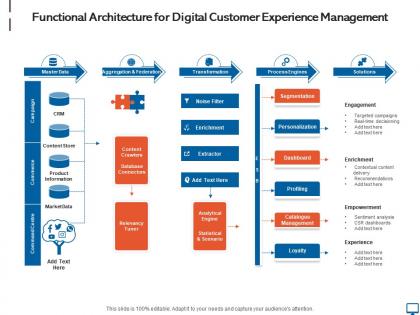
Functional architecture for digital customer experience management




Try Before you Buy Download Free Sample Product
 Impress Your
 Audience
 100%
100% Editable
 Save Hours
 of Time


Our Functional Architecture For Digital Customer Experience Management are topically designed to provide an attractive backdrop to any subject. Use them to look like a presentation pro.
People who downloaded this PowerPoint presentation also viewed the following :
Functional architecture for digital customer experience management with all 2 slides:
Use our Functional Architecture For Digital Customer Experience Management to effectively help you save your valuable time. They are readymade to fit into any presentation structure.
FAQs for Functional architecture for digital
Honestly, tracking metrics across all your channels is where you gotta start - websites, apps, social, email, the whole thing. Focus on customer satisfaction scores, conversion rates, and how fast you're responding on each platform. The integration part is such a nightmare though, getting all that data to actually work together. Customer journey mapping helps you see the big picture. Don't skip the qualitative stuff either - surveys and social listening tell you what people actually think. Main thing is finding where customers bail out or get pissed off so you can jump on fixing it.
Honestly, AI is pretty solid for customer service stuff. You can set up chatbots to answer the boring repetitive questions - cuts down on tickets like crazy. It also gets scary good at recommending products based on what people browse. The thing learns from every conversation too, which is kinda wild. What I'd do is start with something simple, maybe just FAQ automation. Then you can get fancy with sentiment analysis and routing tricky problems to actual humans. Oh, and it predicts what customers want before they ask sometimes. Not gonna lie, that part still feels like magic to me.
Honestly, personalization is a game-changer for keeping customers happy. People love feeling like you actually get them instead of just blasting everyone with the same boring stuff. Think about it - when Netflix suggests shows you'll actually watch, that hits different than random recommendations. Your customers want that same vibe. Use their browsing history and past purchases to show relevant products. Abandoned cart emails work great too. Just don't go overboard with the data creeping (nobody wants to feel stalked). Start simple and build from there. It's basically like being a good salesperson but automated.
Okay so online shoppers are basically impatient - they want everything to load instantly and hate waiting for responses. Plus they're constantly comparing you to competitors (literally opens new tabs while shopping, it's brutal). Physical store customers? Totally different vibe. They'll wait longer but expect actual human conversation and want to touch stuff before buying. Honestly, they care way more about building relationships with staff. Speed matters most online, but in-person it's all about creating an experience. Focus your website on being super fast and efficient, then make your physical locations more about personal connection and expertise.
Track everything - website clicks, app usage, support tickets, all of it. You'll see exactly where people bail out or hit roadblocks. Honestly, individual complaints can throw you off track sometimes, so focus on the bigger patterns instead. Set up dashboards for conversion rates, load times, how users move through your site. Then A/B test fixes based on what you find. Oh, and definitely start with your worst drop-off points first - no point optimizing something that's already working fine.
Definitely watch AI personalization and conversational commerce - that stuff's getting really good. Voice interfaces aren't trash anymore either, which is wild. Your customers basically expect you to read their minds now and help them before they even realize they need it. Privacy's become this massive thing too. People actually care about their data now (finally!), so you need to be upfront about what you're doing with their info while still making things feel personal. Oh, and omnichannel that doesn't suck. Start by looking at where you can predict what customers need next in their journey.
Honestly, just sprinkle feedback opportunities throughout your app without being obnoxious about it. Pop-up surveys work great after someone completes something important. Rating widgets are solid too. But seriously - don't bombard people or they'll hate you. When someone leaves crappy feedback, send them a quick personal message asking what went wrong. Here's the part most companies mess up: actually tell customers when you fix stuff they complained about. Send an email or push notification like "hey, we added that feature you wanted." People love knowing they were heard. Oh, and maybe avoid asking for ratings during stressful moments - timing matters way more than you'd think.
Honestly, the worst thing I see companies do is chase vanity metrics instead of fixing what actually bugs customers. Like spending weeks shaving milliseconds off load times while people can't even find the damn checkout button. Teams never talk to each other either - your mobile app works totally different from the website. So annoying. Don't jump straight into crazy personalization before you understand how people actually use your stuff. Test everything first. My take? Do some real user research, map out their journey across everything, then fix things methodically instead of whatever's trending on LinkedIn this week.
Dude, you absolutely need to get your mobile game together. Most people are scrolling on their phones now, so if your site looks terrible on mobile, they'll just bounce immediately. I tried using a desktop-only site on my phone last week and wanted to throw it across the room - that's exactly how your customers feel. High bounce rates kill your sales and make your brand look amateur. Test it on a few different phones first, then maybe think about redesigning with mobile in mind from the start. Trust me, it's worth the effort.
Honestly, gamification works really well - just add points, badges, and leaderboards to make boring stuff feel like achievements. Progress bars are solid for getting people to finish their profiles. Daily challenges and streaks? Total game changer for retention. I've noticed apps crush it with simple things like "finish your profile, get 50 points" or those weekly challenge things. Don't make your rewards feel cheap though - nobody cares about meaningless digital junk. Oh, and start simple. Pick one thing you want people to do more and just build points around that first.
Start building accessibility right into your design process - don't just tack it on at the end. Alt text for images is basic stuff, plus good color contrast and keyboard navigation. Most websites absolutely suck at screen reader compatibility, which is honestly embarrassing at this point. You'll want to test with real users who have disabilities, not just those automated checker tools. Plain language helps everyone too. Oh, and think about people who aren't super tech-savvy - multiple ways to contact you, that sort of thing. I'd run a quick accessibility audit on your current site first and tackle the worst problems.
So honestly, I'd start with NPS to see if customers actually like you, plus Customer Effort Score - that one's huge because nobody wants to fight through a terrible website. CSAT gives you quick feedback on specific stuff too. Conversion rates are pretty crucial since they show if people actually buy from you (obvious but still). Oh and definitely watch retention rates and how many support tickets you're getting - if those numbers suck, your digital experience probably does too. Pick like 2-3 max though. Tracking everything will just overwhelm you.
Honestly, the best way is to turn your customer journey into actual stories people can relate to. Instead of boring feature lists, show how real users transformed their situation with your product. Case studies work, but make them feel personal - not corporate-y. Your onboarding should feel like a journey, you know? I've noticed brands that nail this make customers feel like they're the hero of their own story. Testimonials become mini-narratives. Even your UI copy can sound conversational instead of robotic. Start small though - pick one touchpoint and add a simple before/after story to it.
Honestly, social media has completely changed what customers expect from brands now. They want instant replies - like if Nike responds on Twitter in 5 minutes, they're wondering why you're taking hours. Everything needs to be personalized too. People are way more comfortable calling out bad experiences publicly, which is kinda terrifying but whatever. They're also used to that polished Instagram aesthetic and storytelling vibe from TikTok. The weird part? All this bleeds into how they judge your website and emails. You've gotta match that same energy - quick responses, good visuals, smooth experience - or people definitely pick up on it.
Honestly, start by mapping out how your customers actually move between online and in-store - like, do they browse on their phone then pick up later? The biggest pain point is when people have to repeat themselves because your systems don't talk to each other. Super annoying. Get your inventory synced up first, then train your team on whatever digital tools you're using. Customers should be able to start something online and wrap it up in person, or the other way around. I'd pick just one customer path and nail those handoffs before trying to fix everything at once.
-
Great product with effective design. Helped a lot in our corporate presentations. Easy to edit and stunning visuals.
-
Great designs, Easily Editable.
-
Perfect template with attractive color combination.
-
Appreciate the research and its presentable format.