

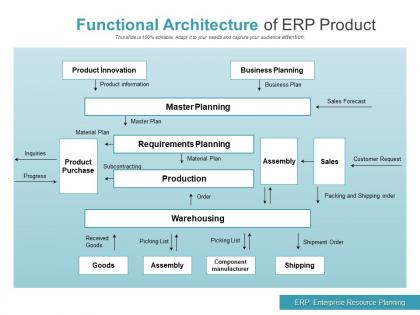
Functional architecture of erp product




Try Before you Buy Download Free Sample Product
 Impress Your
 Audience
 100%
100% Editable
 Save Hours
 of Time


Frame your thoughts with our Functional Architecture Of ERP Product. They will acquire a fantastic look.
People who downloaded this PowerPoint presentation also viewed the following :
Functional architecture of erp product with all 2 slides:
Get in the frame with our Functional Architecture Of ERP Product. The focus will be centered on you.
FAQs for Functional architecture
So basically there are four main pieces to look at. You've got the presentation layer - that's just the interface users see. Then there's the application layer where all the business rules happen. Data layer stores everything, obviously. But honestly? The integration layer is where the magic happens - it connects finance, HR, inventory, all that stuff. Most systems now are cloud or hybrid, which is probably better anyway since you don't have to deal with servers. Oh and when you're shopping around, don't get distracted by fancy features. Focus on how smoothly these layers actually work together.
So basically your ERP works like this - you've got the interface part running on everyone's computers, but all the actual data and processing happens on central servers. Kind of like Netflix, honestly. You click around on your screen, but everything's really happening somewhere else. Multiple people can jump in at once without screwing things up. The cool part is when you need more power, you just beef up the servers instead of upgrading every single person's computer. Just don't let your internet connection suck or you'll be waiting forever for everything to load.
Your ERP database is where all your business data lives - customer info, inventory, financials, the works. It's what connects all those different modules together. Otherwise you'd have a bunch of systems that can't talk to each other, which is pretty useless honestly. Real-time reporting depends on it too. Here's my advice: learn your database structure early, even if it seems boring. Trust me, you'll thank yourself later when you need custom reports or want to connect other tools. Without good data management, your whole ERP falls apart.
Honestly, moving to cloud ERP is a total game changer. Your old clunky on-premise system becomes super flexible - you can scale up when business is booming or dial it back when things slow down. No more buying expensive hardware every time you grow. Plus automatic updates and way better disaster recovery. I mean, being able to access everything remotely saved everyone's butt during COVID. The integration stuff is smoother too. Just make sure whatever vendor you pick has decent APIs and won't trap you in their little walled garden forever. That's always annoying.
So basically it's about where the software actually runs. On-premise means everything's installed on your own servers - you deal with all the maintenance, updates, security stuff. Pretty much a full-time job honestly. Cloud ERP runs on someone else's servers and you just log in through your browser. Way easier IMO. You get automatic updates, better backup options, plus you can easily add more users when you need to. I'd look at your IT budget first though - that usually makes the decision pretty obvious. Oh and how much tech headache you actually want to deal with.
Think of it like building with Lego blocks instead of buying some giant pre-built castle. Start with what you actually need - maybe just finance and inventory tracking. Later you can snap on HR or manufacturing stuff when your business gets bigger. Way cheaper than dropping cash on a huge system right away. One module crashes? The rest keeps running fine. Oh, and figure out your top 3 business headaches first - that'll help you pick which modules to start with. Trust me, you don't want to pay for features you'll never use.
Honestly, the biggest pain will be your old data formats not talking to modern ERP systems at all. Security's another headache - those legacy systems are basically sitting ducks for today's hackers. Timeline-wise? Whatever they quote you, double it. I've watched "quick" migrations drag on for ages. Staff will probably grumble about learning new processes too. Oh, and expect some downtime when you actually flip the switch. Start by figuring out what data mess you're dealing with first, then test everything like crazy before launch.
Start with modular, cloud-native design - that's non-negotiable. Horizontal scaling beats vertical every time, so pick platforms that can add servers instead of just beefing up what you have. API-first approach will save your sanity later when you need integrations. Here's what I wish someone told me: resist the urge to customize everything upfront. Configure instead. Those custom tweaks seem smart now but they'll bite you when you're trying to scale. Oh, and this should be obvious but apparently isn't - choose a vendor who's actually handled companies at your target size, not where you are today.
Start with role-based access - people should only get permissions they actually need. Multi-factor authentication is basically required now, not optional. Encrypt everything (data at rest and in transit). Regular security audits are huge but honestly, network segmentation might be even more important - it isolates your ERP from other systems and way too many companies skip this step. You need solid backup and disaster recovery plans too because ERP failures are catastrophic. Oh, and focus on access controls first since they give you the most immediate security boost for the effort.
Honestly, mobile accessibility means rebuilding your ERP from scratch. Don't even think about just adding a mobile skin to what you've got - that's a recipe for disaster. You'll need responsive APIs, offline sync, and interfaces people can actually use with their thumbs. The backend has to be modular so it can handle different devices without breaking. I'd start by figuring out what your users really need when they're mobile versus sitting at their desk. Service-oriented architecture is your friend here. It's way more work than most people expect, but worth it.
So data governance in ERP is basically figuring out who owns what data and how it moves around. Without clear rules, you'll get messy customer records scattered everywhere - finance sees different numbers than ops, total headache. Set up ownership rules and quality standards right in the architecture itself. Don't rely on people to manually follow processes (spoiler: they won't). Map out your critical data flows first and nail down single sources of truth for each type. Oh, and build access controls directly into the design. Trust me on this one.
So role-based access is pretty much what it sounds like - your job determines what you can actually do in the ERP system. Accounting folks get the financial stuff but can't touch inventory settings (probably for the best tbh). Your dashboard only shows menus and reports that matter for your role, which is nice because you're not scrolling through a million irrelevant options. The downside? Sometimes you need data from another department and you're basically stuck waiting. Just double-check that your permissions actually line up with what you need day-to-day, or you'll be constantly bugging IT for access.
Honestly, API integration is what turns your ERP from a glorified spreadsheet into something that actually works with the rest of your tech stack. You can hook it up to your CRM, e-commerce site, accounting tools - whatever you're using. Data moves between them automatically instead of someone manually copying stuff over (which always gets screwed up anyway). Real-time connections mean fewer errors and your team isn't stuck doing data entry all day. Though I'd start small - figure out which two systems absolutely need to talk to each other first, then build from there.
Yeah, customizations can definitely bog down your ERP if you're not smart about it. Every time you add custom code or workflows, you're making the system do more work - extra database queries, complex logic, all that stuff. I've seen some pretty brutal performance hits from heavy customizations that broke the system's built-in optimizations. Here's the thing though - test everything in staging first before you go live. And honestly? Check if you can just configure standard features instead of building custom ones. Sometimes the boring solution is actually the right one. Way less headache down the road.
Cloud-native and microservices are totally taking over ERP right now. Companies are breaking apart those huge monolithic systems - way smarter approach honestly. APIs are everywhere since you need everything talking to each other. Mobile-first is finally standard (about time). Low-code platforms let business folks tweak workflows themselves instead of bugging IT every five minutes. The really cool stuff? Embedded analytics and ML that actually predict things before they happen. Oh, and if you're doing any ERP overhaul, focus on flexibility first. Don't get distracted by fancy feature lists that'll be outdated next year anyway.
No Reviews