

Architecture of the erp system erp system it ppt summary




Try Before you Buy Download Free Sample Product
 Impress Your
 Audience
 100%
100% Editable
 Save Hours
 of Time


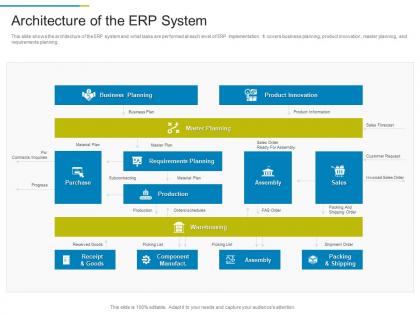
This slide shows the architecture of the ERP system and what tasks are performed at each level of ERP implementation. It covers business planning, product innovation, master planning, and requirements planning.
People who downloaded this PowerPoint presentation also viewed the following :
Architecture of the erp system erp system it ppt summary with all 2 slides:
Use our Architecture Of The ERP System ERP System IT Ppt Summary to effectively help you save your valuable time. They are readymade to fit into any presentation structure.
FAQs for Architecture of the erp system erp system
So ERP systems basically have three main layers. Users see the presentation layer - that's your interface. Business logic runs in the application layer, and everything gets stored in the database layer. Integration middleware connects to other tools, though honestly that's where things usually go sideways if you don't plan it right. Most systems share stuff like reporting engines and workflows across different modules. Oh, and definitely ask for their architecture diagram when you're shopping around - you want to see how data actually moves between components. Trust me on that one.
So basically cloud ERP runs on the vendor's servers - you just log in through your browser and they deal with all the updates and tech stuff. On-premises means everything's on your own servers, so your IT team handles it all. Cloud's way easier for remote work (learned that the hard way in 2020), but on-premises gives you total control over your data. Honestly, I'd look at what your IT team can actually handle first. Some companies think they want full control until they realize how much work that actually is. Really depends on your compliance needs too.
So your database is like the heart of the whole ERP thing - pumps all your business data around to where it needs to go. Customer records, inventory counts, financials, HR stuff, you name it. When modules can't share info properly, you get these annoying data silos everywhere. Trust me, fixing that mess later is awful. Real-time reporting only works if everything's talking to each other smoothly. Oh and seriously - spend time on the database design from day one. I learned that the hard way when we had to rebuild ours during a growth spurt.
Think of it like breaking your giant ERP system into smaller, independent pieces that don't rely on each other. Your inventory, accounting, HR stuff - they all become separate services. Honestly, it's pretty brilliant because you can update one part without breaking everything else. Need to scale just your order processing? Easy. Want to completely replace your payroll system? No problem. Different dev teams can work on their own pieces without getting in each other's way too. I'd start with whatever feels most isolated already - maybe your reporting or user management. Those are usually good first candidates.
Honestly, start with who can access what - most data breaches happen because someone got into stuff they shouldn't have. Multi-factor authentication is a must (we skipped it at my old job and paid for it later). Encrypt everything, both stored data and when it's moving around. Set up audit logs so you know who's doing what. Oh, and keep your ERP separate from other systems - network segmentation is clutch. Don't forget regular patches and security scans. I'd tackle access controls first since that's your biggest risk area.
Oh man, you're gonna hate dealing with data inconsistencies between systems - that's always the worst part. API compatibility is a total nightmare too, especially with legacy systems that basically refuse to play nice with anything modern. Real-time syncing will make you want to pull your hair out. Performance tanks when everything tries to talk at once, and don't even get me started on the security holes that pop up everywhere. Different systems defining the same data in completely different ways? Pure chaos. Honestly though, get a decent integration platform first and set up your data rules early. Trust me on this - way better than patching things together later.
So your ERP basically moves data in three layers. Users enter stuff at the top, then there's a middle layer that checks if everything makes sense, and finally it gets stored in the database. Pretty straightforward, right? What's neat is the reverse works too - pulling reports flows back up through those same layers. All your different modules (finance, HR, whatever) connect to this same pipeline, so updates happen instantly across teams. Oh, and watch your integration points - that's where things usually break. Trust me on that one.
So real-time processing totally flips your ERP setup - instead of those chunky batch updates, you're dealing with constant data streams. Users see changes instantly when inventory moves or orders get processed, which is pretty sweet. But here's the thing - your infrastructure better be solid because it's working 24/7 now. No more "oops, let's retry that batch later" safety net either. The payoff though? Way better decisions, customers actually see accurate info, and you know what's happening right now instead of yesterday. Oh, and don't go crazy - figure out what actually needs real-time versus what can wait for scheduled runs.
Honestly? Multi-tenancy usually makes ERP performance better, not worse. Shared infrastructure means better resource use and lower costs for everyone. But here's the catch - if one company suddenly hammers the system, everyone else might feel it. Think rush hour on the highway, you know? Most modern systems are pretty good at preventing this with isolation features and auto-scaling though. I'd definitely grill your vendor about their specific setup and what happens during peak times before committing.
So APIs are basically how you get all your business systems talking to each other without wanting to pull your hair out. Real-time data flows between your ERP and stuff like your CRM or e-commerce platform - no more copying numbers around manually (thank god). Makes everything way more flexible too. Want to add a new app? Easy. Need to switch vendors later? Won't be a nightmare. I'd honestly start by figuring out which systems you absolutely need connected first, then work from there. Way less overwhelming that way.
Honestly, UI can totally make or break your ERP investment. I've watched companies blow millions on systems that nobody wants to touch because the interface is a nightmare. Users just create their own workarounds instead - which defeats the point, right? Clean dashboards matter way more than you'd think. When workflows feel natural and the navigation actually makes sense, people don't need tons of training. They'll make fewer mistakes too. Role-based design is huge here. Bottom line: if your interface sucks, even the best ERP becomes useless. Make it intuitive and your team will actually embrace it.
Start with responsive design and API-first setup - your ERP needs to handle mobile smoothly. Security's massive here since everyone works on sketchy public wifi (seriously, why do people do this?). Your interface has to work on tiny screens with touch controls. Offline mode helps field workers too. Performance matters big time - nobody waits for slow forms on mobile. Don't try mobilizing everything right away though. Figure out which ERP functions your team actually uses, then build those first. Way smarter approach.
Honestly, go with cloud if you can - you'll get the best scaling options since you just spin up whatever you need and only pay for what you actually use. On-premise is kind of a pain because once you buy those servers, that's it. Want more capacity? Time to shell out for new hardware again. Hybrid's pretty decent too - keeps your main stuff on-premise but lets you scale other parts in the cloud when needed. SaaS handles the scaling for you automatically, though you're stuck with whatever limits your vendor has. If you're expecting growth spurts or busy seasons, cloud's definitely your best bet for flexibility.
So customization is basically what decides how flexible your ERP needs to be right from the start. Map out your must-have customizations early - trust me on this one, it'll save you tons of headaches later. Modern ERPs usually have configuration layers that let you adapt stuff to your business without everything falling apart. Legacy systems? Yeah, they're pretty rigid and honestly kind of a pain. The trick is hitting that sweet spot between being able to customize things and keeping the system stable. Design with modularity so you can tweak workflows or add custom fields later without breaking the whole thing.
Build your analytics separate from your main ERP - trust me on this one. Performance will tank if you don't. Most companies I've seen do a data warehouse that syncs every few hours or so. Real-time is honestly overrated unless you're doing something crazy like day trading. Power BI and Tableau work great for this stuff. Here's the thing though - design your ERP database thinking about reports from the start. You don't want to be that guy later trying to pull insights from a mess of transaction tables. Also consider embedded analytics right in your ERP if it supports it.
-
Awesome presentation, really professional and easy to edit.
-
Great quality product.
-
Very unique, user-friendly presentation interface.
-
Unique research projects to present in meeting.