


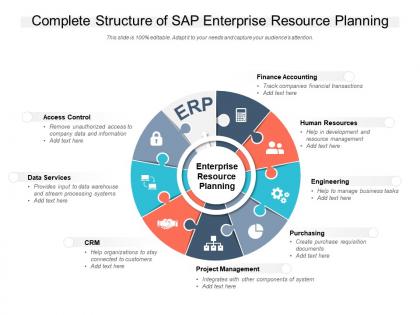
Complete structure of sap enterprise resource planning




Try Before you Buy Download Free Sample Product
 Impress Your
 Audience
 100%
100% Editable
 Save Hours
 of Time


Our Complete Structure Of SAP Enterprise Resource Planning are topically designed to provide an attractive backdrop to any subject. Use them to look like a presentation pro.
People who downloaded this PowerPoint presentation also viewed the following :
Complete structure of sap enterprise resource planning with all 2 slides:
Use our Complete Structure Of SAP Enterprise Resource Planning to effectively help you save your valuable time. They are readymade to fit into any presentation structure.
FAQs for Complete structure of sap
So the big SAP modules are FI (Finance), CO (Controlling), SD (Sales & Distribution), MM (Materials Management), PP (Production Planning), and HR. They all connect to each other automatically - create a sales order and boom, it checks inventory and updates your books instantly. Honestly took me forever to wrap my head around how seamless it actually is. Everything happens in real-time since they share the same master data. My advice? Map out your main business processes first so you know which modules you'll actually need and how they'll work together. Way easier than trying to figure it out backwards.
So basically SAP works like everything talks to each other instantly. Update something in your warehouse? Finance and sales see it right away - no waiting around for systems to sync overnight (thank god, that was awful). All the modules pull from the same database, which is honestly pretty cool. Your reports show what's happening now, not yesterday's numbers. I'd start by figuring out which live reports you'd actually check daily - like maybe inventory levels or sales pipeline stuff? That real-time visibility makes such a difference when you're trying to make quick decisions.
So NetWeaver is like the backbone that holds your whole SAP system together. All your modules - FI, MM, SD - they can't actually communicate without it running underneath. It handles the boring stuff like logins, database connections, and web services. Honestly, most people don't even think about it until something breaks. Your Basis team basically lives in this layer, especially when you're trying to connect SAP to other systems or troubleshoot integration problems. Think of it as the plumbing - not glamorous, but everything falls apart without it working properly.
Look, SAP's pretty flexible once you get into it. You can tweak modules through configuration and custom fields, plus there are workflow modifications if you need them. Industry add-ons are huge too - like retail has completely different needs than pharma, obviously. Your functional consultants will help map out standard processes and build custom reports. Honestly, the pre-built industry solutions for automotive and healthcare save tons of time. Third-party integrations work well too. I'd start by comparing your current processes to SAP's defaults - that'll show you exactly where customization makes sense.
So the main thing with S/4HANA is it runs on that HANA in-memory database - way faster than the old stuff. Real-time analytics instead of waiting around for batch jobs to finish overnight. The interface got a complete makeover too with Fiori, looks actually decent now. They simplified the whole architecture, fewer tables to deal with. Oh and you get AI/machine learning built right in, which is pretty cool. Honestly if you're thinking about upgrading, I'd look at your reporting needs first - that's where you'll notice the biggest difference right away.
Honestly, SAP's interface makes a huge difference in how fast you can work. The new Fiori setup is so much better - you get these personalized tiles for stuff you use all the time, plus role-based dashboards that actually make sense. Way less time clicking around looking for things. Mobile access is pretty solid too, which helps when you're not at your desk. Classic SAP GUI though? Ugh, that thing's a pain. If you're still using it, definitely bug your IT team about upgrading to Fiori. Yeah there's a learning curve, but trust me - it's worth it.
Okay so SAP's got some solid security stuff built in. Role-based controls mean people only see what they need for their job. Authorization objects let you get super granular - like blocking access to specific transactions or even data fields. Everything gets logged too (and I mean literally everything), so you can see who touched what and when. There's fraud prevention through duty segregation, plus encryption and customizable password rules. Honestly though? Set this up right from the start. Trust me, trying to fix security gaps later is a total nightmare compared to doing it properly upfront.
So SAP handles multi-unit finances through company codes - each business unit gets its own books that roll up for consolidated reporting. You can set different charts of accounts, currencies, fiscal years per unit which honestly saves your sanity with regional compliance stuff. Intercompany transactions get handled automatically and eliminated during consolidation. Real-time dashboards show each unit's performance too. Oh, and definitely map out your current units and their financial needs first - trust me on this one. Makes the whole setup process way less painful. The visibility you'll get across units is pretty solid once it's running.
So for SAP data migration, you've got a few solid options. LSMW is probably your best bet for basic master data stuff - super straightforward to use. Data Services works great for heavy lifting and complex transformations, but fair warning, it'll make your head spin at first. Migration Cockpit is the new kid on the block for S/4HANA projects, comes with templates that actually don't suck. Oh, and don't overlook simple Excel uploads through standard transactions if you're just moving small chunks of data. My advice? Map out what you're dealing with volume-wise first, then pick whatever matches your team's skills and how much time you've got.
So SAP ERP basically connects your whole supply chain through MM and SD modules. You can see inventory levels, track how suppliers are doing, follow shipments from start to finish. Stock movements update automatically, purchase orders get created when you hit reorder points - honestly the traceability stuff is solid. Analytics show you lead times and where things get stuck. Oh and definitely check out the logistics information system first, that's where all the useful daily reports live. Short sentences mixed with longer ones feel way more natural than that robotic stuff.
Oh man, you're gonna run into so many data format headaches. Legacy systems basically speak a different language than SAP's newer stuff. Half the time nobody even remembers what those old systems actually do anymore - documentation? What documentation? Real-time syncing becomes this nightmare, and don't get me started on security issues when you've got ancient systems that can't handle modern protocols. Custom middleware will save your sanity though. Seriously, map out your data flows before you touch anything and add like 50% more time for testing. This stuff always drags on way longer than planned.
So SAP basically pulls all your customer stuff into one place - sales, service, marketing, the whole thing. Super handy once you figure it out. Track leads from day one through their entire buying history and support issues. The automation for follow-ups is clutch, and you can spot upselling chances way easier. Honestly, the reporting gets a bit overwhelming at first, but it shows you which customers actually make you money. I'd start by figuring out where your customer data lives now and how SAP can stop you from jumping between ten different systems.
So SAP's got pretty decent reporting options. Standard reports cover the basics - financials, sales data, operational stuff. When those don't cut it, there's Query Designer for building custom ones. Report Painter exists too for fancy formatting, but honestly most people find it more hassle than it's worth. Real-time dashboards are nice when you need live updates. You can drill down into specific transactions which is super helpful. My advice? Start with what's already built-in first. Once you see what's missing, then you'll know exactly what custom reports to create.
Dude, SAP's workflow stuff is actually pretty solid for getting rid of those annoying manual handoffs. Set up approval chains and documents automatically go to the right people - no more hunting down who's supposed to sign what. It tracks bottlenecks in real-time too, which is honestly a lifesaver when your boss asks why something's stuck. The notifications and audit trails happen automatically, so less admin busywork for your team. Oh, and it enforces business rules without you having to babysit everything. I'd start by mapping your most repetitive processes first - those are usually the biggest time wasters anyway.
Honestly, the biggest wins are way lower upfront costs and not dealing with hardware headaches. SAP handles all the server maintenance stuff, so you don't need a massive IT team anymore. Remote access became clutch after COVID hit - people can log in from literally anywhere now. Implementation is way faster too since there's less setup involved. Oh, and the automatic updates are nice because you're not stuck on some ancient version forever. I'd look at your current IT situation and see if paying monthly makes more sense than dropping a huge chunk of cash upfront for on-premise.
No Reviews