

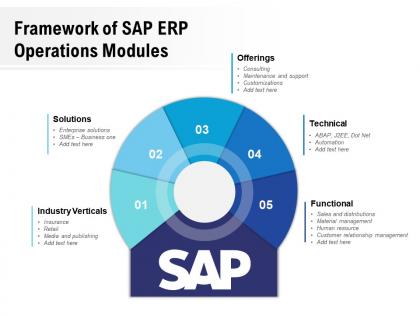
Framework of sap erp operations modules




Try Before you Buy Download Free Sample Product
 Impress Your
 Audience
 100%
100% Editable
 Save Hours
 of Time


Our Framework Of SAP ERP Operations Modules are explicit and effective. They combine clarity and concise expression.
People who downloaded this PowerPoint presentation also viewed the following :
Framework of sap erp operations modules with all 2 slides:
Give your audience a fulfilling experience. They will find our Framework Of SAP ERP Operations Modules elevating.
FAQs for Framework of sap
You'll mainly be dealing with four big modules: SD (Sales & Distribution), MM (Materials Management), PP (Production Planning), and QM (Quality Management). They basically cover your whole order-to-cash and procure-to-pay flow. SD handles customer orders and deliveries. MM is all about purchasing and inventory stuff. PP takes care of manufacturing planning and execution, while QM keeps quality standards in check. Most of the real work happens in these four, honestly. Start with SD and MM if you're just getting into SAP - they connect to pretty much everything else, so you'll get a good base. Trust me on that one.
So operations modules are like the backbone connecting your whole SAP system - they share master data and transactions across everything in real-time. Process a sales order in SD? It'll automatically update MM for materials, FI for financials, PP for production. Pretty smooth once you get the hang of it. Standard interfaces handle the integration through shared databases, so no custom coding needed for basic stuff. Oh and seriously - start with clean master data or you'll have garbage flowing everywhere. Learned that one the hard way!
Honestly, the real game-changer is having visibility into everything happening on your floor in real-time. Your inventory management gets way cleaner, and production planning actually makes sense for once. All the modules connect properly - production numbers flow straight into your financials, procurement talks to inventory, you know the drill. No more hunting down data in five different systems. The forecasting gets much sharper too, which helps with supply chain stuff. Oh, and the reporting is actually useful instead of just pretty charts. I'd start by figuring out what's driving you crazy now, then tackle those modules first.
So MM is basically your procurement and inventory hub - handles purchasing, vendor stuff, tracking materials, the whole nine yards. Most companies live in this module since everyone's gotta buy things, right? What's neat is how it talks to FI for invoices and PP for production planning. Data just flows between departments without you having to do extra work. Honestly though, if you're new to this, just nail down the purchase req to PO process first. That's like your bread and butter - once you get that down, everything else clicks way easier.
So the PP module basically connects all your production stuff - demand planning, materials, scheduling - into one system that actually works together. Instead of juggling spreadsheets, you can auto-generate production orders from sales forecasts and see material availability instantly. Shop floor scheduling gets way less painful too. What's cool is it talks to your inventory and procurement automatically, so no more working in separate bubbles. Your lead times drop because everything syncs up without manual handoffs. Oh, and definitely map out your current workflow first before jumping into configuration - learned that one the hard way!
So QM is basically your quality watchdog for everything SAP-related. It jumps in when materials show up, stops production if something's off, and blocks sketchy shipments to customers. Creates inspection lots automatically too, which is pretty handy. Honestly, it can slow things down sometimes but that's kinda the point - better than dealing with quality disasters later. Works across procurement, production, sales, the whole nine yards. Oh and it handles all your certificates and quality docs. Just make sure you set it up right from the start or you'll be tweaking settings forever.
So basically SAP connects all your supply chain stuff - MM for materials, PP for production, and SD for sales. It's actually pretty slick when you see it working. Like, inventory gets low and boom, purchase orders go out automatically. Production gets scheduled based on what you think you'll need. The whole thing updates in real-time so you're not playing phone tag between departments trying to figure out where stuff is. Honestly took me forever to appreciate how much smoother things run when everything talks to each other. I'd start by figuring out where you're wasting the most time manually tracking things right now.
Start with cleaning up your business processes before jumping into SAP - trust me on this one. Garbage in, garbage out is so real with these systems. Training is huge too, like way bigger than people think. I've seen companies blow tons of money on SAP then wonder why nobody uses it right. The modules work way better when they're actually talking to each other instead of operating separately. Map out what you're doing now first, then figure out which modules can connect smoothly. Integration is where you'll actually see the efficiency gains everyone promises.
So the PM module automates all your maintenance schedules and tracks how your equipment's performing. Way better than dealing with messy spreadsheets - trust me on that one. You can create preventive maintenance plans, handle work orders, and see your equipment's full history. It connects to inventory so you don't run out of spare parts, plus links to finance for cost tracking. The predictive stuff is pretty cool though - catches problems before they turn into expensive disasters. I'd start by mapping out your most critical assets first. That's honestly where you'll see the biggest return right away.
Biggest thing is S/4HANA runs on HANA's in-memory database, so MM, PP, SD - all that stuff runs way faster than ECC's old setup. The Fiori interface is completely different too. Actually such a game changer after those awful ECC screens we've been stuck with forever. Real-time analytics get built right into your processes now, which is pretty cool. Data models are way cleaner - less redundant junk to deal with. Oh, and definitely train your people on the new interface first if you're upgrading. That's where everyone gets tripped up initially since it looks nothing like what they're used to.
SAP's BI tools are honestly pretty solid for digging into your operations data. All that inventory and production stuff gets captured automatically, so there's tons of info already there. I'd start with dashboards for your biggest headaches - way easier than trying to tackle everything at once. Custom reports work great for demand forecasting too. The real-time dashboards are where it gets interesting though, your team can actually catch bottlenecks before they blow up. Set up some KPI tracking and you'll start seeing patterns you missed before.
Dude, data migration is gonna be your worst enemy - your existing data is way messier than you think. People will fight you on new processes too because they're convinced the old way was perfect. Legacy system integration? Total nightmare. Oh, and you'll definitely need more customization than planned. Honestly, the change management piece is what kills most projects. Budget tons of extra time upfront for training and data cleanup. I learned this the hard way - those two things can completely derail your timeline if you don't plan for them.
Dude, training is seriously everything with SAP. I've watched companies blow millions on licenses then wonder why nobody uses the system - spoiler alert, they rushed through training. People need to get the "why" behind SAP's weird logic, not just where to click. Otherwise they'll just go back to their beloved Excel sheets and you're screwed. Make it specific to each role though. Oh, and don't think you're done after launch - plan for tons of follow-up support because people will forget stuff immediately.
So SAP workflow is pretty sweet - it takes all those approval processes you're doing manually and automates them. Once you set the rules, purchase orders and expense reports just flow to whoever needs to approve them without any back-and-forth emails. The system handles notifications and will even bug people when they're taking forever (which happens way too often, honestly). You can set different approval paths based on dollar amounts or which department it's coming from. My advice? Map out what's currently slowing you down the most - that's where you'll see the biggest wins first.
Map out your current processes first - trust me on this one. Standard SAP features beat custom code every time since upgrades turn into absolute hell otherwise. Configure don't develop whenever you can. Your sandbox is your friend, so test everything there before going live. Documentation with solid business reasons will save your butt later. Getting end users involved early is clutch - they'll tell you if you're actually fixing problems or just creating busy work. Don't implement anything big without stakeholder approval first.
No Reviews