

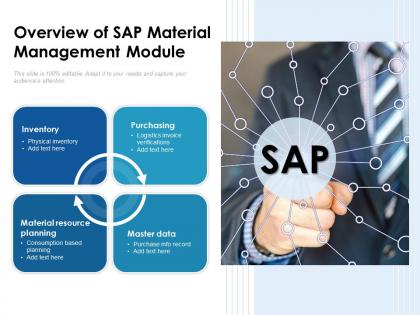
Overview of sap material management module




Try Before you Buy Download Free Sample Product
 Impress Your
 Audience
 100%
100% Editable
 Save Hours
 of Time


Our Overview Of SAP Material Management Module are explicit and effective. They combine clarity and concise expression.
People who downloaded this PowerPoint presentation also viewed the following :
Overview of sap material management module with all 2 slides:
Give your audience a fulfilling experience. They will find our Overview Of SAP Material Management Module elevating.
FAQs for Overview of sap
So you've got four main pieces to worry about. Material Master is your starting point - it's basically the central database for all your stuff. From there, Purchasing handles your POs and procurement. Inventory Management tracks what you have and where it goes. Invoice Verification matches up your invoices with what actually came in. Oh, and there's Warehouse Management too, but honestly most places don't go crazy with that unless they're huge. The cool thing is they all connect - create a PO and your inventory automatically knows what's coming. I'd definitely start with Material Master since everything builds off that foundation.
So MM talks to SD and PP through shared data and live transactions. Sales orders automatically check if you have enough stock, then create purchase requests if you're running low. Production orders grab what they need straight from MM inventory. Stock levels update instantly everywhere when goods move around. Honestly, it's pretty slick once you get the hang of it - no manual work needed. Just make sure your material masters are set up right from the start. That's where most people mess up and then wonder why nothing's syncing properly.
So basically you start with a purchase requisition to request stuff you need. Once that gets approved, it becomes a purchase order. Then when your materials show up, you do the goods receipt. Last step is invoice verification - honestly this part can be annoying but you gotta match everything up. The whole thing's actually pretty logical once you've done it a few times. Each step just flows into the next one. Oh and definitely don't forget to check your three-way match before you post anything - PO, goods receipt, and invoice all need to line up. Want me to show you how to create a PR?
SAP MM is honestly a game-changer for inventory stuff. Set up your material master data first - that's where everything starts. The automated reorder points are clutch because they tell you exactly what to buy and when. No more running out of stock or sitting on too much inventory (learned that the hard way). Real-time tracking means you'll actually know what's happening with your stock levels. ABC analysis is built right in too, which helps you focus on what really moves the needle. Oh, and purchase orders flow through automatically once you get procurement integrated. Just make sure your reorder parameters are dialed in correctly.
So SAP MM has this vendor master setup that's actually pretty decent for tracking suppliers. You can score them on delivery times, quality, pricing - all that stuff. Way better than those messy spreadsheets everyone uses (trust me on this one). The system lets you create approval workflows for bringing new vendors on board too. Performance metrics get stored right in there, which is super helpful. Just make sure you define your scoring criteria first - like what actually matters to your business. Oh and get your team to actually input the data regularly or it's pointless. The evaluation features work great if you stay consistent with them.
SAP MM puts all your material info in one master record - think of it as your single source for each item. The cool thing is it uses different "views" so purchasing people only see what they need, accounting sees their stuff, etc. You'll create these through MM01/MM02 transactions. Basic details like descriptions sit alongside the more complex procurement and plant data. Once it's set up right, your purchasing and inventory processes just pull from this central spot automatically. Oh and definitely nail down your material numbering scheme first - trust me on that one, it'll save you headaches later.
So there are basically four PO types in SAP MM you'll deal with. Standard POs are like 80% of what you'll create - just regular material purchases. Then you've got Service POs for external services, which honestly can be a pain because the service specs need to be spot on. Stock Transport Orders move inventory between plants. Consignment POs are when vendors keep their stock at your site until you actually use it - pretty neat setup. Each type flows differently through the system and hits accounting in different ways. Just make sure you're picking the right one for what you're buying. Your company probably has guidelines on when to use which type, so definitely check those out first.
So SAP MM has this contract management thing that's actually pretty solid. You can set up outline agreements with vendors - contracts, scheduling agreements, all that stuff. Way better than those messy spreadsheets we used to deal with! The system tracks how much you're using against your targets and will bug you when contracts are about to expire. There's a full audit trail too, which saved my butt during our last compliance review. You'll reference these contracts when making POs, makes everything smoother. Try transaction ME31K first - that's where you create contracts. Should help streamline things.
Honestly, the biggest pain points are gonna be data migration nightmares and your team hating the new processes. Integration with existing systems is messy too. Clean your data first - like, really scrub it before moving anything. Run both systems side by side during the switch. Get your power users on board early so they'll actually help sell it to everyone else instead of complaining. User training is huge, don't skimp on it. Oh, and nail down who owns what data from the start - that governance stuff will save you later. Map out current workflows with stakeholders first.
So SAP MM has a bunch of reports already built in for procurement and inventory stuff. Check out ME80FN for purchasing and MB52 for inventory first - that's where I'd start anyway. You can track PO performance, vendor analysis, inventory turnover, ABC analysis, all that good stuff. Real-time visibility into spend and stock levels is pretty solid. If the standard reports don't cut it, you can build custom ones with SAP Query or hook into BW for fancier analytics. Fair warning though - there's almost too many options once you start digging around!
Dude, Fiori is SO much better than that old clunky interface. Your team will actually thank you for the upgrade - the mobile stuff works great when you're walking around the warehouse doing counts. Those role-based tiles are clutch for getting to your frequent transactions fast. No more clicking through endless menus for basic purchase reqs or goods receipts. Honestly feels like moving from a flip phone to an iPhone, if that makes sense? I'd start rolling it out with whatever MM transactions you guys do most. Trust me, once people see how clean it looks they won't want to go back.
Oh man, config settings will absolutely make or break your MM performance. Number ranges and field selections are huge - I've watched bad valuation classes turn systems into molasses. Movement types mess things up too. Honestly? Document splitting and approval workflows just keep adding layers that slow everything down. Start with your heavy hitters like MIGO and ME21N first. Check which fields you actually need vs what's set as mandatory - you'll probably find a ton of unnecessary stuff. Account determination logic is another big one that trips people up. Streamline those frequent transactions and you'll see a difference pretty quick.
So SAP MM classification is basically like tagging your materials with searchable filters instead of memorizing random material codes. First you'll set up classes and characteristics in CT04/CT01, then use CL20N to assign materials to those classes. Think color, size, technical specs - whatever makes sense for your stuff. Honestly saved my butt so many times when procurement needed to find similar parts fast. The transaction codes are kind of clunky but you get used to it. I'd start with just one material group first though - don't go crazy and try to classify everything at once.
Set up those multi-level approval workflows in SAP MM - they're honestly pretty solid for tightening control. Configure dollar thresholds for purchase requisitions and lock down user roles so nobody sees stuff they shouldn't. Every transaction gets tracked automatically, which auditors eat up. You'll want three-way matching between POs, receipts, and invoices too. Oh, and make vendor selection fields mandatory - saves headaches later. Start by mapping your current approval matrix into SAP's workflow config. The system basically becomes your digital paper trail, and trust me, that beats digging through emails when questions come up.
Honestly, SAP's really pushing that S/4HANA thing hard right now, especially for MM stuff. The AI demand forecasting is actually getting pretty solid, plus they've automated a bunch of procurement workflows. Fiori doesn't suck anymore either - weird how that happened, but inventory management feels way less clunky now. Oh, and there's all this sustainability tracking built in because everyone's obsessed with ESG these days. If you haven't started thinking about your S/4HANA migration yet, probably should. The predictive analytics for procurement are worth checking out too - my buddy's team saw some decent results with it.
No Reviews