


Material Planning Dashboard For Inventory Management




Try Before you Buy Download Free Sample Product
 Impress Your
 Audience
 100%
100% Editable
 Save Hours
 of Time


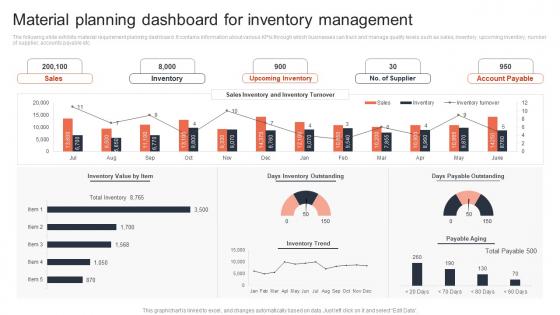
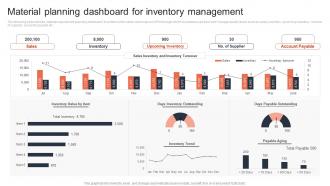
The following slide exhibits material requirement planning dashboard. It contains information about various KPIs through which businesses can track and manage quality levels such as sales, inventory, upcoming inventory, number of supplier, accounts payable etc.
People who downloaded this PowerPoint presentation also viewed the following :
Material Planning Dashboard For Inventory Management with all 7 slides:
Use our Material Planning Dashboard For Inventory Management to effectively help you save your valuable time. They are readymade to fit into any presentation structure.





FAQs for Material Planning Dashboard
Real-time inventory levels are your bread and butter - gotta have those. Demand forecasts and supplier performance metrics too. Lead time tracking is huge. Oh, and definitely set up stockout alerts and overstock warnings because honestly those will be lifesavers when things get crazy. ABC analysis categorization helps you figure out what's actually worth stressing about vs what can wait. Safety stock levels should be visible at a glance. The dashboards I love most show procurement status and delivery schedules all in one place - saves so much clicking around. Start simple though, then build up based on what your team actually ends up using.
Honestly, real-time data is a game changer for material planning. You're getting live updates on inventory, supplier issues, and demand shifts instead of working off outdated reports from last week. Way better than flying blind, right? Your forecasts actually become accurate since you're seeing what's really happening - like what's flying off shelves or stuck somewhere in shipping. I'd start with the obvious stuff first: connect your inventory system, supplier feeds, and sales data. Those three alone will make a huge difference. Once you see current conditions instead of stale numbers, you can catch shortages before they bite you.
Honestly, start with inventory turnover and stockout frequency - those hit your wallet hardest. Lead time variance matters too since surprises suck. Days of supply is clutch because it literally tells you when you're screwed. Don't sleep on forecast accuracy either. Garbage in, garbage out, you know? Safety stock levels and how your suppliers are performing round out the must-haves. Six metrics total. That'll catch most fires before they burn the house down. Build your dashboard around these, then get fancy later if you want.
Dude, charts and dashboards are game-changers for supply chain stuff. Nobody wants to stare at endless spreadsheet rows - visual heat maps and graphs make bottlenecks pop right out. Half your job is literally just getting executives to pay attention to the data in the first place. Interactive dashboards work great because people can click around and explore issues themselves. Oh, and tailor your visuals to each group - finance loves cost trends while ops people are all about capacity charts. Figure out what decisions each person needs to make first, then build charts that actually help them decide. Trust me, it's way more effective than email dumps of numbers.
So basically forecasting tells you what demand's gonna look like so you're not scrambling last minute. Your dashboard crunches historical data and seasonal patterns, then spits out stuff like "hey, order 500 units by Tuesday." Without it you're just putting out fires constantly - trust me, learned that the hard way. It translates all those predictions into actual moves you need to make. Check your forecast accuracy every week though. If those numbers are consistently wrong, everything downstream gets messy and you'll be chasing problems instead of staying ahead of them.
Honestly, just focus on what you actually need to see every day. Manufacturing? Lead times and supplier stuff should be right up top. Retail's more about seasonal trends and how fast inventory moves. Most dashboards let you drag widgets around - I'd start there and mess with the settings until it clicks. Custom alerts are pretty clutch too. The trick is figuring out your top 3-5 daily decisions first, then build everything around those. Don't get caught up in all the fancy features right away. Once you nail down what matters most, you can always add more widgets later.
Oh man, the data cleanup is gonna be brutal - your inventory info is probably everywhere and none of it matches up. Plus every department thinks their random Excel sheet is gospel, so good luck getting them to switch. I'd honestly start with just one product category to show it actually works before trying to boil the ocean. Executive backing is huge or people will just ignore you. And seriously, assign someone to babysit the data quality full-time. Otherwise you'll spend forever fixing garbage numbers instead of planning. Getting everyone to agree on what metrics actually matter? That's half the battle right there.
So basically, these dashboards show you what's actually happening with your inventory in real time - super helpful for catching problems early. You'll spot when you're overstocked (before it kills your budget) or when you're about to run out and need those crazy expensive rush orders. The forecasting stuff is probably the best part though - way better than guessing what customers want next month. Plus you can see which suppliers are being flaky before it screws up your whole timeline. Honestly, just start with your priciest items first and you'll see the savings pretty quick.
Honestly, Power BI or Tableau are your best bets for this - both connect really well to ERP systems. Don't sleep on Excel though. I know it seems basic but it's surprisingly powerful for smaller ops, plus everyone already knows how to use it. Qlik Sense is solid too if you want something different, or even Google Data Studio works. The main thing is picking whatever actually talks to your current systems (SAP, Oracle, whatever you're running). Also make sure your team will actually want to use it - I've seen too many fancy dashboards just sit there collecting digital dust. Start simple with what you know, then upgrade later when you outgrow it.
Pull at least 12 months of historical data - that's your best friend for spotting demand patterns and seasonal trends. Focus on high-volume items first since those matter most. You'll want to dig into past stockouts and overstock situations to see what went sideways. Late supplier deliveries screw up everything downstream, so check their performance history too. The dashboard comparison between actual vs planned usage helps fine-tune your algorithms. Honestly, nailing those predictions feels pretty good when you get it right! Oh, and don't forget to adjust safety stock based on what you learn.
Honestly, tracking supplier performance is a total game-changer for your material planning. You go from constantly putting out fires to actually seeing problems coming. Track delivery times and quality rates - when you notice Supplier X has that annoying 15% delay pattern, you can adjust reorder points before you're scrambling. Your dashboard starts flagging shortages weeks ahead instead of the day they hit. It'll even suggest safety stock levels and backup suppliers for critical stuff. Oh, and start simple - just focus on delivery performance and quality scores first. Those two alone make planning way more accurate, trust me.
So basically everyone on your supply chain team gets the same live view of inventory, demand forecasts, supplier stuff - you know the drill. No more digging through random spreadsheets or waiting for Kevin to respond to emails. Procurement, production, logistics can all see what's actually happening and make calls together. You'll catch problems early instead of scrambling later. Honestly, the hardest part is getting people to actually check it daily - maybe try doing quick standups around it? Sounds cheesy but it works. Way better than those marathon meetings nobody wants.
Honestly, AI and machine learning are complete game-changers for this stuff. You get predictive analytics that actually forecast demand and auto-adjust inventory levels. IoT sensors give you real-time visibility when shit hits the fan in your supply chain - which happens more than you'd think. Cloud platforms make everything way more scalable without waiting around for IT forever. Mobile dashboards let you make calls from anywhere, and the visualization tools actually make sense of complex data now. Just make sure whatever you pick plays nice with your current ERP system. Nobody needs more data silos.
Role-based permissions are your starting point - only let the right people see sensitive supplier costs and inventory data. Encryption for connections and data storage is non-negotiable, obviously. Regular security audits will catch problems before they blow up. Honestly, I'd just work with IT upfront to nail down solid data governance policies rather than scrambling later. Oh, and if you're shopping for dashboard solutions, go with something that already has enterprise security baked in. Way easier than trying to retrofit security afterwards. The whole thing's really about controlling access and staying ahead of vulnerabilities.
Honestly, mobile access is a game-changer for materials stuff. You can check inventory or approve urgent POs from anywhere - meetings, airports, wherever. Why wait until you're back at your desk when delays cost actual money? Your warehouse team can update everything in real-time too, which is clutch. I'd definitely set up alerts for critical levels so you catch issues early. Nothing worse than finding out you're short on key parts after it's already a problem. The coffee thing is real though - maybe handle the big decisions after caffeine kicks in.
-
What an exhaustive collection of templates you guys have there in slideteam. Impressive!!!
-
Loved the collection. Editing the presentation was seamless with their templates.