

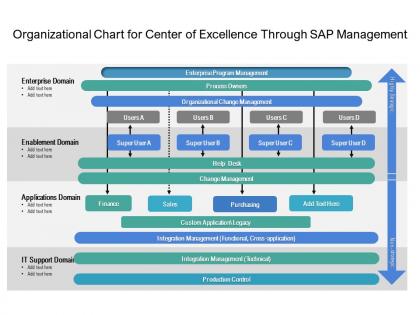
Organizational chart for center of excellence through sap management




Try Before you Buy Download Free Sample Product
 Impress Your
 Audience
 100%
100% Editable
 Save Hours
 of Time


Our Organizational Chart For Center Of Excellence Through Sap Management are explicit and effective. They combine clarity and concise expression.
People who downloaded this PowerPoint presentation also viewed the following :
Organizational chart for center of excellence through sap management with all 2 slides:
Give your audience a fulfilling experience. They will find our Organizational Chart For Center Of Excellence Through Sap Management elevating.

FAQs for Organizational chart for center of excellence
So you need the basics - who reports to who, job titles, departments. Names and roles obviously. Show both direct reports and those dotted-line relationships too. Keep the design clean though, crossed lines everywhere just looks messy. If you're sharing it around, throw in contact info. Update it regularly because there's literally nothing more annoying than getting the wrong person's info from an old chart. Oh, and honestly? The bigger your company gets, the more this becomes absolutely critical. People get lost without it.
Honestly, org charts are lifesavers when you need to figure out who the hell to talk to. No more guessing games about approvals or who's actually in charge of what. You'll see how teams connect and where you fit in the bigger picture - which is weirdly helpful for understanding why your job matters. I've watched people waste entire afternoons chasing down the wrong person for decisions. Super frustrating to watch. Next time you're stuck on a project, just pull up your company's chart first. Trust me, it'll save you from that awkward "sorry, you need to talk to Sarah's boss's boss" runaround.
If you've got Microsoft Visio, that's probably your best bet - tons of templates and importing is super easy. But honestly? Lucidchart is what I'd pick. Way more intuitive and the collaboration features are clutch. Draw.io is completely free and actually pretty impressive if you're trying not to spend money. Don't sleep on PowerPoint or Google Slides either - they work fine for basic charts. Sometimes you don't need all the bells and whistles, you know? OrgChartJS is decent for web stuff. I'd start with whatever you already have lying around and see how it goes.
So startups are super flat - founders at top, maybe some team leads, then everyone else. That's it, like 2-3 levels max since people are doing everything anyway. Big corporations though? Completely different story. They've got these massive hierarchies with VPs, directors, managers, senior managers, coordinators - honestly it's kinda ridiculous sometimes. But I get why they need it. When you've got thousands of employees, someone has to keep track of who does what. My advice? Keep your org chart simple until you literally can't function without more structure. Don't overcomplicate things early on.
Honestly, org charts are perfect for this! New hires can see who reports to who and figure out the whole company structure. I usually make a simplified version that just shows the teams they'll actually work with - nobody needs to see every single person on day one, you know? Walk them through how projects flow between departments during training. It really helps them identify key people and know who to bug when they need something. Those first weeks are already overwhelming enough without trying to memorize the entire company hierarchy. Focus on their immediate circle first, then expand from there.
Ugh, the biggest mistake is making them way too complicated - like having a box for literally everyone. Just focus on key positions and who reports to who. Also, those tiny fonts that make you squint? Don't do that to people. And honestly, I see this all the time - companies only show the "official" reporting structure but ignore who actually has influence day-to-day. Include contact info too so people aren't playing detective. Keep it simple and visual. Most importantly though, update the damn thing when people leave or get promoted, not just once a year during reviews.
Honestly, yeah hierarchy totally messes with how people feel at work. Too many layers and everyone feels cut off from the top - like shouting into the void, you know? Decisions crawl at a snail's pace when you need three approvals just to order new pens. But swing too far the other way and your managers are drowning, can't give anyone proper attention. You want enough structure so people aren't confused about who does what, but not so much that everything gets bottlenecked. I'd just ask your team straight up - can they actually get to the right person when they need help? That'll tell you everything.
Org charts are clutch for strategic planning - they show you exactly where the gaps and redundancies are hiding. You can literally see which departments should probably merge or where you need new roles. Honestly, trying to reorganize without one is like rearranging furniture blindfolded. When you're going through big changes, people actually know who they're reporting to now (shocking concept, right?). The visual aspect makes everything click better than some confusing email chain. Start by comparing your current chart to whatever goals you're chasing - you'll spot the weird misalignments pretty fast. It's basically your roadmap for not screwing up restructuring.
Looking at an org chart basically gives you a reality check on your leadership situation. You'll spot the obvious problems right away - like departments with just one senior person or these crazy long chains of command. Honestly, it's kind of eye-opening how fragile some structures look on paper. The whole thing becomes a visual game of "what happens if this person quits tomorrow?" You can see where there's no clear backup for important roles. Pretty useful for figuring out where to focus your training efforts and maybe start cross-training people before you're scrambling to fill gaps.
First thing - make one person actually responsible for this. When it's "everyone's job," nobody does it. Trust me on this one. Build it right into your hiring/firing workflow so charts get updated immediately instead of... well, never. Pick whatever system works - your HR platform, some fancy tool, honestly even a Google doc if that's what people will actually use. Just stick with one. Review it every few months with department heads because stuff always slips through. I swear some companies are still showing people who left during the pandemic!
Oh definitely add the work setup stuff next to people's names - like "Remote (EST)" or "Hybrid (comes in T/W/F)" or whatever. Color coding is clutch for this, makes it so much faster to scan. Time zones are huge if you've got people scattered around. Also maybe throw in how people prefer to be reached? Some folks are Slack people, others are email people, you know how it is. Dotted lines for cross-team stuff helps too since everyone's working with like five different groups now. Just make it brain-dead simple to figure out when someone's actually available.
So hierarchy is huge here - some cultures want flat teams, others need clear boss-to-employee chains. Communication flows differently too depending on background. Age and seniority respect can make or break things, so don't accidentally put a 25-year-old managing someone's respected mentor (learned that one the hard way). Individual vs. group decision-making cultures will clash if your chart doesn't reflect how people actually work. Some team members might expect collective ownership while others want clear individual accountability. Honestly, just draft something and run it by a few people from different backgrounds before you make it official. They'll catch stuff you'd never think of.
Honestly, digital org charts are a game changer for working with other departments. Instead of that awkward "who do I even email about this?" moment, you can actually see who handles what. The search function is clutch - like when you need to find whoever deals with vendor stuff or approvals. You'll also see the chain of command, which helps you figure out if you need someone's boss involved. I learned this the hard way after spending way too long tracking down the wrong person for a project last month. Just make sure it's updated regularly or it's basically useless.
So org charts are actually goldmines for data! Look at span of control first - that's how many people report to each manager. Then check management layers between frontline staff and the C-suite. The management ratio shows you how many bosses vs actual workers you've got. Reporting lines are huge too - some companies have such messy structures it's ridiculous. You can spot bottlenecks, see which departments are bloated or understaffed, and figure out who really makes decisions. Honestly, most orgs don't realize how much their chart reveals about efficiency problems.
Honestly, think of your org chart as a cheat sheet for succession planning. Look at who's sitting one or two levels below your critical roles - those are your potential successors. Mark the scary spots first (you know, positions where if someone left tomorrow you'd be screwed). Then work backwards and see what skills people actually have versus what they'd need. The visual part is clutch because you can map out how one promotion creates this whole chain reaction. Don't forget some roles might not have obvious internal candidates - that's where external hiring comes in, which obviously takes longer to plan for.
No Reviews