

External erp integration with salesforce crm




Try Before you Buy Download Free Sample Product
 Impress Your
 Audience
 100%
100% Editable
 Save Hours
 of Time


Our External ERP Integration With Salesforce CRM are explicit and effective. They combine clarity and concise expression.
People who downloaded this PowerPoint presentation also viewed the following :
Content of this Powerpoint Presentation
Description:
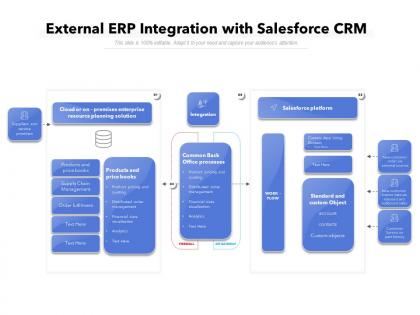
The image depicts a PowerPoint slide outlining the integration of an external Enterprise Resource Planning (ERP) system with Salesforce CRM. The slide is structured to showcase the synergy between cloud or on-premises ERP solutions and Salesforce's platform, emphasizing the workflow and common back-office processes that can be optimized through integration.
The slide is divided into four main sections:
1. Cloud or on-premises enterprise resource planning solution:
This section is likely meant to detail the ERP system's features, including supply chain management, order fulfillment, and product and price book management.
2. Salesforce platform:
It illustrates how the Salesforce platform can be used, mentioning standard and custom objects like accounts and contacts, and possibly custom applications using Einstein AI.
3. Common Back Office processes:
This part of the slide refers to shared back-office processes between the ERP and Salesforce, such as product pricing and quoting, order management, financial data visualization, and analytics.
4. Integration:
This final section probably highlights the technical aspects of integration, such as API gateways and the workflow between the two systems.
Use Cases:
The slide can be utilized across various industries for presentations on digital transformation and system integration:
1. Retail:
Use: Streamlining inventory and customer relationship management.
Presenter: Systems Integration Manager.
Audience: Management, IT staff.
2. Manufacturing:
Use: Integrating supply chain data with customer service insights.
Presenter: Operations Director.
Audience: Supply chain managers, sales team.
3. Technology:
Use: Demonstrating the integration of software solutions for enhanced customer management.
Presenter: CRM Consultant.
Audience: Tech support, sales force.
4. Healthcare:
Use: Connecting patient management systems with CRM for better patient engagement.
Presenter: Healthcare IT Specialist.
Audience: Hospital administrators, care coordinators.
5. Finance:
Use: Integrating financial planning resources with customer data for personalized services.
Presenter: Financial Systems Analyst.
Audience: Financial advisors, customer service reps.
6. Education:
Use: Merging student information systems with CRM for recruitment and retention efforts.
Presenter: Admissions Director.
Audience: Admissions staff, marketing team.
7. Telecommunications:
Use: Synchronizing network management systems with CRM to improve customer service.
Presenter: Network Operations Manager.
Audience: Customer service agents, network engineers.
External erp integration with salesforce crm with all 2 slides:
Give your audience a fulfilling experience. They will find our External ERP Integration With Salesforce CRM elevating.
FAQs for External erp integration
So ERP integration connects all your business stuff - accounting, inventory, sales, HR - into one system instead of having everything scattered. No more juggling spreadsheets everywhere (seriously, what a nightmare that was). Real-time data across everything means way fewer mistakes and you can actually make decisions quickly. Your team stops doing the same data entry twice and focuses on stuff that matters. Honestly, the time savings alone are worth it. I'd start by listing what systems you're using now and figure out where you're losing the most time - that's where you'll see results fastest.
So basically, ERP integration connects all your systems so you're not dealing with totally different numbers from each department anymore. Data flows automatically between modules instead of you manually entering the same stuff everywhere (which obviously creates errors). Your reports actually pull from one place now, giving you real-time visibility into inventory, financials, whatever. Honestly, it's such a relief not spending forever reconciling spreadsheets - you can actually trust your dashboards. Just make sure you map the data fields right from the start. Trust me on that one, it'll save you so much pain later.
Honestly, data inconsistencies will drive you nuts - that's probably your biggest headache right there. Your team's gonna push back hard because nobody likes change. Budget? Yeah, kiss that original number goodbye. Here's what actually works: Clean up your data first, before you touch anything else. Loop in stakeholders early so they don't feel blindsided. Timeline-wise, double whatever you think it'll take because Murphy's Law is real. Run both systems side by side initially - I can't stress this enough. Don't rush the go-live date just because someone's breathing down your neck. Better to be late than broken.
So ERP integration lets you see what's happening across your whole supply chain in real time - procurement, inventory, delivery, all of it. No more manual data entry between systems (thank god). Everything syncs automatically, so fewer mistakes and way faster decisions. Honestly, the speed difference is wild once all your systems actually talk to each other. You'll spot problems early, forecast demand better, process orders faster. Your inventory levels get optimized too. My advice? Map out how data currently flows through your company first. That'll show you exactly where integration would help most.
Honestly, APIs are a game-changer for ERP systems. They're like translators that let your ERP chat with other software automatically - no more manual data entry nightmare. Your CRM syncs with your ERP, inventory updates flow to your e-commerce site, all that good stuff happens in real-time. I learned this the hard way when we had to do everything manually at my old job. Pick an ERP with solid API options upfront. Trust me, you'll thank yourself later when you want to plug in new tools and everything just... works.
Oh totally! ERP integration with CRM is honestly a game changer. You'll finally see everything about a customer in one spot - their orders, how they pay, support issues, whatever. No more bouncing around different systems all day (which gets old fast). Your sales people will actually know what's happening with accounts when they pick up the phone. Way better conversations that way. You can catch upselling chances too, plus spot problems before customers start complaining about them. I'd start by figuring out where all your customer data currently lives first.
Dude, first thing - map out what you've got now before touching anything new. Trust me on this one. Get everyone involved early, especially the actual users since they know where stuff really breaks. Testing in a sandbox is huge, and honestly? Whatever timeline you're thinking, add like 50% more time because it always takes longer. Oh and clean up your existing data first - data migration is such a pain otherwise. I learned that the hard way on my last project. Make sure you've got a solid rollback plan too, just in case everything goes to hell.
Okay so basically it comes down to where your stuff lives. Cloud means everything runs on someone else's servers and you just log in through the internet. On-premise is when you host it all locally on your own hardware. Honestly, cloud is way less of a headache - no buying servers or dealing with setup nightmares. Plus you can scale super easily if your business grows. But on-premise gives you total control over security and you can customize however you want. The downside? You're stuck handling all the maintenance and updates yourself (which honestly sucks). Really depends on your budget and how fast you need this thing running.
Look, you really can't mess around with three key things: data encryption, authentication, and access controls. HTTPS is non-negotiable for all API connections - maybe throw in a VPN if you're dealing with super sensitive stuff. I learned this the hard way honestly, rushed through security once and spent weeks fixing it later. Multi-factor authentication is your friend here. Don't give everyone admin access either, stick to role-based permissions. Oh and those integration logs? Check them regularly because that's where you'll spot weird activity. Trust me, create a security checklist before you even touch the technical stuff.
First thing - audit what you actually have right now. Your current systems are probably messier than they look, honestly. Does your team know how to handle the tech side, or will you need outside help? Also check your data quality because garbage in, garbage out. The real kicker though is whether people are ready for change. ERP touches everyone's day-to-day work. Get department heads on board early - like, really early. Map out a timeline that won't kill everyone and build in proper training. Oh, and don't rush the rollout phases.
Honestly, just pick 3-4 metrics that actually matter to your business and track them weekly at first. Data accuracy is obvious - how often does info sync without screwing up? User adoption though... that's the one everyone ignores and it'll kill you. Doesn't matter how smooth your integration is if Karen from accounting refuses to use it, you know? Processing times for your main workflows, system downtime, cost savings vs the old manual stuff. Oh and uptime obviously. Start simple though - don't try tracking everything at once or you'll burn out on it fast.
So basically ERP integration takes all your compliance nightmares and automates them. Everything gets centralized with proper audit trails. Real-time reports pop out in whatever format regulators want - SOX, GDPR, you name it. The best part? It stops people from doing dumb non-compliant stuff before it happens. Trust me, you'll thank yourself during audit season when you're not digging through random spreadsheets until 2am. Data stays consistent across teams too, which honestly saves so much drama. I'd start by figuring out which compliance processes are eating up most of your time right now.
Start training way before launch - hands-on workshops for each department since accounting needs totally different stuff than warehouse folks. Create user manuals and quick guides they can actually use. Here's what saved my sanity: pick "super users" in each area who become your go-to troubleshooters. Trust me, you don't want to be the only person fielding every random question! Set up a help desk for go-live and keep it running at least a month after. The real magic happens with refresher sessions a few weeks later when people have actually broken things and know what they're confused about.
Dude, ERP integration is a game changer for project management. You get real-time visibility across all your departments instead of constantly bugging finance for budget updates or scrambling to check inventory. Everything just flows into one system - it's honestly like having x-ray vision. Your project managers can finally see the whole picture, which means better resource allocation and way more accurate timelines. Plus you'll catch bottlenecks before they completely wreck your deadlines. Just make sure your PM tools actually talk to the ERP though, or you're back to square one with data scattered everywhere.
Honestly, the whole integration space is moving crazy fast right now. AI tools are doing automatic data mapping between systems, which used to take forever manually. Low-code platforms let business folks build their own integrations without bugging IT constantly. Everything's going API-first and cloud-native - way more modular than before. Real-time sync is pretty much expected now. Batch processing feels ancient at this point. Event-driven stuff is blowing up for complex workflows too. If you're doing any big integration work, definitely check out iPaaS solutions first. They'll save you tons of custom dev time.
No Reviews