


Salesforce lead management powerpoint presentation





Try Before you Buy Download Free Sample Product
 Impress Your
 Audience
 100%
100% Editable
 Save Hours
 of Time


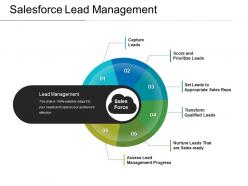
Get more leads for your business using a sales strategy with this Salesforce Lead Management PowerPoint Presentation. This PPT template will assist you in growing your business. This lead management slide can be useful in depicting to your salesforce or employees the process of lead generation. By using this slide, you will be able to transform strangers into potential customers. This is a professionally designed template in a circular style. With this lead generation template, you can demonstrate the customer journey or the steps or phases of an organization. It is a 6 stage management process that includes capturing, scoring, transforming the leads and so on. This salesforce management slide can be of great help where you need to show the marketing issues and the sales issues. The key heading can be displayed in the central zone and the process on the outer sides of the inner circle. You may also add a suitable icon as per your needs.
People who downloaded this PowerPoint presentation also viewed the following :
Salesforce lead management powerpoint presentation with all 5 slides:
Canvas effectively with our Salesforce Lead Management Powerpoint Presentation. Impress folks with your concern for the future.


FAQs for Salesforce lead
Honestly, start by mapping what you're already doing - then build around that. You'll need the basics: web forms, landing pages, maybe some integrations to pull leads in. Lead scoring is huge though - saves you from chasing every random person who downloads a whitepaper at 2am (been there). Set up assignment rules so qualified leads hit the right reps automatically. Create a solid handoff process when leads become real opportunities. The conversion tracking piece is critical too. Four main buckets: capture, qualify, assign, convert. Just don't try to build it all at once or you'll go crazy.
So Salesforce automation is seriously worth it for leads. Start with email workflows - they're pretty straightforward and you'll see results fast. Set up rules that automatically assign leads based on territory or scores, then add follow-up sequences that fire at the right times. The lead scoring thing? Honestly saves so much headaches because you're not chasing people who'll never buy. You can also get alerts when someone hits your pricing page or does other important stuff. Build it piece by piece though - I went overboard at first and it got messy. Once you nail the basics, the time savings are insane.
So basically, lead scoring and grading automatically rank your prospects for you. Scoring tracks stuff like email opens and site visits - all that behavioral data. Grading is different though - it's about whether they actually fit your ideal customer profile based on company size, role, etc. Your sales team gets a clear picture of "how interested are they?" vs "would they even be a good customer?" Pretty neat system honestly. You can set up workflows so hot leads go straight to your top reps. Start by figuring out which actions actually matter for your business, then build your scoring around those behaviors. Way better than guessing who to call first.
Dashboards are honestly a game changer for lead tracking. Head to the Dashboard tab and build some charts from your lead reports - way easier than it sounds. Track conversion rates, lead sources, pipeline speed, rep performance, all that good stuff. I love filtering by date ranges or territories to catch trends fast. Set a few up to auto-refresh so your team isn't working with stale data. The lead-by-status charts are probably where I'd start, then maybe add time-to-conversion metrics. Oh, and definitely track which campaigns bring in your best leads - that data's gold.
Ugh, duplicate leads are the worst - they'll mess up your whole database. Plus you've got leads just sitting there getting stale because nobody claimed them. Data quality is probably trash too, which makes everything else pointless. Here's what actually works: Set up duplicate detection rules first (seriously, do this today). Then create auto-assignment based on territory or whatever makes sense for your team. Validation rules will force people to enter clean data - they'll hate it but you'll thank me later. Oh, and lead scoring helps you figure out who's worth calling first. Start with duplicates though, that's your biggest win.
Integrations are honestly a lifesaver for lead management. You can connect Salesforce to your marketing tools, web forms, social platforms - whatever you're already using. No more manual data entry (thank god). Marketing and sales handoffs become smooth, plus your lead scoring gets way better when you're pulling data from everywhere. The best part? Qualified leads automatically flow to your dialing system. I'd map out where you're currently losing leads or doing tedious manual work - that's where you'll see the biggest wins. Oh, and your team will actually love you for cutting out all that repetitive stuff.
Honestly, start with Journey Builder in Salesforce - it's a lifesaver for those automated email sequences. Map out your buyer's journey first though, or you'll be building blind. Set up lead scoring so you're not wasting time on tire-kickers, and use assignment rules to get hot leads to the right reps fast. Those cold leads sitting in your pipeline? Don't ignore them - I've seen companies make bank re-engaging old prospects. Create custom fields for lead preferences and track everything. Regular follow-up cadences are crucial too.
Honestly, Salesforce is pretty solid for team stuff. Everyone can jump into the same lead records and update them instantly. The Chatter feature lets you @mention people directly on leads - I probably overuse it but whatever, it works. When leads get bounced around (which happens way too much), that activity timeline saves your butt since it shows exactly who touched what. You can assign leads to specific people and set up those automated notifications too. Oh, and workflows help catch leads that need attention. Just keep your activities current and don't be shy about tagging teammates.
Oh man, Salesforce has so much stuff for lead workflows. Custom fields are great for grabbing whatever data your team actually cares about. Validation rules help keep your data clean, and Process Builder or Flow can automate the routing - honestly Flow is way better if you're willing to learn it. Lead assignment rules will distribute leads based on whatever criteria you set up. You can customize statuses, page layouts for different users, approval processes if that's your thing. I'd start by sketching out your current process first, then figure out what automation would actually save you time.
So Salesforce analytics will show you which lead sources actually convert vs the ones just wasting your money. I'm obsessed with the Lead Source report and Opportunity Pipeline by Lead Source - honestly you can get lost in there for hours. Track your lead scores and conversion rates by campaign to see where your best customers came from originally. You'll spot patterns you totally missed before. Focus your budget on what's working and cut the dead weight. Oh and start with just those two reports I mentioned - you'll find some obvious wins right away that'll make you wonder why you waited so long.
Dude, you're gonna hate this answer but data quality is HUGE for lead management in Salesforce. Bad data screws up your lead scoring, routes leads to wrong reps, makes your reports garbage. Your team ends up chasing dead contacts while real opportunities sit buried under duplicate records. I learned this the hard way lol. Clean data keeps automation working right and gets your sales people to actually trust the system. Set up some validation rules and audit regularly - seriously, your conversion rates will jump. It's boring work but it pays off when you're not losing deals to messy data.
So Salesforce basically tracks every single touchpoint - email, social, web calls, events, all of it. Pretty cool actually. You can see someone's entire journey in one dashboard, which makes coordinating campaigns way less of a headache. It automatically grabs lead sources and keeps track of what people have clicked on or downloaded. Your team will know exactly how someone found you and what caught their attention. Oh, and you can set up those automated email sequences that fire off when people do certain things. Just make sure everyone's actually logging their calls and meetings - that part still requires humans being, well, human.
Clean your data before importing anything - get rid of dupes, fix formatting issues, map everything properly. Data Import Wizard works great for small batches. Use Data Loader if you're doing bulk stuff. Seriously though, test with like 10-20 records first. I learned this the hard way when I had to fix 5,000 messed up leads once. Never again. For exports, reports usually do the trick unless you need tons of data, then go with Data Loader. Just grab all the fields you actually need. Oh and obviously be careful about privacy stuff if you're sending it anywhere. Run data audits every few months or your database turns into a nightmare pretty quick.
Dude, user training literally makes or breaks your whole Salesforce setup. Your team won't input decent data or follow lead scoring if they don't know what they're doing. I've watched companies blow thousands on features that nobody even touches - what a waste. Train people on actual daily stuff, not boring feature demos. Trust me, once your sales reps get comfortable with the system, your data stays cleaner and conversion rates go up. Short workshops work way better than those marathon training sessions everyone hates.
So Einstein basically does all the tedious lead analysis you should be doing but never have time for. Lead scoring happens automatically - no more guessing which prospects are worth your time. The predictive stuff is actually solid too, like flagging when leads are going cold. Plus you get AI email suggestions and timing recommendations for follow-ups. Honestly feels like having a super nerdy coworker who's obsessed with data patterns (but way less annoying). If you're just starting out, focus on the lead scoring first - it'll totally change how you work your pipeline.
-
Use of different colors is good. It's simple and attractive.
-
Excellent template with unique design.