

Salesforce Architecture Powerpoint Ppt Template Bundles




Try Before you Buy Download Free Sample Product
 Impress Your
 Audience
 100%
100% Editable
 Save Hours
 of Time


Our Salesforce Architecture Powerpoint Ppt Template Bundles are topically designed to provide an attractive backdrop to any subject. Use them to look like a presentation pro.
People who downloaded this PowerPoint presentation also viewed the following :
Salesforce Architecture Powerpoint Ppt Template Bundles with all 21 slides:
Use our Salesforce Architecture Powerpoint Ppt Template Bundles to effectively help you save your valuable time. They are readymade to fit into any presentation structure.











FAQs for Salesforce Architecture Powerpoint
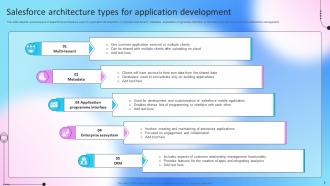
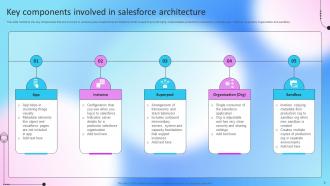
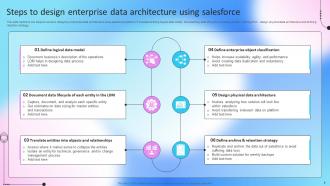
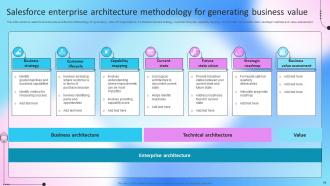
So Salesforce basically has three layers stacked up - the UI you click around in, platform services in the middle handling APIs and security stuff, then the database storing everything at the bottom. Data flows from UI down through platform services to hit the database. It's kinda like a three-layer cake, honestly. The platform layer does the heavy lifting with customizations and workflows - that's where you'll spend most of your design time. Oh and everything talks through APIs, which sounds boring but it's actually pretty crucial for integrations. Focus on how data moves between layers when you're building stuff.
So basically you're splitting costs with thousands of other companies, which is why Salesforce doesn't cost a fortune like building your own system would. Updates happen automatically - no downtime, no IT disasters. Their security is honestly way better than what most companies can pull off on their own since they dump serious money into protecting the whole platform. You can scale up or down instantly too. Oh and here's the thing - you get to focus on actually running your business instead of babysitting servers. Trust me, that's huge.
Metadata is basically Salesforce's blueprint - all your custom fields, objects, workflows, page layouts, that kind of stuff. It's the config layer sitting on top of the platform. When you're clicking around in Setup making changes, you're actually editing metadata without realizing it. That's why deployment tools like change sets work - you're moving those configuration pieces between orgs. Honestly took me forever to understand this concept when I started. But once it clicks, deployments make way more sense. Just always think about which metadata components you're messing with.
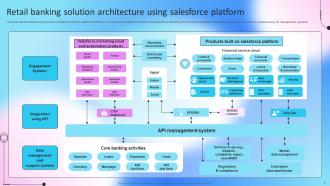
So the Salesforce API is how you connect outside stuff to your Salesforce data. Pretty much any integration you see working relies on it. Pull customer info into marketing tools, send website form data straight to leads, sync up with QuickBooks - that kind of thing. They've got REST, SOAP, Bulk APIs depending on what you're doing. REST is definitely the easiest to start with if you're jumping into this. Honestly, it's nice not being trapped in just Salesforce forever. Your data can go wherever you need it. Oh, and their REST API docs are actually decent compared to some companies.
So Lightning uses modern component-based stuff - Aura and Lightning Web Components. Classic is just old page-based tech. It's like comparing a current smartphone app to some clunky 2005 website, honestly. You get reusable components you can drag around anywhere, way better mobile experience, faster loading. Classic? Pretty much static pages that you can't do much with. Oh and Salesforce is killing Classic support eventually, so if you're still on it you should probably migrate soon. Lightning just makes building custom things so much easier and it'll actually work going forward.
Build your Salesforce apps with governor limits in mind right from the start. Batch DML operations and never put SOQL inside loops - trust me on this one. Heavy operations should go async using future methods or batch jobs so you don't hit those annoying timeouts. Keep triggers super lightweight and push logic into handler classes. Use Flow and Process Builder when they actually make sense instead of coding everything in Apex. Oh, and test with real data volumes early, not just those tiny datasets with like 5 records that don't tell you anything useful.
So first thing - run that Salesforce Optimizer tool to see what's actually broken. Your SOQL queries are probably the main issue, especially if you've got queries running inside loops (super common mistake). Clean up those page layouts too - I swear some people just dump every field on there and wonder why it takes forever to load. Use selective filters on your queries and get indexing set up for fields you search a lot. Oh, and try switching some of those heavy triggers to process builders or workflows instead. Way more efficient. Start with the optimizer results though, that'll show you the worst stuff first.
So declarative is your point-and-click stuff - workflows, process builder, custom fields, that kind of thing. No coding required. Programmatic means you're actually writing Apex or building Lightning components. Honestly? Always try declarative first. It's way faster and your admins can actually maintain it later. I've seen too many orgs jump straight to code when a simple flow would've worked fine. Programmatic only makes sense when you hit those platform limits or need some really complex logic that clicks just can't handle. Plus developers aren't cheap lol.
Salesforce actually has tons of security stuff built right in. Field-level security, object permissions, role-based access - all standard. They've got IP restrictions, session management, and everything's encrypted. The granular controls are honestly pretty impressive - you can lock down individual fields if you want. Two-factor auth and SSO are there too, plus audit trails track every change (which has saved my butt before). I'd start by checking your permission sets and profiles first. Most orgs accidentally give users way more access than they actually need, so that's usually the low-hanging fruit.
So basically Salesforce runs this multi-tenant thing where everyone shares the same database tables, but your data stays separate through org IDs and metadata layers. Pretty clever actually. They handle all the annoying stuff - backups, disaster recovery, indexing, security down to individual rows. You don't touch any database admin work, which is honestly amazing because that stuff's a pain. Field validation and relationships between objects are built right in. The best part? You're just clicking around to build your data model instead of writing SQL all day. Way less headache than managing your own servers.
Honestly, Salesforce makes mobile dev way easier than you'd think. The multi-tenant setup means you're hitting the same REST/SOAP APIs whether it's desktop or mobile - super consistent. Lightning Platform does the security and scaling stuff automatically, which saves you a ton of headaches. Main gotcha though? Mobile connections suck sometimes. Build in solid offline mode and syncing from day one. I'd map out your must-have features first, then see what the Mobile SDK can handle. Trust me, it covers more than you expect.
So Apex is Salesforce's programming language - it handles the business logic that workflows can't touch. Custom validations, data stuff, API integrations, that kind of thing. Runs on their servers which is honestly pretty convenient. Since it's multi-tenant, there are governor limits so you don't accidentally crash everyone else's orgs (learned that one the hard way). Start with basic triggers and classes first. The batch processing gets weird fast if you jump into it too early. Oh and it plays nice with their database automatically, so you don't have to mess with connections.
You've gotta map your old data structure to how Salesforce works first - that's where most people mess up honestly. Clean your data beforehand because dirty data will haunt you forever in SF. Your integration points need planning since you'll probably need middleware for leftover legacy systems. The security setup is completely different, so figure out permission sets early. Oh, and Salesforce has these governor limits that can catch you off guard if you're doing heavy customization. Start small with one business process as a pilot. Way easier to fix issues before you migrate everything.
So Salesforce has these things called Platform Events and Change Data Capture that are perfect for this. CDC is probably your best bet - it automatically pushes notifications whenever records get updated, so you don't have to constantly check for changes. Platform Events work too if you need custom stuff. The whole thing runs on a message bus (sounds fancy but it's pretty straightforward), so your integrations can react right away when data changes. I'd start with CDC though - way easier to set up and you'll have real-time syncing to your external systems running in no time.
So AppExchange is basically Salesforce's app store but for business stuff. Instead of coding everything yourself, you can just download pre-built apps that handle industry-specific problems, integrations, dashboards - whatever you need. It plugs straight into your org. Honestly, there's a crazy amount of functionality just waiting there. Most companies don't even know half the stuff that exists. I'd start by searching for your industry first - you'll probably find apps that solve like 80% of what you're trying to build. Way easier than starting from zero.
-
“The presentation template I got from you was a very useful one.My presentation went very well and the comments were positive.Thank you for the support. Kudos to the team!”
-
SlideTeam is the way to go when you are in a time crunch. Their templates have saved me many times in the past three months.