


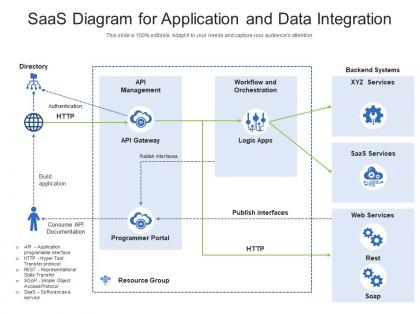
Saas diagram for application and data integration




Try Before you Buy Download Free Sample Product
 Impress Your
 Audience
 100%
100% Editable
 Save Hours
 of Time


Our SaaS Diagram For Application And Data Integration are topically designed to provide an attractive backdrop to any subject. Use them to look like a presentation pro.
People who downloaded this PowerPoint presentation also viewed the following :
Saas diagram for application and data integration with all 2 slides:
Use our SaaS Diagram For Application And Data Integration to effectively help you save your valuable time. They are readymade to fit into any presentation structure.
FAQs for Saas diagram for application
Honestly, integrating your SaaS tools is a game changer. You stop doing all that tedious copy-paste work between systems - I can't tell you how much time that saves. Everything flows automatically, so you get consistent data across platforms instead of weird discrepancies in your reports. Your team works way smoother too since the tools actually talk to each other. I'd start by looking at where you're entering the same info multiple times (probably more places than you think). Those spots are perfect for integration. Oh, and map out what you're currently using first - it helps you see the bigger picture.
So basically you're connecting all your different apps so data moves between teams without anyone copy-pasting stuff everywhere. When your sales team closes a deal in the CRM, it automatically kicks off onboarding in your project tool, updates billing, tells customer success - the whole chain happens by itself. Honestly saves so much time and those awkward follow-up messages. No more data sitting in random spreadsheets either. I'd start small though - just pick one workflow that touches a few departments and figure out which tools can actually talk to each other. Way less overwhelming that way.
Honestly, the worst part is when your systems refuse to talk to each other - data silos and login issues everywhere. Each vendor has their own weird API formats and rate limits that'll make you want to scream. Version control is brutal too. One app updates overnight and suddenly half your workflows are broken (I swear they do it on purpose). Security gets messy fast when you're juggling access across platforms. Oh, and you'll be entering the same data multiple times because nothing syncs right. Start by mapping everything out first, then get decent middleware before you go insane.
APIs are basically translators that let your different software tools talk to each other automatically. So instead of doing that annoying export/import dance with CSV files (seriously, who has time for that?), your CRM can just sync directly with your marketing platform in real-time. You can set up workflows where new Salesforce leads trigger HubSpot campaigns automatically. Or when someone fills out a form, it updates their info across all your systems. They're like universal adapters but for software. I'd start by figuring out what data you need flowing between which tools first.
So middleware is like having a translator when your SaaS apps need to chat with each other. It handles all the annoying technical bits - data formatting, authentication, routing stuff around. Without it, you'd be building custom connections between every single app combo, which honestly gets stupid expensive. Your CRM can talk to your marketing tools no problem because the middleware sits there standardizing everything. I'd start by figuring out which apps actually need to connect first. Then just pick middleware that plays nice with those platforms. Way easier than doing it all manually, trust me.
Track both tech stuff and business impact - you need the full story. API response times, error rates, uptime are obvious ones. Nobody wants integrations crashing randomly (been there, not fun). Business side: measure time saved on manual work, how many people actually use the integrated tools, data accuracy improvements. Cost per integration vs ROI is huge when you're explaining this to your boss later. Honestly I'd start with maybe 3-4 metrics that match whatever you originally wanted from these integrations. You can always add more tracking once you get the basics down.
SaaS integration actually makes your security stronger, not weaker. You centralize everything instead of having data all over the place with different protocols. Way cleaner. You get unified access controls and automated audit trails—plus most enterprise platforms already have SOC 2 and GDPR compliance built in, which honestly is a lifesaver during audits. The biggest win? Visibility into where your sensitive data goes. You can track it moving through systems and make sure it follows your security rules. No more guessing what's happening behind the scenes.
Honestly, get everything in writing first - SLAs, timelines, who's doing what. That's saved my butt so many times. Set up regular check-ins and don't wait to escalate problems because they just get worse. Oh and make sure both teams have clear contact people, otherwise you'll be playing phone tag forever. The biggest thing though? Treat them like actual partners instead of just vendors you're paying. I know it sounds cheesy but it really makes a difference. Document literally everything too - even the small stuff comes back to bite you later.
Dude, real-time sync is a game changer - you'll actually know what's happening RIGHT NOW instead of finding out your data is from last week during some important meeting. Sales, marketing, customer stuff all updating live means you can catch trends as they happen and jump on opportunities fast. No more making decisions with stale numbers. Though honestly, half the companies I know set this up and then never actually look at their dashboards lol. The trick is getting your team to check those real-time updates regularly, otherwise you're just burning money on fancy data that sits there looking pretty.
You're looking at licensing fees first - usually $50-500+ monthly based on data volume and features. Development time gets pricey fast if you need custom integrations. Honestly, that's where budgets explode. Monthly maintenance costs add up too. Don't forget downtime during rollout and training your team - both hit productivity. My take? Test with Zapier or native integrations before building anything custom. Way less risky financially, plus you'll know if it's even worth the investment. I learned this the hard way on a project last year.
Honestly, SaaS integration is a game-changer for smaller businesses. Big companies have always had their systems talking to each other - CRM, accounting, marketing tools, all that stuff working together. Now you can do the same thing without hiring a whole dev team or spending crazy money. Most platforms are built for regular people now, which is awesome because I definitely don't want to learn Python just to connect my apps. Figure out where you're wasting time doing manual work first. Then find tools that link your existing software together. You'll end up with enterprise-level automation without the enterprise budget. It's pretty sweet actually.
So point-to-point is basically connecting every app directly to each other - with 5 apps you'd have like 10+ connections to babysit. Hub-and-spoke throws a central platform in the middle that everything connects to instead. Honestly, point-to-point works fine when you're just starting out with a couple tools. But man, it gets crazy complicated once you add more stuff. Hub-and-spoke scales way better and you can actually see what's happening with your data. I'd definitely go hub-and-spoke if you're planning more than 3-4 systems.
Honestly? SaaS integration is where the magic happens. Your CRM starts talking to your support tools and marketing platforms - suddenly you've got this complete picture of every customer. No more making people repeat their whole story when they call in (which is honestly the worst). Data just flows between everything automatically. Your customers get way faster responses and everything feels personalized. The consistency across all touchpoints is pretty impressive once you get it running. I'd start by figuring out which systems absolutely need to connect first - don't try to do everything at once.
Look, AI-powered integration stuff is huge right now - basically letting systems talk to each other automatically. Real-time event architectures are everywhere too. Your APIs better be solid or you're screwed, honestly. Low-code tools are kind of a game changer since business people can build connections themselves instead of bugging developers constantly. Oh, and industry-specific marketplaces are way better than generic ones now. Find vendors with AI mapping features and pre-built connectors for your space. Trust me, it'll save you like 3-4 months of custom dev work, maybe more.
Honestly, focus on three main things: tech training, change management, and support during the switch. The tech part's usually easy - most SaaS tools these days are pretty user-friendly anyway. But the people stuff? That's where it gets messy. Your team needs time to figure out how their daily work changes when everything starts connecting. I'd get some super users in each department and create docs that don't suck. Also make sure there's a clear plan for when stuff inevitably breaks.
-
Informative design.
-
Use of different colors is good. It's simple and attractive.
-
Attractive design and informative presentation.
-
Use of different colors is good. It's simple and attractive.