

Generative AI Technologies For Generative AI The Next Big Thing In Technology AI SS V




Try Before you Buy Download Free Sample Product
 Impress Your
 Audience
 100%
100% Editable
 Save Hours
 of Time


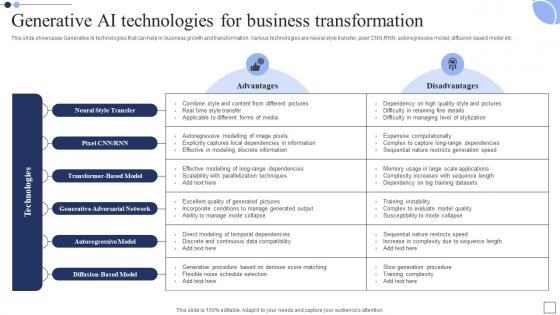
This slide showcases Generative AI technologies that can help in business growth and transformation. Various technologies are neural style transfer, pixel CNN,RNN, autoregressive model, diffusion based model etc.
People who downloaded this PowerPoint presentation also viewed the following :
Generative AI Technologies For Generative AI The Next Big Thing In Technology AI SS V with all 9 slides:
Use our Generative AI Technologies For Generative AI The Next Big Thing In Technology AI SS V to effectively help you save your valuable time. They are readymade to fit into any presentation structure.








FAQs for Generative AI Technologies For Generative AI The Next Big Thing In Technology
So basically, regular AI looks at stuff that already exists - like spotting cats in photos or figuring out sales patterns. Generative AI actually makes brand new content from nothing. We're talking poems, artwork, music that never existed before. Pretty crazy honestly! Traditional AI is way more rule-based and predictable. But generative AI? It studies tons of data then spits out original stuff that feels almost human-made. Oh and if you need help with creative work or brainstorming - that's where generative AI really shines.
Honestly, generative AI is a game changer for content creation. I'd start with something simple like email subject lines and see how it goes. My friend's team uses it for brainstorming campaign ideas, writing social posts, and cranking out ad copy variations - they're literally twice as fast now. It's pretty solid at personalizing stuff for different audiences too. The one thing though? You'll definitely need to edit everything because AI can be weirdly formal sometimes and totally miss your brand's vibe. But for generating blog outlines or A/B testing multiple versions quickly, it's honestly amazing.
Honestly, it's kinda messy right now. Attribution is huge - you don't want to rip off artists whose work trained these models. Be upfront about what's AI vs human-made too. Copyright stuff gets weird fast, so definitely loop in legal if you can. Also think about whether you're screwing over human creatives unfairly - that sits wrong with me personally. Set some team guidelines about disclosure and maybe draw lines around when AI's cool versus when you need actual human creativity. Oh, and make sure it aligns with your company values or whatever.
Honestly, generative AI is a game-changer for speeding up design work. You can pump out like 10 concept variations in minutes instead of spending hours on each one. It handles all the boring stuff - backgrounds, textures, basic assets - so you don't have to. The iteration part is huge too; you're not starting over every single time. I've been using it to explore weird creative directions I wouldn't normally try, then I just polish the good ones by hand. Oh, and definitely start with whatever tasks you do most often. That's where you'll actually notice the time savings right away.
Honestly, generative AI is perfect for this stuff. Feed it your customer data - what they buy, how they browse, their preferences - and it'll pump out personalized content that doesn't suck. Custom product descriptions, email campaigns, even chatbots that sound human. I'd start with something simple like personalized subject lines first (way easier to test). The AI picks up on patterns in your data and creates recommendations that actually make sense. Once you nail that, you can go bigger - dynamic websites that change based on who's visiting. Pretty wild what it can do when you give it decent data to work with.
PyTorch is probably your best bet to start with - super popular in research circles. TensorFlow and Hugging Face Transformers are the other heavy hitters. Honestly, if you're not trying to build something totally from scratch, just use OpenAI's API. Way easier than training your own models. Hugging Face's model hub is like GitHub but for AI models, which is pretty cool. You can literally get something working in minutes. For specific stuff: Stable Diffusion handles images, LangChain's great for LLM apps. Oh, and Weights & Biases for tracking experiments - trust me, you'll need it once you start tweaking things.
So basically AI is making digital art way more accessible now. You don't need to spend years learning technical stuff to create cool visuals, music, or writing. Experienced artists are using it as this crazy new experimental tool too. The whole "is it even real art?" thing is such a mess right now - people are really divided on it. We're seeing these weird new hybrid art forms where humans and AI work together, which is actually pretty interesting. I'd mess around with Midjourney or DALL-E if I were you. See how they fit into what you're already doing instead of replacing it entirely.
Honestly, data quality makes or breaks everything. Your algorithm could be brilliant, but if you're training it on garbage data - biased, incomplete, whatever - you're gonna get terrible results. It's like that cooking analogy, you know? Even Gordon Ramsay can't make magic happen with rotten ingredients. I learned this the hard way on a project last year. Clean, diverse datasets will give you way better outputs than fancy model tweaks ever will. Seriously, audit your data first before you waste time on the flashy stuff.
So you can basically use AI to create super realistic training scenarios without the crazy costs or danger. Medical procedures, emergency situations - stuff that'd be impossible to practice safely otherwise. What's wild is how it generates thousands of different versions of the same scenario, so trainees see weird edge cases they'd probably never encounter. You can dial up the difficulty too based on what your team actually needs work on. I'd start with your scariest or most expensive training situations - that's where AI simulations really shine. The realism is honestly getting pretty nuts these days.
Yeah, so AI and copyright is basically a hot mess right now. The AI gets trained on copyrighted stuff without asking permission first. Courts are still scratching their heads about who actually owns what you create - is it yours, the AI company's, or just... nobody's? Plus if your AI work looks too similar to existing copyrighted material, you might get in trouble. Different countries are handling this totally differently too, which doesn't help. I'd say document how you made whatever you're creating, don't use AI for anything super important without running it by a lawyer first, and honestly just stay updated on new rules. It's changing fast.
Honestly, generative AI is pretty solid for this stuff. It can grab data from your systems and spit out first drafts of reports - financial summaries, project updates, whatever you need. The monthly reports everyone dreads? Way less painful now. AI looks at your data patterns and turns them into actual readable text in whatever format works. You'll definitely want to double-check everything since it sometimes misses context or gets weird about details. But man, it saves so much time. I'd start with something simple, maybe a recurring report you already do, just to test it out first.
Honestly, the data stuff is probably gonna be your biggest headache - most companies have such messy, scattered data it's not even funny. Your current systems likely can't handle AI workloads either, so budget for infrastructure upgrades. Security and compliance gets tricky too, especially in regulated industries. Don't forget about training your team because what's the point of fancy tools if nobody knows how to use them? Cost management becomes a real issue fast. My advice? Start with a tiny pilot project first to see what breaks, then scale from there.
Dude, AI can really speed up game dev by handling the tedious stuff. Texture generation, 3D models, character designs, dialogue - it does it all now. Some of these tools are getting scary good tbh. What's really cool is procedural content generation. Think endless terrain or NPCs that actually feel unique. Also great for quick prototyping when you're testing ideas. I'd start with something simple like textures or concept art first though - see how it meshes with your current setup before going all-in.
Honestly, it's like identity theft but way scarier. Anyone can make fake videos of you saying literally anything - perfect setup for blackmail or fraud. Politicians are gonna have a field day manipulating voters with this stuff. What really bugs me is how they can just steal someone's face without asking. Detection tools exist but they're always playing catch-up since the tech keeps getting better. Even smart people fall for these fakes now. My advice? Always double-check weird videos you see, especially if they seem too crazy to be true.
Honestly, I've been messing around with AI for lesson planning and it's pretty wild how fast you can pump out content. ChatGPT's great for brainstorming discussion questions or whipping up case studies that actually match where your kids are at. Quiz creation is super easy too - you can even make different versions for differentiated learning, which saves me tons of time. Role-playing scenarios work well if that's your thing. The feedback templates are clutch since they adapt to different student responses. I'd say just start with something small, like generating a few quiz questions for tomorrow's class. See how it feels before diving deeper into the fancy stuff.
-
The service is fast, and I could access any presentation after buying the subscription. I don’t think I’ll ever have to worry about a presentation in my life.
-
Loved the fact that SlideTeam provides clean, high-definition, and professional PowerPoint products.