

Google Ads Strategies Powerpoint Ppt Template Bundles




Try Before you Buy Download Free Sample Product
 Impress Your
 Audience
 100%
100% Editable
 Save Hours
 of Time


Our Google Ads Strategies Powerpoint Ppt Template Bundles are topically designed to provide an attractive backdrop to any subject. Use them to look like a presentation pro.
People who downloaded this PowerPoint presentation also viewed the following :
Google Ads Strategies Powerpoint Ppt Template Bundles with all 17 slides:
Use our Google Ads Strategies Powerpoint Ppt Template Bundles to effectively help you save your valuable time. They are readymade to fit into any presentation structure.
-

Google Ads Strategies
-
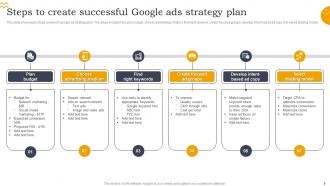
Steps to create successful Google ads strategy plan
-
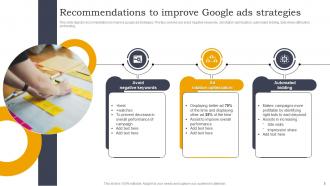
Recommendations to improve Google ads strategies
-
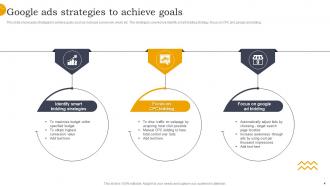
Google ads strategies to achieve goals
-
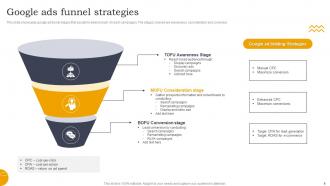
Google ads funnel strategies
-
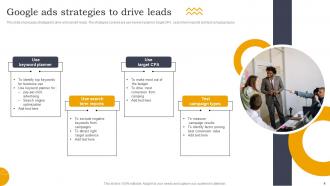
Google ads strategies to drive leads
-
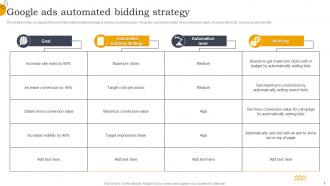
Google ads automated bidding strategy
-
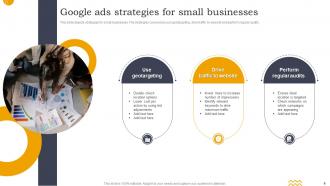
Google ads strategies for small businesses
-
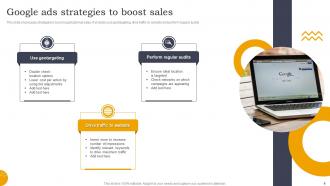
Google ads strategies to boost sales
-
Google ad campaign strategies icon
-
Google ad marketing strategy icon
-

Thanks for watching
-

-

-

-

-

FAQs for Google Ads Strategies Powerpoint
Honestly, it all comes down to getting your targeting and messaging right. Start with solid keyword research that actually matches what people are searching for. Your ad copy needs to speak their language - none of that corporate fluff. Then make sure your landing page doesn't disappoint when they click through. Oh, and seriously use negative keywords. I can't tell you how much random junk traffic you'll avoid. Pick a bidding strategy that works for your budget - manual gives you more control but takes time. But here's the big one: set up conversion tracking immediately. Otherwise you're just guessing what's working and what's draining your wallet.
Google's Keyword Planner is your best starting point - totally free and gives you search volumes plus competition data. I'd also peek at what competitors are doing with SEMrush or SpyFu (kinda sneaky but super helpful). The real treasure though? Your search terms report after running ads for a few weeks. You'll see exactly what people actually typed before clicking. Think like your customers would - test broad terms AND specific long-tail stuff. Oh, and start small! See what converts, then throw more money at the winners.
Dude, your ad copy is literally what makes or breaks everything. Perfect targeting means nothing if your headlines suck - I've watched identical campaigns tank just because of boring copy. You want to speak directly to what people are actually searching for and show them why you're different. Test everything though, seriously. A/B test your headlines and descriptions like crazy because you never know what'll hit. Sometimes the weirdest variation performs best. Short sentences work. But mix it up with longer ones that actually flow naturally. Don't just throw money at ads hoping they'll work - the copy is where the magic happens.
A/B testing is basically comparing different ad versions to see what actually works - way better than just winging it. Test headlines, descriptions, landing pages, whatever. Honestly gets addictive once you start seeing the data roll in. You'll figure out which stuff drives more clicks and conversions from your real audience, not some theory. Just don't go crazy testing everything at once or you won't know what made the difference. Stick to one element at a time. Run it for at least a week to get solid results, then put more money behind whatever's winning.
Honestly, start by checking your search term reports - there's always some bizarre stuff triggering your ads that you'd never expect. Kill those budget-draining keywords that aren't converting. Set up conversion tracking first though, or you're basically throwing money blindly. Adjust your bids based on what devices and locations actually work for you. Oh, and use dayparting so your ads only show when people are awake and buying. Tighten up audience targeting too. I'd probably do a quick campaign audit to spot the biggest money pits right now.
So ad extensions are basically free extra space for your ads - you can throw in phone numbers, extra links, prices, whatever. Your click-through rates will probably go up 10-20% which is pretty solid. Google's algorithm loves them too since they make ads more useful. The cool thing is they often make your ad take up more room on the page without costing extra. I'd start with sitelinks and callouts first - they work for like 99% of businesses. Oh and they help your Quality Score too, which... honestly I still don't totally get how Google calculates that but higher is better.
So Google has three main ad types. Search ads are those text ones at the top when you Google something - they catch people already looking for your stuff. Then there's display ads, which are basically banner ads scattered across websites (honestly, these can be hit or miss). Shopping ads show actual product pics and prices right in search results - perfect if you're selling physical products. Here's the thing: search ads usually work best for beginners since you're targeting people who already want what you've got. Display helps with brand awareness and bringing back visitors. Shopping's great for direct sales. I'd start with search ads first - they convert way better than the others typically.
Okay so first thing - get that Google Ads remarketing tag installed on your site to track who's visiting. Then build audience lists based on what pages people hit or what they did there. The cool part is you can get crazy specific with targeting. Like, only show ads to cart abandoners or people who checked out your pricing. I'd definitely segment by where they are in your funnel though - homepage visitors need totally different messaging than someone who almost bought. Don't forget frequency caps or you'll just piss people off. Your creative should acknowledge they've been there before. Oh and start with your highest-value page visitors first, obviously.
Honestly, start with conversion tracking if you haven't already - you're totally blind without it. CTR shows if people actually want to click your ads. CPC keeps you from bleeding money. Quality Score is annoying but super important since Google uses it for both where your ads show up and what you pay. Conversion rate tells you who's actually buying stuff. ROAS and CPA are the real money metrics though - they show if you're making or losing cash. Oh, and don't obsess over impressions. They look impressive in reports but don't really mean much for your wallet.
So location targeting is basically showing your ads only to people in certain areas - game changer for ROI honestly. You're not burning money on clicks from people who can't even visit your business. Analyze where your current customers are coming from first, then build around that. You can bid higher for those fancy zip codes where your best customers live, or completely exclude areas that never convert. The data gets super detailed too. I mean, why pay for someone in Alaska to click your ad if you're a local bakery in Miami? Makes zero sense. Start there and you'll see your performance jump pretty quick.
Dude, you NEED good landing pages for Google Ads. Here's why - Google judges whether your landing page matches your ad copy, and that affects your Quality Score. Bad score = higher costs and worse ad placement. I've watched people waste thousands because they sent ad traffic to their homepage instead of a relevant page. Your page speed matters too, especially on mobile. The whole thing needs to flow: someone sees your ad, clicks it, lands somewhere that makes sense. Otherwise they'll bounce instantly and you're paying for nothing. Oh and honestly? A focused landing page converts like 3x better than generic pages anyway.
Think of negative keywords as your ad campaign's security guard - they block irrelevant searches that'll drain your budget fast. So if you're selling premium stuff, add "free" as a negative keyword. I check my search terms report every week (honestly gets weirdly addictive lol) to find new ones to block. Don't go crazy though - you might accidentally block good traffic. Start with the obvious stuff like competitor names or totally random searches. Then just keep tweaking based on what you're actually seeing in your data.
Honestly, the worst mistake is casting too wide a net with your targeting - you'll drain your budget on useless clicks super fast. Set up negative keywords from the start. And for the love of god, don't send people to your homepage when you could make landing pages that actually match your ads. I've watched people torch their entire month's budget in 48 hours because they forgot to cap daily spending. Track conversions, not just clicks - clicks are vanity metrics that don't make you money. Oh, and start with exact match keywords first. You can always branch out once you see what's actually working.
Honestly, I'd start by digging into your past data to see when people actually buy your stuff - holidays, back-to-school, whatever. Bump up budgets during those peak times and dial back when it's dead. The trick is planning like 2-3 months out because these campaigns need time to work properly. Don't forget to swap your keywords too. "Holiday gifts" hits way different than generic product names. Oh, and set up those automated bid adjustments - you'll thank me later when you're not glued to your laptop adjusting budgets every damn week during Black Friday season.
Here's what's actually worked for me: landing pages need to load in under 3 seconds or people bounce immediately. Use those call buttons and location extensions - they're gold for mobile. Keep headlines super short since phone screens are tiny. Oh, and check your conversion data first - that'll show you if mobile users are actually buying. Most people bid way too low for mobile traffic, which is honestly kind of dumb since that's where everyone is now. Try responsive search ads too, they automatically resize. Speed and simplicity beat fancy design every time.
-
Been using SlideTeam for some time now…can’t imagine why I wasted all that time in front of the screen trying to make the perfect presentation.
-
Wonderful ideas and visuals. I'm really pleased with the templates, which are unique and up to date.