

Database Management System Powerpoint PPT Template Bundles




Try Before you Buy Download Free Sample Product
 Impress Your
Audience
 100%
Editable
 Save Hours
of Time


Our Database Management System Powerpoint PPT Template Bundles are topically designed to provide an attractive backdrop to any subject. Use them to look like a presentation pro.
People who downloaded this PowerPoint presentation also viewed the following :
Database Management System Powerpoint PPT Template Bundles with all 22 slides:
Use our Database Management System Powerpoint PPT Template Bundles to effectively help you save your valuable time. They are readymade to fit into any presentation structure.





FAQs for Database Management System Powerpoint
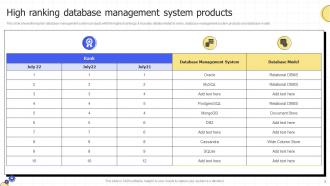
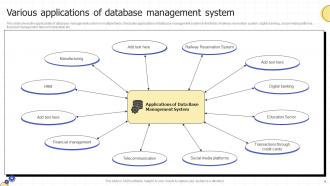
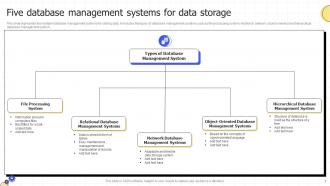
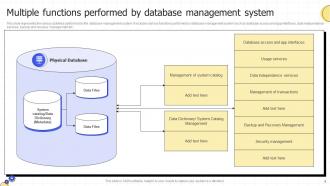
So basically a DBMS does the heavy lifting with your data storage and makes sure you can actually find stuff when you need it. It keeps everything secure too - like who gets access to what. Multiple people can use it at once without everything breaking, which is honestly pretty cool. Oh and it handles backups automatically so you don't lose everything when things inevitably go sideways. Plus it keeps your data clean and consistent. Really though, the best part is you don't have to think about any of the technical mess happening behind the scenes.
SQL databases use tables with fixed structures - super organized but kinda rigid. NoSQL throws that out the window and lets you store stuff however you want (documents, key-value pairs, whatever). Here's the thing though - SQL databases get pricey when you need more power since you're basically buying beefier hardware. NoSQL spreads across tons of cheaper servers instead, which honestly makes way more sense for big apps. You do lose some data consistency guarantees with NoSQL. Got complex relationships between your data? Stick with SQL. Need to scale fast with messy data? NoSQL's your friend.
Honestly, cloud DBMS is a game changer. No more buying expensive servers upfront - that alone sold me on it. When you need more capacity, scaling happens instantly instead of waiting weeks for hardware. The provider takes care of all the annoying stuff like backups and security patches. Your team can work from literally anywhere too. Only paying for what you use vs. guessing how much you'll need? Way better. Oh, and no more 3am calls about server crashes - been there, not fun. I'd try it on a smaller project first to see how it meshes with your setup.
So normalization is just getting rid of duplicate data - you put each piece of info in one spot instead of copying it everywhere. Way more efficient that way. It also saves you from those headaches where you update a customer's address in one table but forget about the other three tables (been there, done that). Break your data into logical tables and connect them with foreign keys. Start with first normal form and see how far you need to go. Honestly, most apps don't need to go crazy with it - just enough to keep things clean and consistent.
So indexes are basically shortcuts that help your database find stuff fast. Like a book index - you don't flip through every page to find something, you just go straight to page 47. Without them? Your database scans the whole damn table every time. Gets brutal when you have tons of data. I've seen 30-second queries drop to milliseconds just by adding the right index. But here's the thing - don't index everything. Slows down your writes and chews up storage. Focus on columns you're always filtering or joining on first. Those WHERE clauses are your best friend for figuring out what needs indexing.
So ACID properties are basically your database's four promises when handling transactions. **Atomicity** - your transaction works completely or fails completely, no weird half-done states. **Consistency** keeps your data following all the rules you set up. **Isolation** stops different transactions from messing with each other (honestly the hardest one to nail). **Durability** means once something commits, it's saved forever even if everything crashes. Without these you'd have corrupted data everywhere and users losing their minds. When you're building stuff, just think about how these affect where you draw your transaction lines.
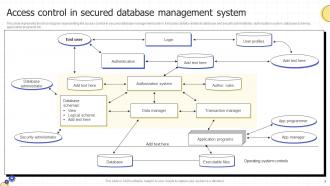
So each database type handles security totally differently. Oracle and SQL Server are like tanks - crazy detailed permissions, encryption everywhere, audit logs for days. NoSQL is all over the place though. Some focus on speed first, security later (MongoDB learned this the hard way). Cloud databases throw in IAM integration which is nice, plus automated backups. In-memory ones worry more about network stuff since your data's just sitting there exposed. Honestly, just figure out what security features you actually need first, then see which database checks those boxes best.
Oh man, data inconsistencies will drive you absolutely insane - that's probably your biggest nightmare right there. Downtime windows are brutal too, plus you'll hit compatibility issues between systems that hate each other. Schema mapping? Total disaster, especially since source data is always a hot mess (seriously, why is it never clean?). Performance will tank during transfers, you risk losing data without proper validation, and if something breaks, rolling back is complicated as hell. Honestly though, do a pilot run with just some of your data first. Also budget like 3x more testing time than seems reasonable.
So basically, DBMSs handle big data by spreading everything across multiple servers - kind of like having a bunch of computers work together instead of one struggling alone. The cool part is they break huge queries into smaller pieces that run at the same time. Parallel processing, you know? Modern stuff like Hadoop plays nice with regular databases too. Oh, and they use special storage tricks (columnar formats and compression) that make analytics way faster. Honestly though, figure out what you actually need first - real-time or batch processing makes a huge difference in what you'd pick.
Look, set up different backup types - weekly full ones, daily incremental, and transaction logs every 15-30 minutes for anything critical. Automate everything because manual backups are basically guaranteed to fail when you need them most. Keep copies local AND somewhere offsite (cloud's perfect for this), plus encrypt all your files. Here's what nobody talks about though - actually test your recovery process! I can't tell you how many people find out their backups are trash right when disaster hits. Write down your recovery steps and run through them every few months. Trust me, you'll be so grateful you did this prep work when things inevitably go sideways.
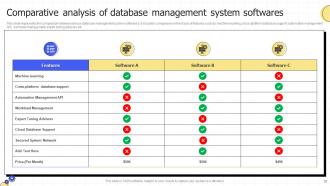
Look at what you actually need first - how much data, how many users, do you need perfect consistency? PostgreSQL is solid for structured stuff with strict requirements. MongoDB's better if you're dealing with messy data or need to scale fast. Honestly though, most people way overthink this whole thing. What does your team already know? There's zero point picking some complex distributed setup if nobody can actually run it. Start simple, test it with real load, then add complexity when you actually hit walls. Oh and definitely build a quick prototype first - saves you from making dumb choices later.
Honestly, just focus on three main things: money, how much your team actually knows, and growth potential. PostgreSQL or MySQL won't cost you anything and they're rock solid - way better than blowing your budget on Oracle right out the gate. Your devs need to actually understand whatever you pick too. I've seen teams choose MongoDB because it sounds cool, then struggle for months because everyone only knew SQL. Performance matters if you're building something real-time, but don't overthink it. Pick something boring and proven first - you can always switch later when you're not scrambling for cash.
Oh man, database design is seriously make-or-break for your app. Bad structure = slow queries and you'll be debugging weird join issues forever. Trust me on this one. You end up writing hacky workarounds just to deal with poor planning. But when you nail the design upfront? Queries fly, code stays clean, maintenance doesn't suck. Proper normalization and indexing save you so much headache later. I always sketch out the data relationships first - like, before touching any code. Saves tons of time.
First thing - check your slow query logs and execution plans to see what's actually dragging you down. Nine times out of ten it's either missing indexes or some horrific nested query that someone wrote at 2am. Focus on your most-hit queries since those give you the biggest bang for your buck. Your table structure matters too - normalize it properly but don't get all academic about it. Oh, and set up monitoring for CPU and connections before things go sideways. Honestly though? Just start with basic indexing and rewriting the worst queries first.
Dude, you should definitely keep an eye on cloud-native databases and AI query optimization - that stuff's getting crazy good. Serverless databases are blowing up because they scale automatically, so you don't have to guess your capacity anymore. Graph databases are perfect for complex relationships like social networks. Oh, and multi-model databases? Total game changer since you can handle different data types without jumping between systems. Real-time analytics used to be this fancy add-on but now it's pretty much expected. Honestly though, I'd start with a small cloud pilot project first - way less risky than diving in headfirst.
-
Thank you for showering me with discounts every time I was reluctant to make the purchase.
-
A big thanks to SlideTeam! An incredible and diverse library of templates helped me with my business project presentation.