


Building Management System Powerpoint Ppt Template Bundles




Try Before you Buy Download Free Sample Product
 Impress Your
 Audience
 100%
100% Editable
 Save Hours
 of Time


Introducing our comprehensive Building Management System BMS PowerPoint presentation, designed to demystify the world of intelligent building management. Explore the myriad challenges faced in the management of modern structures and discover the transformative benefits of a BMS. Our presentation delves into the intricate components of a BMS, shedding light on sensors, controls, and communication systems that make buildings smarter, more efficient, and sustainable. Uncover the diverse types of BMS systems available, from standalone to integrated solutions, and learn about the latest software innovations that drive these systems. Whether youre a facility manager, engineer, or simply curious about the future of building management, this presentation is your key to understanding this dynamic and evolving field.
People who downloaded this PowerPoint presentation also viewed the following :
Content of this Powerpoint Presentation
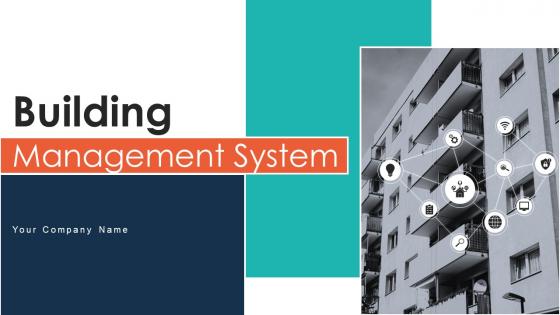
Slide 1: The slide introduces Building Management System. State your Company name and begin.
Slide 2: This slide represents solution to challenges faced in building management system which assists to enhance building efficiency and sustainability.
Slide 3: This slide highlights benefits of building energy management system which assists to gain greater knowledge and control of energy used.
Slide 4: This slide renders components of building management system which assists to ensure efficient and effective operation of modern buildings.
Slide 5: This slide shows comparison of building management software which enhances energy usage and assists in cost savings.
Slide 6: This slide covers different types of building management system which assists to monitor different mechanical and electrical systems of building.
Slide 7: This slide displays architecture of cloud based building management system which makes easy to share information.
Slide 8: This slide depicts features of BACnet protocol which assists to support security in building management and provides standard way for transfer of data.
Slide 9: This slide shows latest advancements in building management system which assists to enhance occupants experience and paves path.
Slide 10: This slide displays building management system dashboard which enables users to control building assets and create automated reports.
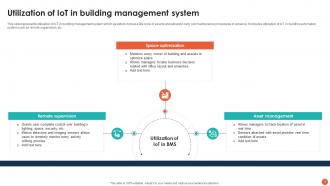
Slide 11: This slide represents utilization of IoT in building management system which assists to increase life cycle of assets.
Slide 12: This slide represents steps involved in designing building management system which assists to optimize utilization of supervised subsystems.
Slide 13: This slide highlights tips for successful implementation of building management system which assists to meet specific needs of building.
Slide 14: This slide presents steps for maintenance of building management system which assists to ensure that system function effectively.
Slide 15: The slide displays Tool for building management system icon.
Slide 16: The slide renders Project development through building management system icon.
Slide 17: This is a Thank You slide with address, contact numbers and email address.
Building Management System Powerpoint Ppt Template Bundles with all 25 slides:
Use our Building Management System Powerpoint Ppt Template Bundles to effectively help you save your valuable time. They are readymade to fit into any presentation structure.












FAQs for Building Management System Powerpoint
Okay so you need four main things to get your BMS running properly. Sensors and controllers come first - they grab data from your HVAC, lights, security, all that stuff. You'll also need a central server to process everything. The interface matters way more than people think - if it's a pain to use, nobody will bother with it. Oh, and don't forget about connecting it all together with solid networks, whether that's wireless or ethernet or whatever. My advice? Map out which systems you want to tackle first, then expand from there. Way easier than trying to do everything at once.
Your BMS basically runs everything automatically - HVAC, lights, equipment - based on who's actually in the building. Pretty cool how it learns your patterns and does stuff like dimming lights in empty areas or cooling rooms right before people show up. The sensors they make now are honestly crazy good. You'll get reports showing exactly where you're bleeding energy, which is super helpful for fixing the worst spots first. Most places see 15-30% savings without making anyone uncomfortable. Oh, and definitely check your dashboard weekly - that's where you'll catch the biggest waste happening.
So with automation, your BMS stops being this thing you have to babysit all the time. It starts learning patterns - like when people actually show up to work, not just when they're supposed to. The system makes tiny adjustments constantly instead of you having to mess with HVAC settings manually. Honestly, it's pretty cool how it flags maintenance issues before stuff breaks down completely. Most people see around 20-30% better energy efficiency. Way fewer emergency repair calls too. Oh, and definitely base your setup on real occupancy data rather than just guessing at schedules.
Just hook up your IoT sensors to the BMS using APIs or gateway devices - pretty straightforward. Temperature, humidity, occupancy, energy usage, all that stuff gets pulled in automatically. Then run it through analytics platforms that'll catch patterns your regular BMS totally misses. Like how occupancy affects your HVAC efficiency or when equipment's about to crap out. Fair warning though - you'll get buried in data at first. I'd start with maybe 3-4 sensors in one area, see how it goes. Once you're not drowning in numbers, expand from there. The predictive maintenance alone makes it worth the headache.
Dude, cloud-based building management is actually pretty sweet. Remote access means you can fix stuff from your couch at 2am - honestly saved my butt more times than I can count. Real-time alerts keep you on top of everything, plus the software updates itself which is nice. Analytics are way better than the old clunky systems too. Best part? You can expand to new buildings without dealing with server headaches. Oh, and no more IT maintenance costs eating your budget. Definitely try it on one building first though - learned that lesson the hard way with other tech rollouts.
So basically a BMS watches your building's temp, humidity, lighting, and air quality 24/7, making tweaks to keep people happy. It'll catch stuff like bad ventilation or broken equipment before things get messy - which honestly saves you so much headache later. Safety-wise, it connects with fire alarms and security to handle emergencies better. You'll get way fewer "it's too hot in here" complaints. The trick is programming it right for your specific spaces. Oh, and don't forget about occupancy patterns - empty conference rooms don't need the same settings as packed offices.
Oh man, integration problems will drive you absolutely nuts - nothing wants to play nice together. Your old HVAC stuff definitely wasn't built for this modern tech. Staff will hate you at first because learning new systems sucks when they think the current setup works fine. Budget-wise? Tack on at least 20% extra because you'll hit weird compatibility issues halfway through. Actually happened to my buddy last year - total nightmare. Get your facilities people on board early though, makes everything smoother when they're not fighting you the whole time.
Look, regulatory standards aren't suggestions - they dictate exactly what your BMS has to monitor and report. Building codes require energy reporting. Fire safety integration is mandatory. Indoor air quality monitoring too. ASHRAE standards are your main headache, though local codes are all over the place honestly. Here's the annoying part: these standards change constantly. Your BMS design better be flexible or you'll be doing expensive retrofits down the road. I'd map out every applicable standard right at the start. Trust me on this one.
So BMS pricing is all over the place - you're looking at roughly $2-8 per square foot for installation. Labor's gonna be your biggest expense, more than the actual hardware. Sensors and controllers add up fast too. Oh, and you'll spend about 10-15% of that initial cost each year on maintenance stuff like calibrations and updates. But here's the thing - most places cut their energy bills by 15-30% in year one, so you're typically breaking even in 3-5 years. Definitely shop around though. Get at least three quotes because prices vary like crazy between vendors.
So you basically hook up IoT sensors to track things like vibration, temperature, and energy usage on your HVAC, elevators, whatever. The data feeds into your BMS and machine learning picks up on patterns. When something's about to crap out, you get a heads up. Way better than scrambling when stuff breaks at 2am, trust me. The algorithms get scary good at predictions once they have enough info to work with. I'd start small though - maybe just one system first? See how it goes, then roll it out to everything else. Game changer for scheduling maintenance during downtime instead of dealing with emergencies.
Honestly, hands-on training is the way to go. Pair it with role-based paths so people learn what they actually need - like, why teach HVAC guys about lighting schedules, right? Set up scenario exercises using real situations from your building. The buddy system works great too - have experienced users help the newbies out. Quick reference cards are clutch for common tasks. Track who's struggling with what features (you'll spot patterns). Schedule refresher sessions every quarter or so. Oh, and definitely build your training around actual job functions instead of trying to cram everything into everyone's heads at once. That never works.
So a BMS is like having a smart building that runs itself - it'll cut your carbon footprint by around 30% just by optimizing everything automatically. The system monitors your HVAC, lighting, water usage, all that stuff in real-time. Lights dim when rooms are empty, temperatures adjust themselves, equipment runs during cheaper off-peak hours. Honestly, the air quality tracking is pretty cool too. All this data helps big time with green certifications. I'd say start with whatever's draining the most energy first - that's where you'll see results fastest.
Honestly, the big thing right now is AI that can actually predict what your building needs before problems happen. Cloud platforms are getting really smart at learning patterns too. IoT sensors are way cheaper now - you can track air quality, how many people are in rooms, all that stuff in real-time. Your building management system has to work with everything else though, like security and lights. Oh, and edge computing is becoming huge because who wants their HVAC failing when the internet goes down? Look for systems with open APIs and machine learning built in. That's where everyone's putting their money.
Look, treat your BMS like any other critical system - segment that network first. Default passwords? Change them now. MFA everywhere you can set it up. Firmware updates are annoying but don't skip them when things seem fine. Your IT security team needs to be involved from day one - this isn't just a facilities thing anymore, honestly. Monitor for weird network traffic and limit access by roles. Run security audits quarterly so you catch problems before the bad guys do. Trust me on this one.
Focus on energy stuff first - kWh usage, demand spikes, efficiency ratios. Comfort metrics matter too: temperature swings, humidity, air quality. Track your system uptime and how often things break down. Runtime hours are huge - nobody wants HVAC cranking when the building's ghost town empty, you know? Maintenance costs tell you a lot before problems get expensive. Honestly, don't go crazy with data though. Pick maybe 5-6 solid KPIs and actually stick with them. Set some baselines first, then realistic targets. Work order volumes are another good one to watch for patterns.
-
I didn’t expect such a good service for the money I am paying. But, they exceed my expectations. Great work SlideTeam.
-
Crisp and neat slides. Makes it fun and easier to curate presentations.