

Google Adwords Campaign Powerpoint PPT Template Bundles





Try Before you Buy Download Free Sample Product
 Impress Your
Audience
 100%
Editable
 Save Hours
of Time


Our Google Adwords Campaign Powerpoint PPT Template Bundles are topically designed to provide an attractive backdrop to any subject. Use them to look like a presentation pro.
People who downloaded this PowerPoint presentation also viewed the following :
Google Adwords Campaign Powerpoint PPT Template Bundles with all 29 slides:
Use our Google Adwords Campaign Powerpoint PPT Template Bundles to effectively help you save your valuable time. They are readymade to fit into any presentation structure.












FAQs for Google Adwords Campaign Powerpoint
You'll want to nail three main things: headlines that actually grab people, ad copy that matches what they're searching for, and solid calls-to-action. Most ads are way too generic - that's honestly where people mess up the most. Your description should highlight what makes you different and speak to what users actually want. Work your keywords in naturally, don't just stuff them everywhere. Oh, and use those extensions like sitelinks - they give you more space to work with. Always end with something clear like "Shop Now" or whatever makes sense for your business. Test different versions because you never know what'll click with people.
Honestly, just dig into Google's demographic targeting in your audience settings first. Figure out who you're actually trying to reach - age, gender, income, whether they have kids, all that stuff. Then write your ads like you're talking directly to those people, not some random crowd. I always split my demographics into separate ad groups because - trust me on this - a 25-year-old isn't gonna respond to the same message as someone in their 50s. Make your headlines feel personal, like you get their specific problems. Run a few different versions and see which groups actually buy from you. The data will surprise you sometimes.
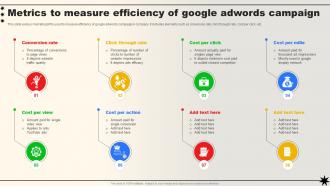
For your Google Ads template, start with the basics: clicks, impressions, CTR, and cost-per-click. ROAS is honestly the king metric though - it's the only one that really tells you if you're making money or burning it. Conversion rate and cost-per-acquisition matter too. Quality score and impression share are super helpful for optimization. Oh, and if you're doing search campaigns, definitely track search terms performance. You can always add more later, but these will cover like 90% of what you need to know upfront.
For seasonal campaigns, swap out your regular keywords for holiday-themed ones first. Creative assets need updating too - nobody wants to see summer vibes in December lol. Adjust your targeting since people shop differently during holidays. Bidding gets tricky because everyone's competing harder, so bump up your bids. Landing pages are huge here - seriously, most people forget this step and wonder why conversions suck. Create dedicated ad groups for seasonal stuff. Your promos should match whatever holiday you're hitting. Oh, and start this whole process like 2-3 weeks early or you'll be scrambling.
Honestly, just stay organized with your naming - same format every time. Group similar ads together or you'll hate yourself later (trust me on this one). All the basics need to be there: campaign names, ad groups, headlines, descriptions. Character limits are a pain so mark those clearly since Google doesn't mess around. I usually color-code stuff for approval status - makes life easier. Oh, and definitely test it on something small first! Nothing worse than discovering your whole template's broken after uploading 50 campaigns. Learned that lesson the expensive way.
Take your best A/B test winners and bake them right into your template. Headlines, CTAs, descriptions - whatever drove the highest conversions becomes your new default. Honestly, this is where data gets fun because you're not guessing anymore. Pay attention to the emotional hooks that kept winning. Build in spots where you can test new stuff against your proven winners too. That way your template isn't just sitting there - it becomes this launching pad for more testing. Oh, and focus hard on those value props that consistently crushed it.
Go after keywords that scream "I'm ready to buy" - stuff like "buy," "best," or "[product name] review." Long-tail ones are your friend since they're cheaper and super targeted. I've watched people tank their budgets on crazy broad terms that convert like garbage. Your branded keywords? Grab those too because competitors will definitely try stealing your traffic. Look, start with maybe 10-15 solid keywords per ad group, let them run for a week, then throw more money at whatever's actually working. The key is thinking like your customers when they're wallet-out ready, not just window shopping.
Pick images that actually match your brand and support whatever you're trying to say. Upload multiple sizes for responsive ads - they'll adjust better across different placements. Don't overcomplicate things though. Cluttered visuals just confuse people and tank your click-through rates. Show your product doing its thing or highlight the main benefits visually. Your headline and image should work together, not fight each other for attention. Honestly, I'd test a few different styles to see what clicks with your audience. Oh, and double-check they look decent on mobile since that's where most people will see them anyway.
Your ad copy is literally what makes or breaks everything - doesn't matter how good your targeting is if the headlines suck. Think of it like your elevator pitch but you've only got 10 seconds instead of 30. I'm always harping on people to write at least 3-4 different headlines per template because you never know which one will hit. Address whatever problem your audience has and make your value super clear. Oh, and test constantly - what works for one campaign might totally bomb for another. Keep the tone conversational but punchy. Boring copy = dead campaign.
Make your template super flexible with responsive elements that work across formats. Headlines should stay under 30 characters, descriptions under 90 - this covers both search and display ads. Square images (1:1 ratio) are your safest bet since they fit most placements. Google's character limits are honestly such a headache, but you've gotta stick to them or your ads get cut off weird. Always create multiple headline and description variations - like 3-5 of each if you can. Oh, and definitely test everything across search, display, and shopping before you launch. Trust me on this one.
For your Google Ads template, write down daily budget caps for each campaign - I swear this saves me every time because I always forget otherwise! Break down what percentage goes to search vs display campaigns, plus set that total monthly limit. If you're hitting multiple regions or audiences, map out how much goes where. Seasonal stuff matters too - bump up budgets during busy periods. Oh and be super specific with your notes. That way if someone else has to jump in and manage things, they won't be texting you constantly asking what you meant.
So basically you need to swap out all the keywords and copy to match whatever industry you're targeting. Like if you're going from healthcare to SaaS, ditch "patient care" for something like "workflow efficiency" - that kind of thing. The ad structure can stay pretty much the same though. Oh and definitely update your audience targeting too because what works for one industry is usually useless for another. I'd start by checking out what your competitors are doing in that space first. Honestly the messaging switch is where most people mess up - it's all about nailing those industry-specific pain points.
Honestly, Google's pretty picky about this stuff. Don't use any sketchy claims about what your products can do - they'll shut you down fast. Trademark issues are another headache if you're mentioning other brands. Also, certain keywords around healthcare or finance need special certifications (which is annoying but whatever). Your landing page has to actually match what the ad says too. I always double-check their policies before going live. Trust me, getting flagged sucks and takes forever to fix.
Mobile users scroll crazy fast, so your headlines need to hit hard right away - put the good stuff first. Keep everything shorter too since there's way less screen space to work with. Definitely add those mobile extensions like call buttons and location stuff. Your landing pages better load fast or people will bounce immediately (learned that one the hard way). Mobile users are honestly just different - they act weird compared to desktop, so you'll need to test everything twice. Oh, and preview your ads on your actual phone first. Trust me on that.
For Google Ads templates, I'd honestly just start with Canva - it's super easy and has loads of premade stuff. Adobe Creative Suite is obviously more powerful if you want total control, but the learning curve is kinda brutal. Figma's great if your team needs to collaborate on designs. But here's the thing - I've literally seen people make decent ads in PowerPoint lol. Sometimes keeping it simple beats getting fancy with all the bells and whistles. Once you get comfortable with basic design stuff, then maybe jump into the Adobe world. But Canva will definitely get you started without wanting to throw your computer out the window.
-
Editable templates with innovative design and color combination.
-
Easily Understandable slides.