


Google Analytics For All Web Tracking Social Media Marketing Guidelines Playbook




Try Before you Buy Download Free Sample Product
 Impress Your
 Audience
 100%
100% Editable
 Save Hours
 of Time


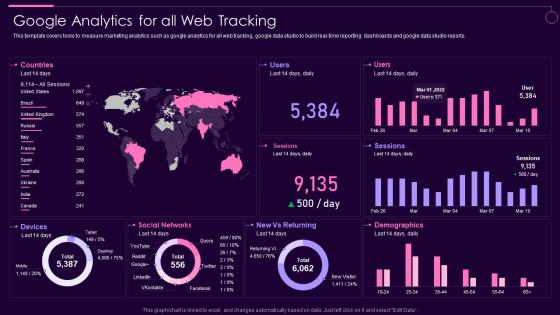
This template covers tools to measure marketing analytics such as google analytics for all web tracking, google data studio to build real time reporting dashboards and google data studio reports.
People who downloaded this PowerPoint presentation also viewed the following :
Google Analytics For All Web Tracking Social Media Marketing Guidelines Playbook with all 7 slides:






FAQs for Google Analytics For All Web Tracking Social Media
Google Analytics' essential features include Real-Time reports, Audience insights, Acquisition channels, Behavior flow, and Conversion tracking. These tools streamline website performance analysis by monitoring visitor demographics, traffic sources, and user interactions, with many businesses finding that mastering these fundamentals enhances their digital marketing strategies and ultimately delivers better customer targeting and measurable ROI improvements.
Google Analytics helps businesses improve website performance by tracking user behavior, identifying high-performing content, monitoring conversion rates, and revealing traffic sources. Through detailed insights into page load times, bounce rates, and user engagement patterns, companies can optimize their digital presence, enhance customer experiences, and increase conversions, ultimately delivering better ROI and competitive advantage.
Universal Analytics uses session-based tracking with pageviews and events, while Google Analytics 4 employs event-based tracking that measures all user interactions as events across websites and apps. GA4 delivers enhanced cross-platform measurement, improved privacy controls, and advanced machine learning capabilities, with many businesses finding that this transition enables better customer journey analysis and ultimately provides more comprehensive insights for data-driven decision making.
Setting up goals in Google Analytics involves navigating to Admin, selecting Goals under the View column, and configuring destination, duration, pages per session, or event goals based on your conversion objectives. These goal types enable businesses to track newsletter signups, purchase completions, and user engagement metrics, ultimately delivering actionable insights into customer behavior and campaign performance across marketing channels.
Event tracking in Google Analytics captures user interactions beyond pageviews, including downloads, video plays, form submissions, button clicks, and scroll depth measurements. These metrics enable businesses to understand customer behavior patterns, optimize conversion funnels, and measure engagement across touchpoints, with many e-commerce and content organizations finding that detailed event data significantly enhances their digital marketing strategies and user experience optimization efforts.
Google Analytics addresses data privacy through anonymization features, consent management tools, data retention controls, IP masking capabilities, and user deletion options to support GDPR compliance. Organizations can configure these privacy settings, implement cookie consent mechanisms, and establish data processing agreements with Google, ultimately enabling compliant analytics while maintaining valuable customer insights for business optimization.
Effective Google Analytics segmentation practices include creating audience-based segments, behavioral segments, traffic source segments, conversion path segments, and custom demographic segments. These approaches streamline data analysis by isolating specific user groups, comparing performance metrics across different channels, and identifying high-value customer patterns, ultimately enabling businesses to optimize marketing strategies and deliver more targeted experiences.
eCommerce tracking in Google Analytics is configured by enabling Enhanced Ecommerce features and implementing tracking code to capture transaction data, product performance, and conversion funnels. This setup allows retailers to measure revenue attribution, analyze customer purchase behavior, and optimize marketing campaigns, with many online businesses finding that detailed sales analytics ultimately streamline inventory management and enhance customer acquisition strategies.
User behavior reports in Google Analytics reveal page performance metrics, user flow patterns, session duration data, bounce rates, and conversion pathways. These insights enable businesses to optimize website navigation, identify high-performing content, streamline customer journeys, and enhance user experiences, with many organizations finding that behavior analysis significantly improves conversion rates and reduces abandonment.
Google Analytics enables businesses to understand audience demographics through detailed reports on age, gender, interests, geographic location, and device preferences, accessible via the Audience Demographics and Interests sections. These insights help organizations tailor marketing campaigns, optimize content strategies, and enhance user experiences, with many retailers and service providers finding that demographic data significantly improves targeting accuracy and conversion rates.
UTM parameters are tracking codes added to URLs that identify traffic sources, mediums, campaigns, terms, and content in Google Analytics. These parameters enhance data tracking by providing granular insights into campaign performance, enabling marketers to measure ROI across channels, optimize budget allocation, and identify high-converting traffic sources, ultimately delivering more precise attribution and strategic decision-making capabilities.
Google Analytics integrates seamlessly with Google Ads, CRM systems, email platforms, and social media tools through APIs, direct connectors, and third-party integration platforms. These connections enable businesses to track complete customer journeys, optimize ad spend based on conversion data, and automate lead nurturing, ultimately delivering unified reporting and improved ROI across all marketing channels.
Common Google Analytics interpretation mistakes include ignoring traffic source context, misunderstanding bounce rate implications, focusing solely on vanity metrics, overlooking conversion attribution models, and drawing conclusions from insufficient data samples. These errors often lead businesses to make misguided marketing decisions, with many organizations finding that proper data literacy training and establishing clear measurement frameworks ultimately delivers more accurate insights and strategic competitive advantage.
Real-time reporting in Google Analytics enables immediate business insights by monitoring live website traffic, tracking campaign performance as it happens, and identifying sudden spikes or drops in user activity. These capabilities allow businesses to make instant adjustments to marketing campaigns, respond quickly to trending content, and optimize user experiences in real-time, ultimately delivering faster decision-making and competitive responsiveness.
Custom dashboards in Google Analytics offer centralized data visualization, real-time performance monitoring, personalized metric tracking, automated reporting capabilities, and enhanced stakeholder communication. These features streamline decision-making by consolidating key performance indicators into digestible formats, enabling marketing teams and executives to quickly identify trends, optimize campaigns, and demonstrate ROI, ultimately delivering faster insights and improved strategic alignment across organizations.
-
Unique and attractive product design.
-
The service is fast, and I could access any presentation after buying the subscription. I don’t think I’ll ever have to worry about a presentation in my life.