


Google Cloud Storage Classes In The Organization Google Cloud Platform Ppt Icons





Try Before you Buy Download Free Sample Product
 Impress Your
 Audience
 100%
100% Editable
 Save Hours
 of Time


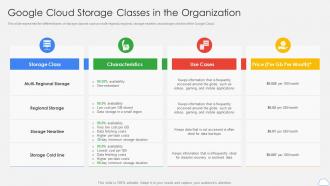
This slide represents the different types of storage classes such as multi-regional, regional, storage nearline, and storage cold line of the Google Cloud.
People who downloaded this PowerPoint presentation also viewed the following :
Google Cloud Storage Classes In The Organization Google Cloud Platform Ppt Icons with all 6 slides:
Use our Google Cloud Storage Classes In The Organization Google Cloud Platform Ppt Icons to effectively help you save your valuable time. They are readymade to fit into any presentation structure.





FAQs for Google Cloud Storage Classes In The Organization Google Cloud
Google Cloud Storage offers Standard, Nearline, Coldline, and Archive storage classes, each designed for different access patterns and cost optimization strategies. These classes enable organizations to balance storage costs with retrieval needs, with many enterprises finding that strategic class selection reduces overall cloud expenses while maintaining performance for frequently accessed data.
Google Cloud Storage pricing varies significantly across classes, with Standard offering immediate access at higher per-GB rates, while Nearline, Coldline, and Archive provide progressively lower storage costs but higher retrieval fees and minimum duration requirements. This tiered approach enables organizations to optimize costs by matching data access patterns with appropriate classes, with many enterprises finding that strategic placement of frequently accessed data in Standard and archival content in cheaper classes reduces overall storage expenses while maintaining operational efficiency.
Standard storage class is recommended for frequently accessed data, active workloads, content distribution, real-time analytics, and operational applications requiring immediate availability. This class delivers optimal performance for websites, mobile applications, and business-critical systems where users expect instant access, with many organizations finding that the higher availability ultimately enhances customer experiences and operational efficiency.
When choosing between Nearline and Coldline storage classes, consider access frequency, retrieval costs, minimum storage duration requirements, and compliance needs. Nearline suits data accessed monthly with 30-day minimum storage, while Coldline works for quarterly access patterns with 90-day minimums, with many organizations finding that matching access patterns to storage classes significantly reduces costs while maintaining operational efficiency.
Regional storage class enhances data redundancy by automatically replicating data across multiple zones within a specific geographic region, ensuring high availability even during zone failures. This approach delivers faster access speeds for regionally-focused applications while maintaining 99.95% availability, with organizations like regional banks and healthcare providers finding significant performance improvements for location-sensitive workloads.
Nearline storage charges $0.01 per GB for data retrieval, while Coldline storage costs $0.02 per GB for retrieval operations. These retrieval fees apply whenever data is accessed, with many organizations finding that strategic data lifecycle management across storage classes significantly reduces overall cloud costs while maintaining accessibility for critical business operations.
Google Cloud Storage classes differ significantly in data access frequency, with Standard designed for frequently accessed data, Nearline for monthly access, Coldline for quarterly access, and Archive for annual or less frequent access. These classes enable organizations to optimize costs by matching storage pricing to actual usage patterns, with many enterprises finding that strategic data classification across classes reduces storage expenses while maintaining appropriate access speeds for different business requirements.
Lifecycle management policies automatically transition objects between Google Cloud Storage classes based on predefined rules, age, or access patterns, optimizing costs by moving data from Standard to Nearline, Coldline, or Archive storage. These policies enable organizations to reduce storage expenses by up to 80%, with many enterprises finding that automated transitions streamline data management while maintaining accessibility.
Google Cloud storage classes maintain consistent security features including encryption at rest, in transit, and IAM controls, regardless of class selection. However, different classes present both challenges and opportunities, with Coldline and Archive storage requiring longer retrieval times that can impact incident response, while frequent access classes enable faster security monitoring and compliance auditing, ultimately delivering enhanced operational security.
Google Cloud Storage encrypts data at rest and in transit across all storage classes using AES-256 encryption by default, with options for customer-managed or customer-supplied encryption keys. This comprehensive security approach enables organizations in healthcare, finance, and government sectors to maintain compliance requirements while leveraging different storage classes for cost optimization, ultimately delivering both data protection and operational flexibility.
Backup and archival strategies vary significantly by storage class, with Standard supporting frequent backups and real-time recovery, while Nearline enables monthly archives, Coldline handles quarterly backups, and Archive manages long-term regulatory compliance. Organizations typically implement tiered strategies, automatically transitioning data from Standard to Archive over time, ultimately reducing storage costs while maintaining compliance requirements.
Compliance and data governance with Google Cloud Storage require evaluating data residency requirements, encryption standards, access controls, audit logging, and regulatory frameworks like GDPR or HIPAA. Organizations must implement strategic policies for data classification, retention schedules, and user permissions, with many finding that automated governance tools streamline compliance while maintaining operational efficiency and reducing risk exposure.
Businesses optimize performance by selecting storage classes based on access frequency, retrieval speed requirements, and cost considerations, with Standard class for frequently accessed data, Nearline for monthly access, and Coldline for quarterly needs. Strategic class selection enables companies to reduce storage costs by up to 70% while maintaining optimal retrieval times, ultimately delivering enhanced operational efficiency and better resource allocation across their cloud infrastructure.
Data replication significantly impacts storage class selection by determining availability, durability, and cost structures across different geographic regions. Regional storage offers single-region replication for cost efficiency, while multi-regional provides automatic replication across continents, with organizations in finance and healthcare finding that strategic replication choices balance compliance requirements, disaster recovery needs, and operational costs while enhancing data accessibility.
Organizations effectively manage data tiering between Google Cloud Storage classes through automated lifecycle policies, access pattern analysis, and cost optimization strategies. By implementing intelligent tiering rules, monitoring data usage frequency, and leveraging tools like Cloud Storage Insights, companies across sectors like healthcare and finance streamline storage costs while maintaining performance, ultimately delivering significant operational savings and enhanced data governance.
-
I was confident and well prepared for my presentation for the first time ever. With SlideTeam’s templates, I could deliver one of my best presentations. Will be coming back for more!
-
Great experience, I would definitely use your services further.