


Key Features Of Microsoft 365 Copilot Microsoft AI Solutions AI SS




Try Before you Buy Download Free Sample Product
 Impress Your
 Audience
 100%
100% Editable
 Save Hours
 of Time


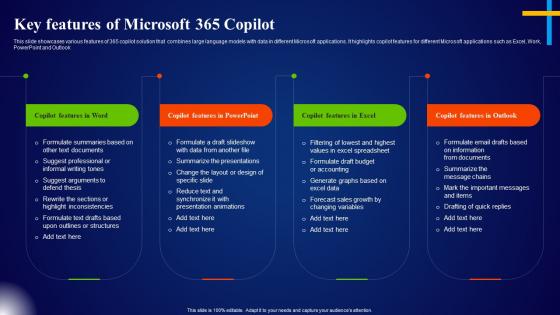
This slide showcases various features of 365 copilot solution that combines large language models with data in different Microsoft applications. It highlights copilot features for different Microsoft applications such as Excel, Work, PowerPoint and Outlook.
People who downloaded this PowerPoint presentation also viewed the following :
Key Features Of Microsoft 365 Copilot Microsoft AI Solutions AI SS with all 9 slides:
Use our Key Features Of Microsoft 365 Copilot Microsoft AI Solutions AI SS to effectively help you save your valuable time. They are readymade to fit into any presentation structure.








FAQs for Key Features Of Microsoft 365 Copilot Microsoft AI
Dude, you gotta try Microsoft 365 Copilot for PowerPoint templates - it's honestly a game changer. Just tell it what kind of slides you need and it'll whip up layouts that actually match your content. The design suggestions are surprisingly good too, especially for brand stuff. I was skeptical at first but the placeholder text it creates is way better than lorem ipsum nonsense. It picks up on your presentation style over time, which is kinda cool. Oh, and it keeps your formatting consistent without you having to think about it. Start with asking it to build templates for your most common presentation types. Total time saver.
So basically you'll see the Copilot button right in your usual apps - Word, Excel, PowerPoint, whatever. Just click it and ask it to do stuff with your actual files. Like I can tell it to summarize a Word doc I'm working on or make slides from my notes. No copying things around between different programs, which is nice. It actually knows what you're doing since it's baked into Microsoft's whole thing. Oh and definitely try it in Word first - just select some text and ask it to change the tone or whatever. That's how I figured out what it could do.
So Copilot basically watches how you work and learns your patterns - like it'll scan your old presentations, meeting notes, all that stuff to figure out your style. When you're making a new deck, it can pull charts from your Excel files or suggest slides that actually make sense for your topic. The prompts you give it matter a lot though - be specific about what you want and it'll do way better. I've noticed it gets pretty good at matching your usual tone once it has enough data to work with. Oh and it can even suggest talking points based on who you're presenting to, which is honestly kind of impressive.
Yeah, Copilot's actually really good for this! You can just tell it something like "make a bar chart for Q3 sales by region" and it'll whip one up in PowerPoint. Pretty cool honestly. It'll even suggest which chart type works best for your data - though sometimes I think it gets a little overzealous with the recommendations lol. The key thing is having your data organized first. Otherwise it gets confused. But once that's sorted, it can help polish up existing charts too and make them look way more professional.
Dude, you need to try the real-time collaboration thing in Microsoft 365 Copilot. Everyone can jump in the same PowerPoint file at once. Multiple people editing slides while the AI suggests content and helps with layouts - it's pretty wild honestly. The coolest part? Copilot takes everyone's random ideas and somehow turns them into something that actually makes sense. Oh, and it'll draft speaker notes too based on what your team's throwing around. I swear you'll cut your prep time in half. Way better than the old email-drafts-back-and-forth nightmare we used to do.
Start by making custom templates with your brand colors and fonts - that's the foundation. Upload your brand guidelines so Copilot actually knows what you're going for. Be super specific with prompts like "use our formal template with blue accents." Honestly, the more detailed you are about tone, the better it performs. Always double-check what it spits out though - sometimes it goes rogue in weird ways. Oh, and save the prompts that work well! You'll thank me later when your whole team can just copy-paste the good ones instead of starting from scratch every time.
Dude, Copilot is a game changer for research. Just tell it your presentation topic and it'll dig through all your company's files, emails, SharePoint stuff - you name it. No more spending hours hunting through random folders (honestly, who has time for that?). Ask it something like "help me research [topic] using our internal documents" and watch it work. It finds supporting data, summarizes key points, even tells you who's worked on similar projects before. Pretty sweet that it pulls everything together instead of you jumping between ten different sources.
Honestly, Copilot is kinda meh for presentations. It spits out super generic stuff that doesn't know anything about your company or audience. The layouts it suggests? Often weird for what you're actually trying to say. Also terrible with complex charts and data stuff. You'll end up rewriting most of it anyway since it misses all the nuanced points you want to make. I mean, it's decent for getting past that horrible blank slide stare. But yeah, expect to spend ages customizing everything to not sound like a robot wrote it.
So basically Microsoft 365 Copilot watches how you present and gives you tips while you're talking. It tracks your pacing, filler words, all that stuff. You'll get little pop-ups only you can see - like "slow down" or "stop saying um so much." Your audience has no clue you're getting coached. Honestly, the pacing alerts are super helpful. I tried it last month and it actually caught me rushing through my intro. After you're done, it gives you this breakdown of what to work on. It's kinda like having someone whisper feedback in your ear but way less awkward.
Yeah, Copilot can definitely help with interactive stuff for PowerPoint! It's more about content ideas than actual functionality though. Ask it to create polls, Q&A slides, or discussion prompts. Pretty useful for making presentations less boring, honestly. It'll also suggest where to put clickable buttons or navigation elements. The AI recommends interactive layouts too and helps structure things so people actually participate. You still have to set up the interactive features yourself in PowerPoint - kind of annoying but whatever. Just try asking it to "suggest interactive elements for my presentation on [your topic]."
So Microsoft 365 Copilot basically follows whatever security setup you already have. Your presentation stuff stays locked down within your company - it won't leak out or train their models. The AI can only see what you can see anyway, so if Bob from accounting can't access those confidential slides, Copilot won't show him either. Pretty smart system honestly. Just make sure your DLP policies are actually configured right for presentations before you let everyone loose with it. Oh, and it inherits all your existing permissions too, which is nice.
Honestly, Copilot's been a game-changer for my presentation prep. I'll ask it to whip up slide outlines or come up with discussion questions. The analogies it suggests for tricky concepts are actually pretty brilliant - way better than what I'd think of at 11pm the night before. PowerPoint integration is solid too. It can auto-generate slides from stuff you already have or help polish your talking points. Oh, and interactive activities - it's surprisingly good at those. My go-to prompt is "create 5 engaging ways to teach [whatever topic]" then I just build from there. Saves me tons of brainstorming time.
Dude, Copilot is actually really good at this stuff. It'll help you tweak your tone for different audiences and can even translate slides if you need multiple languages. The cultural sensitivity thing is surprisingly solid too - like it suggests better examples that don't accidentally exclude people. You can ask it to add diverse perspectives to your talking points, which honestly saves me from second-guessing myself constantly. Oh, and it's great for accessibility stuff like alt text. Just be specific about who you're presenting to when you prompt it. Makes a huge difference in the suggestions you get.
So here's the thing - Copilot doesn't actually learn from what you do or save your personal stuff to get better at helping you. It just looks at your current session plus whatever's in your Microsoft apps (emails, docs, calendar stuff) to give you answers. Microsoft updates the AI models sometimes, but not based on how you specifically use it. Honestly thought it would work differently when I first heard about it! Your suggestions stay pretty much the same since it's just working with whatever data you already have available.
Oh nice! Yeah, Microsoft has some solid training stuff for Copilot in PowerPoint. The Microsoft 365 learning hub is your best bet - tons of tutorials and videos just for presentations. They've got these hands-on labs too where you can mess around with creating slides or fixing up old ones. Honestly, the prompt tips alone will totally change how you use it. Check if your company does any internal workshops first though - mine did one last month that was actually pretty helpful. But the Microsoft Learn modules are free and you can just do them whenever, so I'd probably start there.
-
Great product, helpful indeed!
-
Loved the templates on SlideTeam, I believe I have found the go to place for my presentation needs!