


Linkedin Marketing Analytics With KPI Dashboard




Try Before you Buy Download Free Sample Product
 Impress Your
 Audience
 100%
100% Editable
 Save Hours
 of Time


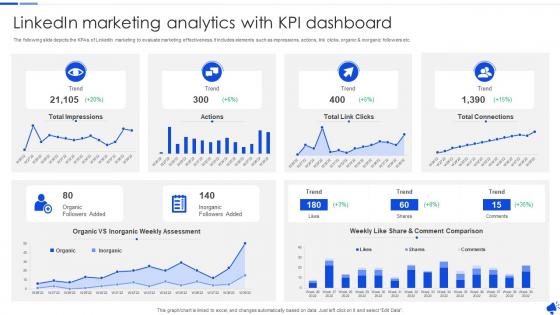
The following slide depicts the KPAs of LinkedIn marketing to evaluate marketing effectiveness. It includes elements such as impressions, actions, link clicks, organic and inorganic followers etc.
People who downloaded this PowerPoint presentation also viewed the following :
Linkedin Marketing Analytics With KPI Dashboard with all 7 slides:
Use our Linkedin Marketing Analytics With KPI Dashboard to effectively help you save your valuable time. They are readymade to fit into any presentation structure.






FAQs for Linkedin Marketing Analytics
Check impressions and reach first - that's how many eyeballs you're getting. Then look at engagement rate (likes, comments, shares) and click-through rates. Follower growth matters too, obviously. The demographic stuff is super useful since it shows who's actually interacting with your posts. But honestly? Don't obsess over vanity metrics like total likes. Focus on the money stuff: leads generated, website traffic from LinkedIn, how many prospects convert to customers. I'd peek at analytics weekly and tweak your content based on what drives real results, not just engagement for engagement's sake.
Honestly, just dig into LinkedIn Analytics - it'll show you what's actually working. Your engagement rates and click-throughs are gold for figuring out what your audience likes. The demographics breakdown is super helpful too. I found out my people are weirdly active at like 7am on Tuesdays (who knew?). Look at your best posts from the past month and spot the patterns - topics, format, whatever. Then just do more of that stuff and drop what's flopping. Make a simple spreadsheet to track winners vs. total duds. Takes maybe 20 minutes but you'll finally know what actually lands.
Personal profiles give you the bare minimum - who checked you out, search stats, basic engagement stuff. But Pages? That's where the good stuff lives. You get detailed follower breakdowns, serious content performance data, visitor tracking, conversion metrics... the works. Think of it like this: personal analytics just tell you "people noticed you." Page analytics actually show you what's working and what isn't. You can track performance over time, compare different post types - honestly it's night and day different. If LinkedIn marketing matters to you at all, definitely go with a Page for those insights.
Track LinkedIn's Campaign Manager stuff first - CTR, cost per click, conversions. That's your baseline. But honestly, most people stop there and wonder why their boss isn't happy with their "engagement rates." You gotta connect those clicks to actual money. Set up UTM parameters on everything so you can follow leads all the way through your CRM. Then do the math - LinkedIn spend vs revenue from those conversions. I check mine monthly because trends are easier to catch that way. Oh, and don't forget to factor in longer sales cycles if you're B2B.
Honestly, forget follower counts - engagement rate tells you way more. Click-through rates show if people actually care enough to take action. Comments are huge on LinkedIn since nobody really comments there anyway, so each one's pretty valuable. I always compare my stuff to my own past performance instead of some random industry benchmark because audiences are weird and different. Try tracking which types of posts work best and when you post them. Oh and definitely see if your engagement turns into actual results - like do you get more profile views or connection requests? That's what really matters.
LinkedIn demographics show you exactly who's seeing your posts - and honestly, it's probably not who you think. Senior tech execs? Give them industry insights, not basic tutorials. Younger professionals love video content and polls, but older audiences stick to articles and case studies. Age breakdown really matters here. I learned this the hard way when I kept posting beginner stuff to an audience of VPs. Don't assume your target audience matches reality though. Check those numbers monthly and switch up your content style, timing, everything to match who's actually engaging.
LinkedIn's built-in analytics are honestly pretty weak. I'd grab Hootsuite or Sprout Social first - way better for comparing across platforms and scheduling stuff. Buffer's solid for tracking how your content actually performs. Google Analytics integration works great if you want to dig deeper, or check out Emplifi (used to be Socialbakers) though that one's gonna cost you. On a tight budget? Google Data Studio can pull LinkedIn data for custom dashboards - not as fancy but it works. Pick whatever fixes your biggest headache first, whether that's planning posts or figuring out ROI.
LinkedIn A/B testing is pretty flexible - you can test headlines, copy, images, CTAs, basically anything. Just test one thing at a time though, otherwise you won't know what actually worked. Run both versions to the same audience simultaneously (LinkedIn's expensive so make sure your budget can handle getting real data). Their analytics will show you the winner based on CTR, engagement, conversions, all that stuff. Honestly, the continuous testing approach works way better than doing it once and calling it done. Use what you learn from each test to build the next round of creative.
So LinkedIn's Insights Tag is just a tracking pixel you drop on your website. Install it and you'll see what people do after clicking your LinkedIn ads - like conversions, page visits, all that good stuff. Way better than flying blind with your campaigns! You can build retargeting audiences too, which honestly makes such a difference. Oh and make sure you put it on pages that actually matter - contact forms, pricing, thank you pages. Otherwise you're missing the whole point. It's basically how you figure out if your LinkedIn ads are worth the money or just burning through budget.
Check your LinkedIn Analytics - the demographics section is actually super helpful. See what job titles and industries your followers have, then tailor your content to match. Like if you've got a bunch of mid-level marketing people following you, skip the CEO-level strategy posts and focus on practical campaign tips instead. Geographic stuff matters too - I always forget about that part. Pull your last 3 months of data and match your top content themes to your biggest audience segments. It's wild how much more engagement you'll get when you actually know who you're talking to.
Honestly? Most people get way too excited about followers and likes when none of that stuff pays the bills. Like, cool, your post got 500 likes - but did anyone actually buy anything? That's what I'd be asking. Another huge thing - stop looking at your metrics like one big blob. Break it down by who's actually seeing your content. A CEO's gonna behave totally different than some junior marketing person, you know? Focus on clicks to your site first, then see what converts. Way more useful than vanity numbers.
LinkedIn's built-in analytics actually show you industry averages right there in your Company Page insights - saves you from guessing. It compares your stuff to similar companies automatically. Hootsuite and Sprout Social have broader benchmarks too if you want more data. Most industries see 2-5% engagement rates, which honestly seems low but that's the reality. Screenshot your current numbers first so you can see if you're actually improving later. Oh, and pay attention to which content types work best for you - that varies way more than people think. Check posting frequency against competitors while you're at it.
Honestly, LinkedIn analytics are a game-changer for figuring out what actually works. You can see which posts get people clicking on your profile or sending connection requests - way better than just counting likes. The demographic stuff is clutch too, shows you if you're hitting actual decision-makers or just random people killing time. I always check what times my posts do best, then stick to that schedule. Oh, and don't get caught up in vanity metrics like total views. Focus on tracking follower quality and which content types bring in the connections you actually want.
Honestly, timing makes a HUGE difference on LinkedIn - we're talking 30-50% swings in engagement. Most people post whenever and wonder why their stuff flops. Tuesday-Thursday between 9-11 AM and 1-3 PM usually work best since that's when people are procrastinating at work (let's be real). But your audience could be totally different! I'd check your Page Analytics first to see when your followers are actually online. Then test those peak times for a few weeks. The difference will probably shock you. Way more important than people think.
Yeah, LinkedIn's algorithm changes will totally screw with your analytics - super annoying when you're trying to figure out if your content actually sucks or if it's just the platform. Sometimes what looks like your reach tanking is really just LinkedIn deciding to push video over carousels or whatever. I always check if there were any recent algorithm updates when I see weird spikes or drops. Focus on longer trends instead of panicking over weekly numbers. Oh, and compare your stuff to industry benchmarks since we're all dealing with the same algorithmic chaos.
-
Making a presentation has never been this easy for me. Thank you SlideTeam for offering a splendid template library.
-
Informative and engaging! I really like the design and quality of the slides.