


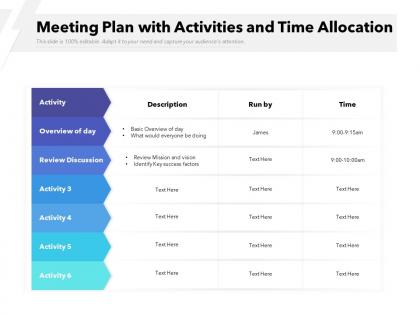
Meeting plan with activities and time allocation




Try Before you Buy Download Free Sample Product
 Impress Your
 Audience
 100%
100% Editable
 Save Hours
 of Time


Our Meeting Plan With Activities And Time Allocation are explicit and effective. They combine clarity and concise expression.
People who downloaded this PowerPoint presentation also viewed the following :
Meeting plan with activities and time allocation with all 2 slides:
Give your audience a fulfilling experience. They will find our Meeting Plan With Activities And Time Allocation elevating.
FAQs for Meeting plan with activities
Okay so first - be super specific with your agenda. Like don't just say "discuss budget," write "approve marketing spend for Q4." Way more helpful. Send stuff out 2 days ahead so people aren't just winging it. Only invite who actually needs to be there (I swear some meetings have half the company for no reason). Block out time for each topic and stick to someone facilitating. Oh, and get someone taking notes - otherwise you'll forget everything by Thursday. Preparation really makes or breaks it. Most meetings honestly should've just been a quick email thread, but when you do need everyone together, these basics work.
Honestly, templates are a game-changer for meetings. Everyone knows what's coming when you stick to the same format - objectives up top, then discussion stuff, action items at the end. People can actually find what they need instead of hunting around. Short sentences work better than rambling ones. The visual consistency helps too since you can scan through everything quickly. I swear, once people get used to the same structure, they actually pay attention instead of zoning out. Pick one format and use it for like 3-4 meetings - you'll see the difference. Way less chaos, more actual productivity.
Honestly, the key is switching things up constantly or people just check out. I always do quick check-ins at the start - something simple, not cheesy. Breakout rooms work great, and polls keep everyone awake. Oh, and call people by name instead of that "any thoughts?" thing that gets crickets every time. The camera thing is tricky - I hate forcing it but participation definitely drops when everyone's a black box. Google docs where people can type together in real-time is gold. Keep everything short though, like 15 minutes tops before you switch gears. End early and get one takeaway from each person.
Okay so honestly? Set time limits for each thing on your agenda and actually stick to them. People zone out way less when they know you're not gonna let discussions drag on forever. I use timeboxing - like 10 minutes for budget stuff, 15 for project updates, whatever. Sometimes I'll even do standing meetings because nobody wants to stand around talking in circles for an hour lol. Get someone to be the timekeeper if you have to. The whole point is people leave knowing what they need to do next instead of feeling like they just sat through another useless meeting. Try putting a timer on your phone next time.
Meeting planning is basically impossible without tech these days. I'd start with Calendly or Doodle for scheduling - saves so much back-and-forth nonsense. Then grab Zoom or Teams for the actual meetings. Google Calendar handles invites automatically, which is clutch. During meetings, shared docs work great for agendas and notes. Afterwards, you'll want something like Asana or Monday for tracking who's doing what. Honestly, just picking one scheduling tool and one video platform will probably save you like 5 hours a week. Maybe more if your team's really bad at coordinating stuff normally.
Definitely shoot them an email within 24 hours with all the key stuff - decisions made, who's doing what, deadlines, etc. Bullet points are your friend here since nobody has time to read paragraphs anymore. Be super clear about ownership though, because that "wait I thought YOU were handling this" disaster is the worst. Oh and don't just send it and forget about it. Actually follow up before deadlines hit. I usually set reminders to check in a few days early - catches problems before they become fires and shows you're paying attention.
Honestly, timing is huge - don't stack meetings without breaks because people literally need to pee. Skip the vague agendas too, like "project discussion" tells nobody anything useful. Only invite who you actually need; cramming everyone in just kills the whole vibe. Sometimes you don't even need to meet - an email works fine. Test your screen sharing beforehand or you'll waste forever troubleshooting while everyone sits there. Send stuff ahead so people can actually prepare. I learned this the hard way, but always wrap up with who's doing what next. Plan this out a few days early, not the night before.
Honestly, visual aids are a game changer for meetings. People actually pay attention when there's something to look at instead of just staring at whoever's talking. Charts and slides help everyone stay on the same page - way better than making people imagine complex stuff in their heads (which never works anyway). Templates are clutch too because you're not starting from scratch every time. Just keep everything clean and directly related to what you're discussing. Oh, and definitely don't overload slides with text - nobody reads that anyway. You should totally set up a basic template this week for your regular meetings. Trust me, you'll thank yourself later.
Honestly? It totally depends on what you're trying to accomplish. Quick status updates should be 15-30 minutes tops. But if you're doing strategic planning or brainstorming, give yourself 60-90 minutes - you can't rush creativity, you know? Also consider who's attending and when you're meeting. Nobody's brain works well during those Friday afternoon death traps. I always book meetings for 25 or 50 minutes instead of the full 30/60 to give people breathing room between back-to-back calls. Shoot for the shortest time that won't make the discussion feel rushed.
Honestly, switching up your activities every 15-20 minutes is a game changer. Some people need visuals like slides or charts, others learn better through discussion, and then you've got the hands-on folks who want breakouts or activities. Death-by-PowerPoint is still a thing unfortunately - nobody wants to sit through 90 slides straight. Pre-reading helps too if people actually do it (big if). Short activities work better than long ones. Always send a summary afterward since half the room zones out anyway. Mix it up and you'll be fine.
Give people at least 48 hours notice - nobody likes scrambling to rearrange their calendar last minute. Put the meeting purpose and agenda right in the invite so they know what they're walking into. The subject line should have the key details because honestly, that's sometimes all people actually read. End meetings 5-10 minutes early to give everyone breathing room between calls. Always include dial-in info even for "in-person" stuff since someone inevitably ends up remote. Oh, and if it's over an hour? Send a reminder the day before or you'll get the "wait, was that today?" messages.
Oh totally, dig into that feedback from your old meetings. I learned this the hard way after running terrible sessions for months lol. Check what people actually said - was your agenda too crammed? Did they need more heads up time? Short surveys work great, or just ask directly. Some topics always drag on longer than you think they will. If certain people seem checked out every time, that's telling you something too. Then tweak your next meeting based on what you found. Different timing, better structure, whatever fits. Makes such a difference once you start paying attention to these patterns.
Honestly, just match the template to what you're trying to do. Brainstorming needs tons of whitespace for capturing random ideas. Team updates? Use structured agendas with status reports and action items. One-on-ones are where templates really shine - having dedicated feedback sections prevents those weird awkward pauses when nobody knows what to talk about. Strategy meetings work better with decision frameworks built in. Don't overthink it though. Start simple with basic templates for your regular meetings, then tweak them based on what people actually use. Complex meetings need complex templates, simple ones don't.
Oh totally, the setting changes everything. Physical meetings put people on the spot more - you can't really hide when you're zoning out. Virtual ones are weird though. Some folks get super chatty in the chat box (way more than they'd speak up normally), but others just go on mute and you literally never hear from them again. I'd say match your approach to wherever you are. Virtual needs more structure - like actual breakout rooms and planned interaction moments. In-person meetings already have that natural buzz, so you can do more organic stuff like group discussions. Honestly, I still think nothing beats face-to-face energy when it works.
Honestly, round-robin style works great - just go around asking everyone directly. Anonymous stuff helps too, like digital polls or those sticky note things. Some people freeze up when put on the spot but are fine writing ideas down. Oh, and maybe give the quiet ones a heads up about topics beforehand? I'd also have someone watch for people trying to jump in - you know how some folks just aren't aggressive about getting airtime. Ground rules about interrupting are clutch, or even use timers if people ramble. Don't just hope it'll happen naturally though.
No Reviews