


Monthly Project Management Timeline With Documentation




Try Before you Buy Download Free Sample Product
 Impress Your
 Audience
 100%
100% Editable
 Save Hours
 of Time


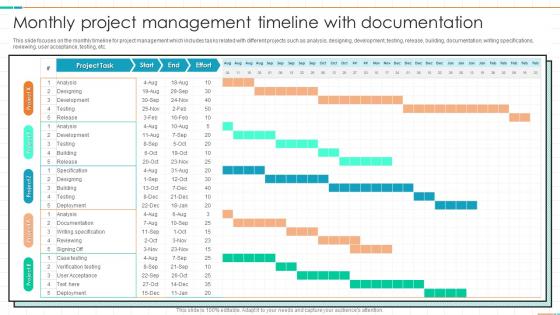
This slide focuses on the monthly timeline for project management which includes tasks related with different projects such as analysis, designing, development, testing, release, building, documentation, writing specifications, reviewing, user acceptance, testing, etc.
People who downloaded this PowerPoint presentation also viewed the following :
Monthly Project Management Timeline With Documentation with all 6 slides:
Use our Monthly Project Management Timeline With Documentation to effectively help you save your valuable time. They are readymade to fit into any presentation structure.
-
Monthly Project Management Timeline With Documentation
-

Monthly Project Management Timeline With Documentation
-

Monthly Project Management Timeline With Documentation
-

Monthly Project Management Timeline With Documentation
-

Monthly Project Management Timeline With Documentation
-

Monthly Project Management Timeline With Documentation
FAQs for Monthly Project Management
Start by breaking your project into specific deliverables, then figure out which tasks depend on others finishing first. This dependency stuff is honestly where most people mess up if they rush through it. You'll want realistic timeframes and clear ownership for each piece. Buffer time is a lifesaver - trust me on this one. Weekly team check-ins help catch problems early. The goal is finding that sweet spot between detailed tracking and flexibility when things inevitably change. Oh, and don't forget to assign who's actually doing what - sounds obvious but you'd be surprised how often that gets overlooked.
Dude, Gantt charts are honestly clutch for project timelines. They lay out all your tasks, dependencies, and deadlines in one spot so you can actually see what's happening. I love how you can spot overlapping work and figure out your critical path right away. When your boss inevitably asks "so when's this gonna be ready?" you literally just point at the chart - saves so much back-and-forth explaining. The progress bars make it dead simple to catch delays early too. My advice? Start with your big milestones first, then fill in the smaller tasks underneath. Trust me on this one.
Gantt charts are probably your best bet - Microsoft Project, Asana, Monday.com all do the job well for tracking dependencies. I swear some people get way too into their Gantt charts though lol. Trello's timeline view works fine for simpler stuff, or honestly even Google Sheets if you're not dealing with anything too complex. The biggest thing is picking whatever your team will actually stick with. No point getting the fanciest tool if half your people won't use it. I'd start with something that plays nice with whatever you're already using and see how it goes.
Honestly, it totally depends who you're talking to. Executives just want the big stuff - major milestones, key deliverables. Don't bore them with every tiny task. Your actual team needs way more detail though, like 1-2 week chunks they can actually do something with. I made this mistake once and created this insanely detailed timeline that nobody could even follow - what a waste of time! Early on, keep it high-level. You can always zoom in later when deadlines start breathing down your neck. Better to start broad and add detail as you go.
Dude, the worst thing you can do is underestimate how long stuff actually takes. Always add like 20-30% buffer time because something will go wrong - trust me on this one. Get your team involved in planning since they're the ones doing the work and know what's realistic. Scope creep kills timelines if you don't push back. Break everything into smaller pieces so you can track progress better. Document changes obsessively - when people want to add more work, you can show them exactly how it'll mess up the schedule. Honestly, most timeline disasters happen because nobody wants to have the awkward conversation about tradeoffs upfront.
First thing - figure out which tasks need others done before they can start. Map those out or you'll hate yourself later (learned this the hard way lol). Drop your milestones at major deliverables or decision points. Space them out so you're tracking progress but not annoying everyone with constant check-ins. Gantt charts actually help here - they show how everything connects visually. Don't just set it and forget it though. Things shift constantly, so I'd review weekly. Dependencies change, milestones move. Set a recurring calendar reminder or stuff will definitely slip through the cracks.
Dude, you HAVE to stay on top of stakeholder communication or your timeline's toast. Regular check-ins are like your early warning system - they catch scope creep and resource issues before everything goes sideways. I can't tell you how many projects I've watched crash because people thought everyone was aligned (narrator: they absolutely were not). Weekly touchpoints help you spot risks early and actually get people to agree on changes. Document everything too, even the boring stuff. Trust me, you'll be grateful later when someone "doesn't remember" agreeing to push the deadline.
Honestly, I'm checking mine daily when projects get hectic - weekly is probably the minimum though. Big milestones or scope changes? That's an instant timeline review. Don't wait until you're already behind schedule, that's the worst. I do formal check-ins weekly but also quick gut checks whenever something feels wonky. Oh, and definitely set a recurring reminder or you'll forget (I learned that the hard way). The second anything shifts, tell your stakeholders immediately. Trust me, they hate surprises way more than minor delays.
Ugh, timeline disasters are the worst! When stuff goes sideways, don't panic and start changing everything - that just makes it worse. Build some buffer time into your schedule from day one (learned this the hard way). You can fast-track critical tasks or crash certain activities if needed. Honestly, communication saves your butt more than fancy project management tricks. Keep everyone updated on what's happening and why things shifted. Document the chaos too - future you will thank you when this inevitably happens again.
So agile works with these short 1-4 week sprints that can pivot when stuff changes - way more flexible but honestly feels messy at first. Traditional planning maps everything out upfront with fixed milestones. I actually prefer agile most of the time, but if your stakeholders need predictable dates and the scope won't shift much, traditional might save you headaches. Quick test: think about whether your requirements will probably change a lot during the project. That's usually the biggest factor in picking which way to go.
Don't just dump a timeline on them - that never works. Instead, pull everyone into a planning meeting where they can actually weigh in on deadlines and suggest what's realistic given their current workload. Be upfront about why certain dates can't move, like client deadlines or budget stuff. When people help build the timeline, they're way more likely to stick to it. Write down the compromises you make so nobody feels ignored later. Honestly, I've seen so many projects crash because managers skipped this step. Short version: make them partners in creating it, not just victims of your schedule.
Honestly, just compare what you planned vs what actually happened with your big milestones. Are you ahead, on time, or behind schedule? I track both individual tasks and the overall project percentage - earned value is clutch for this since it shows if you're actually getting stuff done by your target dates. Scope changes will mess with timelines (happens to everyone, don't stress). Set up checkpoint reviews so you catch problems early instead of scrambling later. Oh, and make a simple dashboard with planned vs actual dates - saves you from those "oh crap" moments when everything's already falling apart.
Honestly, resource allocation will make or break your timeline every single time. Don't plan around people you haven't actually confirmed - I learned this the hard way when our "dedicated" senior dev was secretly managing two other projects. Buffer time is your friend here. Check in with your key people weekly, not just once at the start. Sounds paranoid but trust me on this one. Oh and never assume someone's availability - always verify it first. Those "sure, I can help" conversations mean nothing without actual calendar blocks.
Oh man, I wish I'd started doing this years ago! Keep notes on what screws up your timelines every single project. Like, testing probably takes way longer than you think - mine's always 30% over. Client feedback? Boom, there's your extra two weeks right there. I keep this super basic "what went wrong" doc now after each project wraps up. Sounds nerdy but honestly it's saved my ass so many times. Look for the patterns and just bake those delays into your next timeline from day one. Way better than explaining to your boss why you're behind schedule again.
Don't overcomplicate your timeline visuals - stick to the big milestones instead of cramming in every little task. Honestly, color-coding by priority saves so much headache when people are trying to scan through everything quickly. Execs want those clean Gantt charts, but your team needs the nitty-gritty with all the dependencies mapped out. Always build in buffer time (trust me on this one) and call out any risks upfront. The biggest thing though? Keep updating them and tell people immediately when stuff changes. I've seen so many project managers lose all credibility because their timelines were completely stale. Oh, and start every meeting explaining what's different from last time.
-
Happy to found you SlideTeam. You guys are value for money. Amazing slides.
-
Amazing slides! Unique, attractive, and easy to understand.