

Patient Appointment Scheduling Flowchart For Medical Clinics




Try Before you Buy Download Free Sample Product
 Impress Your
 Audience
 100%
100% Editable
 Save Hours
 of Time


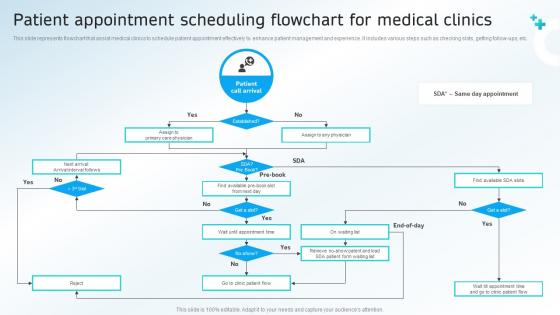
This slide represents flowchart that assist medical clinics to schedule patient appointment effectively to enhance patient management and experience. It includes various steps such as checking slots, getting follow-ups, etc.
People who downloaded this PowerPoint presentation also viewed the following :
Patient Appointment Scheduling Flowchart For Medical Clinics with all 9 slides:
Use our Patient Appointment Scheduling Flowchart For Medical Clinics to effectively help you save your valuable time. They are readymade to fit into any presentation structure.








FAQs for Patient Appointment Scheduling Flowchart
No-shows drop big time, and your staff won't be stuck playing phone tag all day. Patients can book whenever they want online, get reminder texts, handle their own rescheduling - the whole thing runs itself. Nobody wants to sit on hold forever just to schedule a cleaning, you know? Plus you get way better data on booking patterns so you can actually optimize things. Oh, and patient satisfaction goes through the roof. I'd test it with just one provider first though, work out the bugs before going all-in with everyone.
Honestly, automated text reminders work way better than calls - send them 48 and 24 hours out. Most people actually read texts. Make rescheduling dead simple too, like give them a direct link or number so they don't have to call your front desk and wait on hold forever. That's where you lose people. Online booking helps if you can swing it, plus same-day slots when possible. The reminder thing though? Start there. It's the easiest win and you'll see results pretty fast. Flexible scheduling is great but reminders are your quick fix.
Honestly, self-scheduling is a lifesaver for patient experience. People can book whenever they want - 2am on a Sunday? Sure. No more waiting on hold forever just to schedule a cleaning (seriously, who has time for that during work hours?). Patients feel way less frustrated because they're in control of their own calendar. The best part though? Way fewer no-shows. When someone picks their own time slot instead of getting stuck with whatever you offer them, they actually show up. It removes so much friction from an already annoying process.
Honestly, start with automated reminders - that alone cuts no-shows by like 30% which is huge. Then look into online booking systems where patients can schedule themselves 24/7. The new AI scheduling tools are actually pretty solid at handling conflicts too. Your EHR integration matters so everything syncs up properly. SMS and email confirmations help a ton. Self-service cancellations mean less work for your staff, which they'll probably love. I'd roll it out gradually though - don't try to implement everything at once or you'll go crazy.
Honestly, the two big pain points are gonna be your staff freaking out about change and getting your current systems to actually talk to each other. People hate learning new stuff when the old way works fine - I get it. But if you let them help pick the platform and don't skimp on training, they'll come around. Oh, and definitely check that whatever you choose plays well with your EHR first. Nothing worse than finding out after the fact that it doesn't integrate properly. I'd run a test with just one doctor's schedule before going all-in clinic-wide.
Set a 24-48 hour cancellation policy and be super clear about it when people book. Text or email reminders 2-3 days out help a ton with no-shows. Keep a waitlist - seriously, it's amazing how fast you can fill spots when someone cancels. For people who cancel constantly, maybe require deposits or confirmation calls. Quick tip: make sure your staff can reschedule easily without endless back-and-forth calls. Track the repeat cancellers too so you can have that awkward conversation when needed. Being flexible is good, but don't let people walk all over you.
Honestly, scheduling is what makes or breaks your whole practice. Get it right and your staff stays sane, patients aren't sitting around forever, and you're actually making money instead of having rooms sit empty. But screw it up? Total chaos. I've seen places where one bad scheduling system created this nightmare ripple effect - overbooked mornings, dead afternoons, everyone stressed out. Your patients will hate waiting, staff gets burned out from the constant scramble. Really good scheduling software helps though - the smart ones can even predict who's likely to be a no-show based on past patterns.
Data analytics is a game-changer for appointment scheduling, honestly. You can predict which patients will no-show using historical patterns, then strategically overbook to fill those gaps. It helps you figure out peak demand times too - like how Tuesdays are always slammed for some reason. The cool part is spotting trends in appointment types and wait times so you can adjust staffing. I'd start by tracking everything: booking sources, completion rates, cancellation patterns. Once you have clean data flowing in, the scheduling decisions basically make themselves. Short appointments during lunch rush, longer blocks when it's quieter.
Mix up your channels - text, email, phone calls at different times like 48hrs, 24hrs, 2hrs out. Texts are honestly your best bet since people are glued to their phones anyway. Include all the basics: date, time, doctor's name, plus easy confirm/reschedule options. The whole point is letting patients handle changes without calling you back (saves everyone time). Oh and definitely track what actually works for your crowd - some demographics respond way better to certain methods than others.
Keep it stupid simple - patients are already stressed about booking appointments. Your calendar needs to make sense instantly. Big obvious buttons, clear time slots, and you should see provider availability right away. Honestly, most of these systems look like total garbage because engineers design them for other engineers, not actual people. Minimize clicks to book and make rescheduling super easy since everyone changes their mind. Oh, and confirmation messages that actually tell you what happened. Start by thinking like a patient first, not the clinic.
Honestly, just treat virtual appointments like regular ones in your scheduling system. Flag them as "virtual" instead of in-person - same time slots, same booking process. Most EMR systems have telehealth modules now that sync with your calendar, so patients can pick their format when booking. The annoying part? You'll definitely get calls from people who can't figure out the video platform. Trust me on this one. Be upfront about device requirements and internet stuff from the start. My advice: add some virtual slots to your current schedule and see how it goes. Way easier than overhauling everything at once.
HIPAA-compliant software is non-negotiable for scheduling - don't even think about using regular apps. Set up role-based access so staff only see what they need to. Audit trails are clutch because you'll know exactly who looked at what and when. Train everyone on privacy rules and honestly, this part gets overlooked way too much. Never chat about appointments where patients can hear you. Auto-timeouts are a must since people forget to log out constantly. My advice? Skip the headache and get healthcare-specific software with built-in security rather than trying to patch together something generic.
Yeah, so each specialty is totally different when it comes to scheduling. Surgery blocks need way more time - like, you can't just squeeze those in anywhere because of all the prep work. Primary care is the opposite - they pack appointments super tight. Mental health is interesting because patients really want the same time slot every week, which makes sense I guess. Dermatology appointments are usually quick, so they can fit people in last minute pretty easily. Then you've got cardiology where they need time between patients for equipment setup. Honestly, the best thing is to just watch how each department actually works before you try to copy their scheduling style.
Check your EMR first - most of them already have analytics built in for tracking wait times, no-shows, and appointment usage. You might be sitting on features you didn't even know existed. For dedicated tools, Qgenda Analytics and Epic's reporting suite are solid options. Honestly, even a basic spreadsheet works if you're not ready to go fancy. Focus on average wait times, cancellation patterns, when your busiest periods hit, and how efficiently your providers are moving through patients. Some places use real-time patient flow software too, which is pretty neat for catching delays as they happen. Start digging around your current system's reporting section - you'll probably find more than you expect.
Set up feedback touchpoints throughout the whole patient journey - post-appointment surveys about booking, wait times, staff stuff. Send automated follow-ups right after visits since people actually respond when it's fresh. Quick rating buttons in your portal work great too, or those lobby tablets everyone's doing now. Here's the thing though - you've gotta actually USE the feedback. Review it monthly with your team and make real changes patients can see. I swear, if people don't see improvements they'll just stop participating. It's like asking someone's opinion then ignoring it, you know?
-
Understandable and informative presentation.
-
It is my first time working with them and that too on a friend's recommendation. I would say, I am not expecting such a worldly service at this low price.