


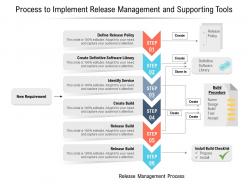
Process to implement release management and supporting tools





Try Before you Buy Download Free Sample Product
 Impress Your
 Audience
 100%
100% Editable
 Save Hours
 of Time


Our Process To Implement Release Management And Supporting Tools are topically designed to provide an attractive backdrop to any subject. Use them to look like a presentation pro.
People who downloaded this PowerPoint presentation also viewed the following :
Process to implement release management and supporting tools with all 2 slides:
Use our Process To Implement Release Management And Supporting Tools to effectively help you save your valuable time. They are readymade to fit into any presentation structure.
FAQs for Process to implement release management
So there's four main phases you'll hit: planning, build/test, deployment, then monitoring after launch. Planning's where you map out what's going in and when. Build and test is honestly where everything goes sideways - always takes way longer than you think it will. Then you deploy using whatever rollout strategy you picked, and monitor for bugs plus user feedback afterward. Oh, and set up gates between each phase with actual criteria for moving forward. Trust me, you don't want to just guess whether you're ready or not.
Dude, these tools are lifesavers - they handle all the boring stuff like builds, testing, deployments automatically. No more "oh shit I forgot to migrate the database" disasters. Your releases become way more predictable since it's the same process every time. Plus everything's faster. Honestly, the best part is your team stops wasting time on deployment headaches and can actually work on cool features instead. I'd say just start with automating builds first. Don't try to do everything at once or you'll go crazy.
Dude, communication literally makes or breaks releases. I've watched so many projects crash because nobody told the right people about delays or changes. Dev teams, executives, users - they all need updates before stuff hits the fan. Build your communication strategy right when you start planning, not later when you remember "oh crap, we should probably tell people." Set realistic expectations from day one. Then actually stick to regular check-ins, even when nothing's happening (boring updates are better than radio silence). Trust me, surprises are the enemy here.
Don't wait until the end to check quality - build it into every step instead. Automated testing in your CI/CD pipeline is clutch, plus code reviews and staging validation before anything hits production. Honestly, making quality everyone's job (not just QA's) will save your sanity later. Set up smoke tests that run automatically and define what "done" actually means upfront. Nothing moves forward without hitting those standards. Oh, and regression testing throughout development - I learned that one the hard way. User acceptance testing is key too, but you probably already know that part.
Track these four core metrics first: deployment frequency, lead time, change failure rate, and mean time to recovery. Honestly, change failure rate is the scariest one but you need it to understand your quality. Lead time shows how long features take from commit to production. Deployment frequency is pretty straightforward - how often you're shipping stuff. Mean time to recovery tells you how fast you bounce back when things break. Oh, and throw in rollback frequency plus customer-reported incidents too. Start simple with these basics, then add more as you get comfortable.
Honestly, just automate everything you can think of - testing, code reviews, the whole pipeline. Feature flags are seriously underrated because you can push code live without users seeing anything yet. Pretty genius if you ask me. Build in good monitoring and rollback systems so when stuff breaks (and it will), you're not scrambling. Don't make safety slow you down - make it part of going fast. Look at your biggest deployment headaches first and start automating those. Gradual rollouts help too since you're not going all-or-nothing every time. The goal is both speed AND safety, not picking one.
Definitely have a solid rollback plan first. Test everything on production-like data - database migrations will bite you if you don't. Blue-green or canary deployments are clutch for catching problems before they hit everyone. Feature flags save your ass too since you can kill features instantly without rolling back the whole thing. Oh, and deploy during off-peak hours if you can swing it. I learned that one the hard way lol. Start with small releases and make sure someone's actually watching when you deploy. Nothing worse than pushing code and walking away.
Honestly, get your rollback plan sorted before you even touch production - learned that one the hard way during a brutal 3am outage last year. If things start going sideways during deployment, kill it immediately. Then fire up your rollback scripts (or do it manually if you have to) to get back to the last stable version. Watch your metrics like a hawk while you're rolling back though - sometimes the rollback itself can be wonky. Oh, and definitely write down what broke so you don't repeat the same mistake. The whole thing's way less stressful when you've actually tested your rollback procedure beforehand instead of panicking when everything's burning.
Dude, agile flips release management on its head. Instead of those brutal quarterly rollouts, you're shipping small pieces every sprint or two. Way less stressful honestly. Your deployment pipeline has to be bulletproof though - can't wing it with frequent releases. The trade-off is you get feedback super fast and aren't gambling with huge changes. Those weekend-long deployments become ancient history. My advice? Get your testing and deployment automated first. Without that foundation, frequent releases will just create chaos. It's like trying to run before you can walk.
Okay so release notes - make them actually readable, not like some tech manual. Focus on what users actually care about: new stuff they can use, bugs that were annoying them, anything that might break their workflow. Nobody gives a damn about your "refactored authentication middleware" or whatever. Use bullet points and clear sections. Screenshots help too if it's a bigger feature. For distribution, email your active users directly and post in your help docs. In-app notifications work great for the really important updates. Keep it casual and put the biggest changes at the top - people scan these things in like 10 seconds anyway.
Honestly, coordination chaos is the worst part - teams stepping all over each other constantly. Then you get those fun surprise bugs that show up right before launch. Communication falls apart between departments too. My advice? Get solid release checklists going and automate your testing. Cross-team meetings help, though they can be kinda painful. Your rollback plan better be bulletproof because stuff breaks. Always does. I'd start by writing down whatever process you have now (even if it's messy) then tackle your biggest headaches first. Don't try fixing everything at once.
Dude, version control is a game-changer for releases. You can tag specific commits as releases and create separate branches for different versions. If something breaks? Just roll back - no stress. I honestly don't know how people managed releases before git (probably lots of crying). The commit history basically documents everything that changed between versions automatically. You can even maintain multiple release streams at once, which is clutch when you're supporting old versions. Start tagging your releases consistently, and maybe try release branches for hotfixes. Trust me, you'll sleep better.
So you'll want major features mapped out with realistic dates - plus buffer time because stuff always takes longer than expected. Map out your dependencies first, that's usually where things get messy. Testing phases and deployment windows are crucial, and honestly don't skip planning your rollback procedures. I learned that one the hard way! Resource allocation and risk assessments help too. Oh, and set up regular stakeholder check-ins with clear success metrics. Keep it visual if you can - mine's basically a giant flowchart that I update constantly. Treat it like it'll change because it definitely will.
Think of environments like practice rounds before the real deal. Dev is where you can break stuff all day long - deploy whenever, test weird ideas, go nuts. Staging should look exactly like production though, so you'll want structured releases to catch those sneaky integration bugs. Production? That's where you need rollback plans, proper monitoring, maybe blue-green deployments if you're feeling fancy. Honestly, I've seen too many teams treat staging like dev and then wonder why prod breaks. Match your release style to the environment - wild in dev, methodical in staging, paranoid in production.
Honestly, you're gonna need a mix of technical stuff and people skills. Project management basics are key, plus learn CI/CD pipelines and tools like Jenkins or GitLab. Communication is massive - you're basically the middleman between dev, QA, and ops all day. Risk assessment matters too because breaking production on a Friday is career suicide lol. Get comfortable with monitoring tools and change processes. My advice? Start by doing actual deployments first, get your feet wet. Then maybe grab a PMP cert or something DevOps-related to make it official. The hands-on experience beats theory every time though.
-
Awesome presentation, really professional and easy to edit.
-
Understandable and informative presentation.
-
Easy to edit slides with easy to understand instructions.
-
Use of different colors is good. It's simple and attractive.