


Project Management Playbook Powerpoint Presentation Slides




Try Before you Buy Download Free Sample Product
 Impress Your
 Audience
 100%
100% Editable
 Save Hours
 of Time


The project management playbook comprises planning methodology showcasing basic templates to ensure projects progress within assigned cost, scope, and time. Here is an efficiently designed Project Management Playbook template. It enables consistent engagement of project management professionals through improved communication across various development stages. Templates for managing the project initiation stage include maturity assessment, project management office charter, project portfolio assessment, and feasibility assessment. Project planning is managed by work breakdown structure, project tasks responsibility assignment matrix, project scheduling, project budget plan. Project execution comprises of change request log management project status report. Project control contains key milestones tracking, risk management plan, quality plan. Project closure covers project acceptance documents, lessons learned for post-project evaluation, and project closure checklist. Moreover, the playbook covers details about the project team with key people involved, the role of the project manager, staff training schedule. The project communication management through stakeholder communication plan, project internal and external communication channels. The project progress is assessed through project essential activities tracking dashboards. Get access to our project management ppt now.
People who downloaded this PowerPoint presentation also viewed the following :
Content of this Powerpoint Presentation
Slide 1: This slide introduces Project Management Playbook. State Your Company Name and begin.
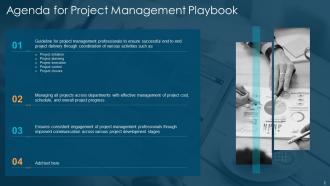
Slide 2: This slide shows Agenda for Project Management Playbook.
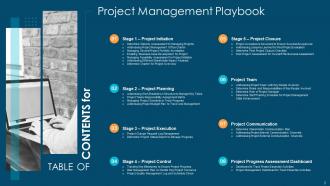
Slide 3: This slide presents Table of Content for the presentation.
Slide 4: This slide shows title for topics that are to be covered next in the template.
Slide 5: This slide provides information regarding project management maturity assessment.
Slide 6: This slide displays information regarding project management office charter.
Slide 7: This slide showcases project portfolio management for managing various projects in terms of managing schedule, budget, resources, etc.
Slide 8: This slide represents Managing Several Project Portfolio for Initiation.
Slide 9: This slide presents information regarding business case development.
Slide 10: This slide displays feasibility assessment focus on objective and rational assessment of proposed project.
Slide 11: This slide represents Addressing Different Stakeholder Impact Analysis.
Slide 12: This slide showcases information regarding project charter which provides brief overview about how project is carried out.
Slide 13: This is another slide continuing Determine Charter for Project Overview.
Slide 14: This slide shows title for topics that are to be covered next in the template.
Slide 15: This slide presents Addressing Work Breakdown Structure to Manage Key Tasks.
Slide 16: This slide showcases information regarding responsibility assignment matrix.
Slide 17: This slide provides information regarding project schedule to manage tasks.
Slide 18: This slide shows Addressing Project Budget Plan to Track Cost Management.
Slide 19: This slide shows title for topics that are to be covered next in the template.
Slide 20: This slide presents information regarding project change request log that covers list of changes.
Slide 21: This slide displays Determine Project Status Report to Manage Progress.
Slide 22: This slide provides information regarding project milestones tracking.
Slide 23: This slide shows title for topics that are to be covered next in the template.
Slide 24: This slide represents Risk Management Plan to Handle Key Project Concerns.
Slide 25: This slide showcases Project Quality Management Log and Schedule Check.
Slide 26: This slide shows title for topics that are to be covered next in the template.
Slide 27: This slide presents Project Acceptance Document to Ensure Successful Approval.
Slide 28: This slide displays Addressing Lessons Learned for Post Project Evaluation.
Slide 29: This slide provides information regarding post project checklist.
Slide 30: This slide represents Post Project Assessment for Overall Effectiveness Assessment.
Slide 31: This slide shows title for topics that are to be covered next in the template.
Slide 32: This slide presents Addressing Project Team with Key People Involved.
Slide 33: This slide displays Determine Roles and Responsibilities of Key People Involved.
Slide 34: This slide provides information regarding the role of project manager in project management.
Slide 35: This slide represents Determine Staff Training Schedule for Project Management Skills Enhancement.
Slide 36: This slide shows title for topics that are to be covered next in the template.
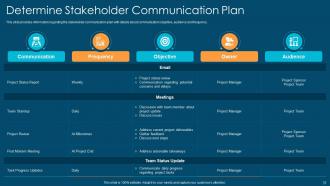
Slide 37: This slide showcases Determine Stakeholder Communication Plan.
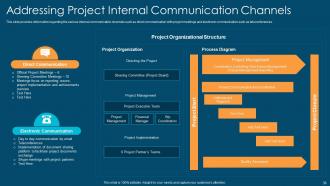
Slide 38: This slide provides information regarding the various internal communication channels.
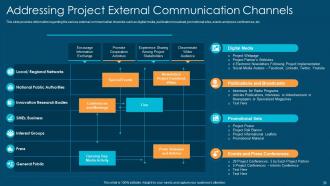
Slide 39: This slide presents regarding the various external communication channels such as digital media, publication broadcast, etc.
Slide 40: This slide shows title for topics that are to be covered next in the template.
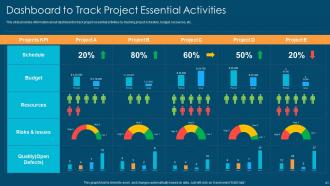
Slide 41: This slide presents Dashboard to Track Project Essential Activities.
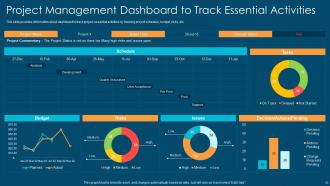
Slide 42: This slide showcases Project Management Dashboard to Track Essential Activities.
Slide 43: This slide displays Icons for Project Management Playbook.
Slide 44: This slide is titled as Additional Slides for moving forward.
Slide 45: This is Our Team slide with names and designation.
Slide 46: This slide presents Bar chart with two products comparison.
Slide 47: This slide contains Puzzle with related icons and text.
Slide 48: This is Our Target slide. State your targets here.
Slide 49: This is an Idea Generation slide to state a new idea or highlight information, specifications etc.
Slide 50: This slide contains Puzzle with related icons and text.
Slide 51: This is a Financial slide. Show your finance related stuff here.
Slide 52: This is a Comparison slide to state comparison between commodities, entities etc.
Slide 53: This is a Timeline slide. Show data related to time intervals here.
Slide 54: This slide provides 30 60 90 Days Plan with text boxes.
Slide 55: This is a Thank You slide with address, contact numbers and email address.
Project Management Playbook Powerpoint Presentation Slides with all 60 slides:
Use our Project Management Playbook Powerpoint Presentation Slides to effectively help you save your valuable time. They are readymade to fit into any presentation structure.
-
Project Management Playbook
-
Agenda for Project Management Playbook
-
Project Management Playbook
-
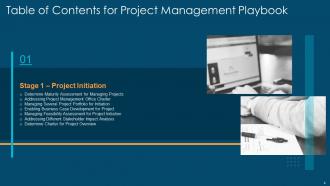
Table of Contents for Project Management Playbook
-
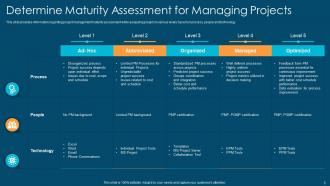
Determine Maturity Assessment for Managing Projects
-
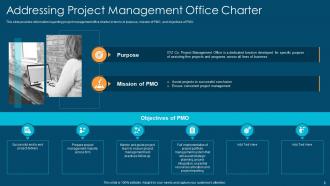
Addressing Project Management Office Charter
-
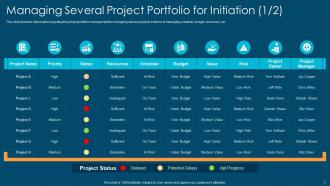
Managing Several Project Portfolio for Initiation 1 2
-
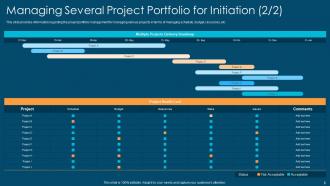
Managing Several Project Portfolio for Initiation 2 2
-
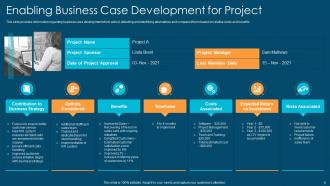
Enabling Business Case Development for Project
-
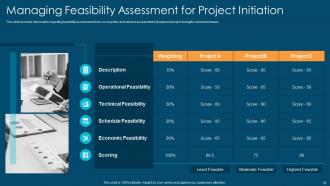
Managing Feasibility Assessment for Project Initiation
-
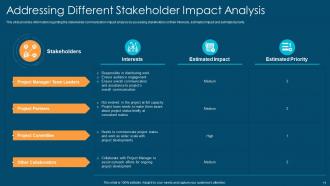
Addressing Different Stakeholder Impact Analysis
-
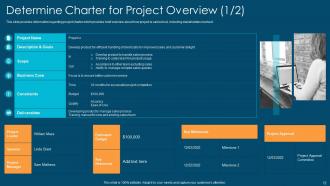
Determine Charter for Project Overview 1 2
-
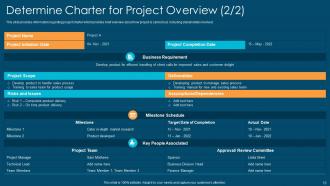
Determine Charter for Project Overview 2 2
-
Table of Contents for Project Management Playbook
-
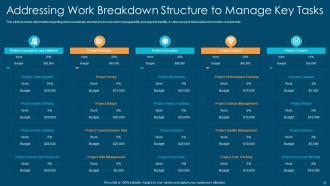
Addressing Work Breakdown Structure to Manage Key Tasks
-
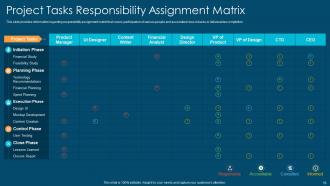
Project Tasks Responsibility Assignment Matrix
-
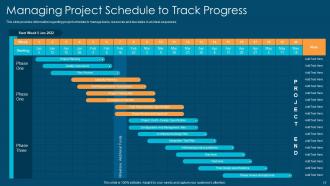
Managing Project Schedule to Track Progress
-
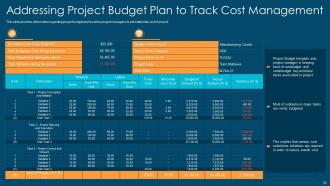
Addressing Project Budget Plan to Track Cost Management
-
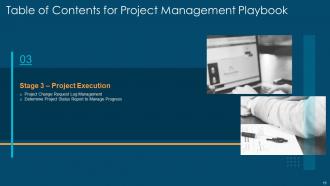
Table of Contents for Project Management Playbook
-
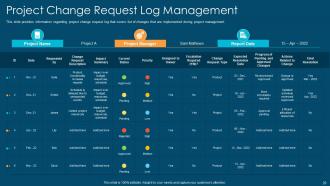
Project Change Request Log Management
-
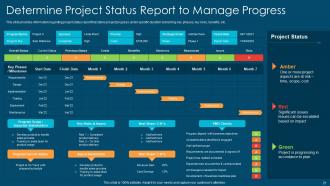
Determine Project Status Report to Manage Progress
-
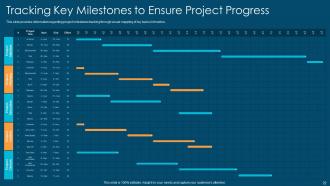
Tracking Key Milestones to Ensure Project Progress
-
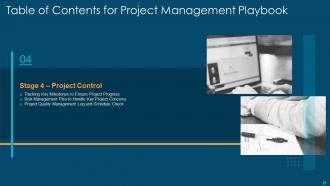
Table of Contents for Project Management Playbook
-
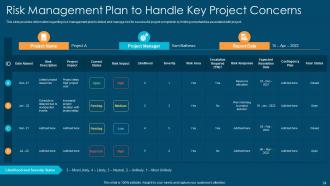
Risk Management Plan to Handle Key Project Concerns
-
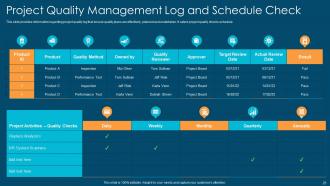
Project Quality Management Log and Schedule Check
-
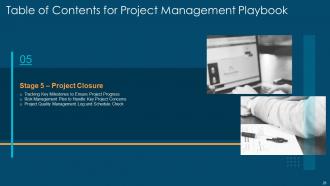
Table of Contents for Project Management Playbook
-
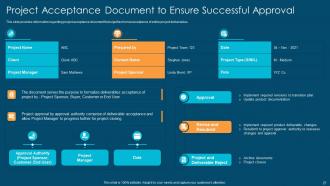
Project Acceptance Document to Ensure Successful Approval
-
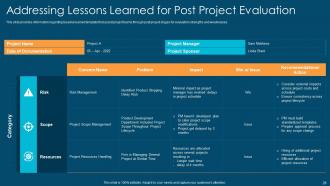
Addressing Lessons Learned for Post Project Evaluation
-
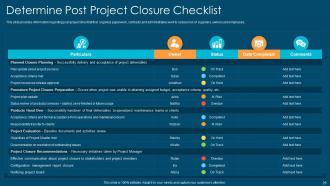
Determine Post Project Closure Checklist
-
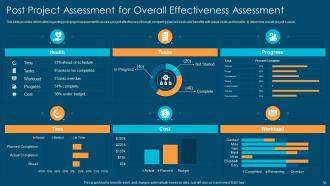
Post Project Assessment for Overall Effectiveness Assessment
-
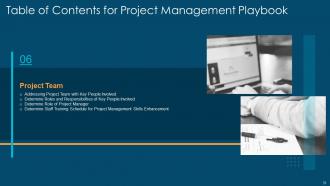
Table of Contents for Project Management Playbook
-
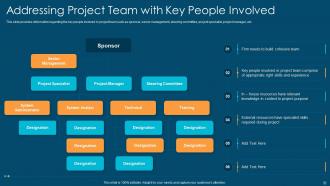
Addressing Project Team with Key People Involved
-
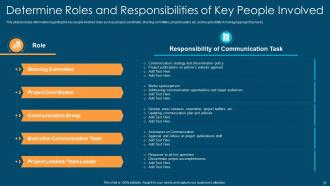
Determine Roles and Responsibilities of Key People Involved
-
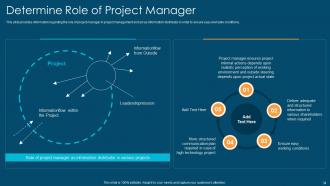
Determine Role of Project Manager
-
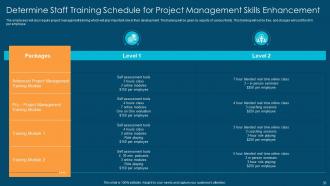
Determine Staff Training Schedule for Project Management Skills Enhancement
-
Table of Contents for Project Management Playbook
-
Determine Stakeholder Communication Plan
-
Addressing Project Internal Communication Channels
-
Addressing Project External Communication Channels
-
Table of Contents for Project Management Playbook
-
Dashboard to Track Project Essential Activities
-
Project Management Dashboard to Track Essential Activities
-
Icons Slide for Project Management Playbook
-

Additional Slides
-

Meet Our Team
-
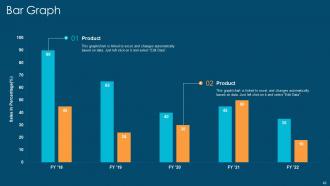
Bar Graph
-
Puzzle
-
Our Target
-
Idea Generation
-
Puzzle
-
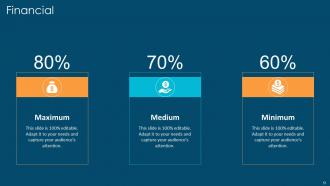
Financial
-

Comparison Slide
-
Timeline
-
30 60 90 Days Plan
-

Thanks for Watching
-

-

-

-

-

FAQs for Project Management Playbook
Your PM playbook should cover the basics first - project lifecycle stages, stakeholder guidelines, and risk assessment tools. Communication protocols are huge too. I'd throw in role definitions and escalation paths because nobody wants to guess who handles what when things go sideways. Change management and quality standards seem boring but trust me, skip those and you'll regret it later. Templates for lessons learned help a ton. Don't try to build the perfect playbook right away though. Start with your most common project types, keep it flexible enough that people will actually use it, then expand from there.
Think of a PM playbook like having one recipe everyone follows instead of each team winging it. Your successful teams probably already have stuff that works - just write that down first. Then when new people join, you're not explaining everything from scratch every single time (which honestly gets old fast). Teams can jump between projects without getting lost, deliverables actually look consistent, and communication doesn't turn into a mess. I'd start small though - pick your best team's process and expand from there.
Dude, visual stuff in your PM playbook is a game changer. No more starting from scratch every time - just grab a Gantt chart template or dashboard and you're set. Your team won't have to decode cryptic status updates anymore (thank god). I swear stakeholders actually pay attention when they can see colorful progress bars instead of boring text walls. Plus you'll look way more organized when juggling multiple projects. Oh and here's what I'd do - pick maybe 2 or 3 templates you'd actually use regularly, then tweak them for your specific stuff. Don't go overboard at first.
First thing - map out how you guys actually work right now, step by step. Then see where the playbook doesn't match reality. Here's the thing: forcing your team into someone else's process is a recipe for disaster. Instead, take their templates and checkpoints but make them fit your style. Your team uses Slack constantly but the playbook wants email updates? Screw that, use Slack. Same with meetings, approvals, all of it. I learned this the hard way on my last project actually. Keep the project management bones but wrap everything in what your team already loves doing.
Honestly, the worst thing you can do is overcomplicate it. I've seen too many teams create these massive 50-page monsters that nobody ever opens again. Don't just copy some template from another company either - that stuff never fits your actual workflow. Get input from your team early or you'll miss how things really work around there. Focus on the situations that happen most often, maybe 80% of what you deal with. Keep it visual and simple. Oh, and start small! You can always build it out once people are actually using the thing and giving you feedback.
Honestly, quarterly is the bare minimum but most good teams do it way more often. Monthly works better if things are moving fast or you're testing new stuff. Don't wait for some scheduled review though - update it right when you hit a wall or figure out something that actually works. After wrapping big projects is perfect timing too since everything's still in your head. Oh and definitely set a calendar reminder with someone's name on it, otherwise it'll just sit there getting more useless by the week. Trust me on that one.
Honestly, you can't really build a solid PM playbook without good tech backing it up. Tools like Asana or Monday are perfect for setting up templates and automating your workflows. Cloud storage is a game-changer too - your team can jump in and make updates from literally anywhere. I'd also grab some collaboration tools while you're building it out (makes gathering feedback way easier). Oh, and don't forget version control - trust me on that one. The trick is finding what actually works for your team instead of just going with whatever's trendy. Start basic and add features as you go.
Dude, get a Project Management Playbook - it's basically checklists and templates for all the stuff that usually goes wrong. Instead of reinventing the wheel every time, you'll have proven strategies ready to go. Super helpful when you're managing like three projects and your brain's fried. Your team will actually document risks the same way too, which sounds boring but trust me, it matters. Oh and customize those templates for whatever industry you're in first. Way better to catch problems early than deal with fires later. Saved my butt so many times honestly.
Look at project delivery times and budget variance first - that's where you'll see real impact. Team satisfaction scores matter too. Honestly, I've watched teams get obsessed with tracking documentation compliance, but that stuff doesn't tell you much. What actually works? Check how often people reference the playbook and adoption rates across different project types. Are you hitting success criteria more consistently now? That's the question. Pick maybe 3-4 metrics that connect directly to better outcomes, not just whether people are using the thing.
Get your stakeholders involved from day one - trust me on this. Interview the key players first: project managers, team leads, executives, maybe even some clients. Those conversations always reveal way more than surveys ever could. Once you've got draft sections, don't just ask "thoughts?" Give them real scenarios to test your templates against. Set up walkthrough sessions where they can actually use the stuff you're creating. Oh, and this might sound obvious but make sure your playbook matches how work really happens, not some idealized version in your head.
Honestly, skip the boring read-through sessions and just do hands-on workshops with real scenarios instead. Way more effective. Pick someone from each team to be the go-to person for questions - trust me, people will have tons. Don't dump everything on them at once though. Roll it out one project at a time or they'll get overwhelmed and forget half of it. Oh, and make those little reference cards for the stuff they'll use most. I learned this the hard way - check back in after a month to see what's actually working and what you need to fix.
Dude, your Project Management Playbook is basically your team's bible when everyone's scattered across different time zones. Get the whole crew access to it first. Then use it to nail down your workflows and how you'll actually communicate - trust me, this stuff matters way more when you can't just tap someone on the shoulder. I'd bring it up during kickoffs and those post-project reviews too. Oh, and don't let it collect digital dust! Keep updating it based on what's actually working for your team. It'll save your sanity when coordinating gets messy.
Honestly, I've watched companies turn things around with this stuff. Microsoft's Azure team shaved 30% off delivery times just by getting everyone on the same page - no more guessing games. Spotify's squad thing works for the same reason. This one marketing agency I know? Client complaints dropped 60% once they standardized their project phases. Pretty crazy difference. The wins always come down to less confusion and faster execution. Oh, and stakeholders actually smile instead of breathing down your neck. Start simple though - just document whatever project went smoothly last time.
Honestly, a good PM playbook saves you so much headache. No more "wait, whose job is this?" confusion that tanks projects. Templates become your best friend - project charters, status updates, risk stuff. Your team actually knows what's happening and when. New people don't have to figure out your weird processes from scratch either. Communication flows better, you spot problems early. I swear, standardizing the basics you do over and over is a game changer. Oh, and future you will definitely appreciate not reinventing the wheel every single time.
Just split your playbook into sections for each approach. Document sprint stuff, standups, and retros for Agile. Then add waterfall phases and risk management for traditional PM. Honestly though? Most teams mix both anyway - I've never seen a purely Agile or waterfall project in real life. Maybe include decision trees so people can figure out which approach fits their project. The trick is keeping it loose enough that teams can actually adapt things instead of following some rigid process that doesn't work for them.
-
Appreciate the research and its presentable format.
-
Thanks for all your great templates they have saved me lots of time and accelerate my presentations. Great product, keep them up!
-
Qualitative and comprehensive slides.
-
Qualitative and comprehensive slides.