

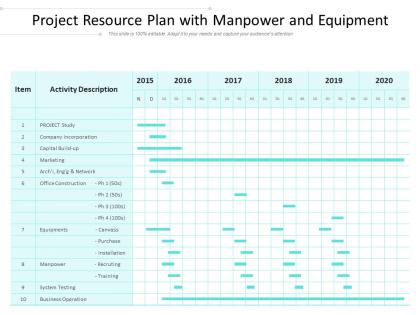
Project resource plan with manpower and equipment




Try Before you Buy Download Free Sample Product
 Impress Your
 Audience
 100%
100% Editable
 Save Hours
 of Time


Our Project Resource Plan With Manpower And Equipment are explicit and effective. They combine clarity and concise expression.
People who downloaded this PowerPoint presentation also viewed the following :
Project resource plan with manpower and equipment with all 2 slides:
Give your audience a fulfilling experience. They will find our Project Resource Plan With Manpower And Equipment elevating.
FAQs for Project resource plan with
Okay so you'll need four main things: resource identification, capacity planning, scheduling, and budget stuff. Map out all your people, tools, and materials first. Then check everyone's availability - honestly this is where most projects completely fall apart if you mess it up. Create a timeline but make it realistic, accounting for dependencies and bottlenecks. Always build in buffer time because I swear something ALWAYS takes way longer than you think it will. Oh and start by listing your key resources and what's limiting them - gives you a good foundation. The whole thing sounds overwhelming but it's really just being organized about it.
Honestly, just break down every single task first - figure out what skills you actually need and how long stuff will realistically take. Then map out which tasks depend on others because that's where things get messy. I always add extra time for when everything inevitably goes wrong (learned this the hard way lol). Cross-check against who's actually available on your team. The biggest thing though? Keep updating your plan as you go. Most people make it once and never touch it again, which is basically useless.
Honestly, it really comes down to how complex your project is. Microsoft Project and Smartsheet are solid if you need serious resource management - capacity planning, allocation tracking, all that stuff. But MS Project has this insane learning curve that'll make you want to throw your laptop out the window. Asana and Monday.com are way more user-friendly and your team will actually want to use them. For basic projects? A good Excel sheet with resource calendars works great. The trick is finding something everyone will stick with. I'd test out 2-3 options with a small project first - most have free trials anyway.
Honestly, stakeholder engagement can make or break your resource planning. Different people have different priorities, and some of them control the purse strings. Get them involved early so you actually understand what they expect - saves you from planning in a fantasy land. The ones who are engaged from the start? They're way more likely to say yes when you need budget or people. I learned this the hard way on a project last year. Map out who controls what resources first, then keep those key players in the loop. Regular check-ins with your resource gatekeepers are clutch.
Ugh, resource conflicts are the worst. First thing - figure out what's actually critical vs what people *think* is critical. You'd be surprised how much wiggle room opens up once you separate the must-haves from wishful thinking. Talk to other PMs early about sharing resources, and honestly? Don't hesitate to escalate if someone's being stubborn about it. I've found that shifting non-critical stuff to off-peak times helps a ton too. The real trick is spotting this mess during planning instead of when everything's already on fire. Weekly check-ins are your friend here - catch those bottlenecks before they turn into full-blown disasters.
Scope basically controls everything about your resources. Bigger project? You'll need more people, money, and time - pretty obvious but easy to forget when you're in the weeds. It's like that dinner party comparison - 5 guests vs 50 totally changes what you buy and how long you spend cooking. I always map out each piece of the scope first, then figure out what skills my team actually has vs what we need. Otherwise you end up scrambling halfway through wondering why nobody knows how to do X. The timeline stuff usually takes longer than you think too.
So forecasting is like having a crystal ball for your project resources. You're basically trying to predict what skills you'll need, when your team will be swamped, and where budget issues might pop up. I always look back at my last 3-4 similar projects first - there's usually some pattern hiding in there about timing and resource usage. It's honestly part data science, part educated guessing. Current team performance helps too, but don't overthink it. The whole point is catching bottlenecks before they steamroll your timeline and figuring out staffing needs early enough to actually do something about it.
Honestly, first thing is figuring out what's actually make-or-break versus what would just be nice to finish. Map out your critical path - I know that sounds fancy but it's just writing down what HAS to happen first. Break those massive tasks into smaller bits so different people can jump in. Weekly check-ins are your friend here, don't wait until everything's on fire. Sometimes stakeholders are living in fantasy land about deadlines (sorry, but it's true). You'll need to have real talk about either cutting scope, pushing timelines, or getting temp help. Way better than that last-minute panic mode we've all been in.
Ugh, bad resource planning is a nightmare. Budget gets wrecked because you're scrambling for contractors at crazy rates. Your timeline? Forget it - key people are never free when you actually need them. The worst part is watching your team burn out completely. I've literally seen entire teams just... break after being stretched thin for months. Quality tanks too when everyone's rushing or you've got the wrong people on stuff. Oh, and start mapping everything out way earlier than you think - always add buffer time because something always goes sideways.
Ugh, budget and time constraints are the worst - they make everything a balancing act. When money's tight, you end up using junior people instead of the experts you actually want. Time crunches are even messier because you'll have to pile more bodies on urgent stuff, even when it's wasteful. I always start with the must-have deliverables first. Then I work backwards to see what's actually doable with the resources I've got. Oh, and definitely pad both your budget and timeline a bit - learned that the hard way. It's basically constant prioritizing and reprioritizing until something works.
Honestly, start with utilization rates - that's your bread and butter metric showing what percentage of time people are actually doing billable work. Check those weekly and you'll spot problems fast. Allocation efficiency is huge too (planned vs what actually happens - spoiler alert, they rarely match). Capacity variance tells you if someone's drowning or twiddling their thumbs. Oh, and don't forget basic productivity stuff like output per hour. I know it sounds like a lot, but once you get the rhythm down it's pretty straightforward to see where things are getting stuck.
Dude, cross-functional teams are a game changer for resource planning. You're literally sitting with marketing, engineering, whoever from the start instead of playing guessing games. No more "surprise, we actually need a designer for three weeks" disasters that wreck your timeline. Other people catch resource conflicts you'd totally miss too. Honestly, even getting one person from each department for just the kickoff meeting makes such a difference. I learned this the hard way on my last project - would've saved me so much chaos.
Honestly, you gotta throw out that rigid planning mindset. Short sprints work way better - like 2 weeks max. Cross-train your people so they're not stuck doing just one thing when priorities flip (and they will flip). Track your team's velocity because guessing capacity is a disaster waiting to happen. Oh, and buffer time for random stuff that comes up - scope creep is real. Daily check-ins are clutch for catching problems before they explode. Your team should help with planning too since they actually know how long things take. Start comparing your estimates to reality next sprint. You'll be shocked how off we usually are at first.
So resource planning is figuring out *what* you need - like which people, equipment, materials for each task. Capacity planning? That's about *how much* your team can actually handle and when they're available. Here's how I think about it: resource planning is "I need Sarah the designer for this project." Capacity planning is "wait, does Sarah even have 20 hours free next week?" They're super connected though - you can't really do one without the other. I'd start with capacity planning first, then figure out who goes where. Makes way more sense that way.
Okay so don't dump everything on the same people while others barely lift a finger - that's recipe for disaster. Give your team realistic deadlines that won't kill their personal lives. Junior folks especially get screwed over with impossible expectations, which honestly pisses me off. Be straight up about what could go wrong on the project instead of sugar-coating everything. Budget enough time for people to actually do good work rather than rush through garbage. I learned this the hard way - your team will burn out fast if you treat them like spreadsheet numbers instead of actual humans.
No Reviews