

Project staff capacity management plan




Try Before you Buy Download Free Sample Product
 Impress Your
 Audience
 100%
100% Editable
 Save Hours
 of Time


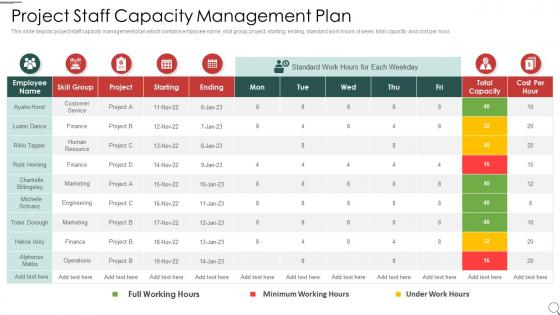
This slide depicts project staff capacity management plan which contains employee name, skill group, project, starting, ending, standard work hours of week, total capacity and cost per hour.
People who downloaded this PowerPoint presentation also viewed the following :
Project staff capacity management plan with all 6 slides:
Use our Project Staff Capacity Management Plan to effectively help you save your valuable time. They are readymade to fit into any presentation structure.





FAQs for Project staff
Honestly, start by documenting what capacity you actually have right now - people, tech, all that stuff. Then you'll want solid demand forecasting so you're not caught off guard. Performance monitoring is clutch too. The scalability planning bit is probably the most critical though - like having a real plan for when everything goes sideways and you're swamped. Communication between teams makes a huge difference so bottlenecks don't sneak up on you. I'd say build the forecasting into whatever planning cycles you're already doing rather than making it some separate thing.
First thing - figure out what you've actually got: staff, equipment, facilities. Check how much you're really using vs what you could theoretically handle. Track throughput and cycle times for a few months minimum. Don't just look at machines either - I've seen companies where the real bottleneck was some ridiculous approval process nobody thought about. Once you have solid data on current performance, compare it against where you need to be based on demand forecasts. Be honest about what you can deliver right now, then work backwards from there.
So basically you want to predict what you'll need before you actually need it - think looking at your past data and trends to guess future capacity. I always start by tracking current usage patterns first since that's your baseline. Historical data plus market stuff helps you figure out if you need more servers, people, whatever, weeks ahead of time. Way better than panicking when you're already maxed out. Just build in extra buffer time because honestly these predictions can be pretty hit or miss. It's kind of like trying to guess how much food you need for a party - better to have too much than run out halfway through.
So basically each industry has its own nightmare to deal with. Manufacturing companies obsess over production lines and equipment running smoothly. Restaurants? They're all about staff schedules and flipping tables fast. Airlines have mastered the dark art of overbooking - honestly impressive how they squeeze every seat. Hospitals juggle bed space with random emergency rushes. Tech firms can scale servers up and down pretty easily, which is nice for them. Retail plans around crazy seasonal spikes like Black Friday. You've got to figure out your main bottleneck first - people, equipment, or physical space - then build some wiggle room around that constraint.
Demand forecasting is probably gonna be your biggest headache - mine's always off by like 20%. Resource bottlenecks will sneak up on you too. Real-time monitoring tools help catch those before they blow up your whole system. The cost vs performance thing? That balancing act never really gets easier, but setting clear SLAs helps. I'd start with auditing what you're actually using right now versus what you think you need. Historical data plus keeping an eye on trends works way better than guessing. You might find you're way over-provisioned in some areas.
Honestly, tech makes capacity management way less of a headache. Real-time monitoring shows you exactly what's happening with your resources - no more guessing games. Dashboards catch bottlenecks before they wreck your day, and automated forecasting predicts what you'll need down the road. The predictive analytics piece is actually pretty slick - it digs into your old data and suggests how to allocate stuff better. Oh, and workflow automation handles the boring adjustments so you're not babysitting everything constantly. Just start with whatever monitoring you've got already. Even basic utilization tracking beats flying blind.
Focus on utilization rates, response times, and throughput first - those are your bread and butter. Utilization shows if you're actually using what you pay for. Response times tell you if users are happy (or complaining). Throughput proves you're getting stuff done. Queue lengths and error rates are lifesavers too since they'll warn you before everything crashes. Oh, and definitely track how accurate your forecasts are - honestly, capacity planning is pretty useless if you're constantly off. I'd review these weekly and tweak your alerts as you go.
Honestly, it's all about nailing your demand forecasting first - dig into your past data and see what patterns emerge. Build in buffer capacity, maybe 10-15% over what you think you'll need. Cross-train your team so people can jump between roles when things get crazy. Flexible partnerships with suppliers are clutch too. I've watched companies get burned both ways - either they're paying for resources they don't use, or they're totally scrambling when demand hits. Set up different response plans for various scenarios. Oh, and don't just set it and forget it - check your projections every quarter so you're not caught with your pants down.
Training your team is honestly one of the best moves for capacity management. Cross-training lets you shuffle people around when things get crazy - no need to panic-hire. Skilled workers are way faster too, and they don't mess up as much. You'd be shocked how much time gets eaten up fixing mistakes from undertrained people. Plus they'll actually notice bottlenecks and suggest fixes since they get the bigger picture. Oh, and start with whatever's causing your biggest headaches right now. Makes the most sense to tackle those areas first rather than training on everything at once.
Look, you can't optimize a supply chain if you don't know what you're working with capacity-wise. Getting visibility into your warehouse space, production limits, and distribution centers gives you the actual data to make smart calls on inventory and routing. Most companies just wing it honestly, which is why their operations are a mess. Short version: measure your capacity constraints and utilization first. Everything else - better inventory placement, smarter resource allocation - flows from there. It's not sexy work but it's what separates the pros from everyone else just throwing darts.
Honestly, monthly is the sweet spot for most places. Weekly if things change fast in your setup. I got burned doing quarterly reviews once - we hit this crazy growth spike and were totally caught off guard. Monthly gives you real trends without drowning in day-to-day weirdness. High-growth stuff? Yeah, you'll want weekly so bottlenecks don't sneak up on you. But here's the thing - pick whatever your team can actually stick to. I've seen too many ambitious weekly schedules die after like six weeks. Start monthly, then adjust if your capacity shifts are happening faster than expected.
Look, seasonal demand is like planning for two completely different businesses. Peak times hit hard - think retail during holidays, but honestly every industry has their thing. You've got two choices: staff up year-round (pricey but you're always ready) or get creative with temp workers and overtime when things get crazy. I'd start by pulling your numbers from the last 2-3 years. Map out when those spikes happen and how brutal they actually are. Once you see the pattern, you can figure out if you want permanent staff or just flex up when needed. Most people underestimate how predictable these cycles actually are.
Honestly, analytics totally changed how we handle capacity stuff. Instead of constantly putting out fires, you can actually see problems coming weeks ahead. Look at your historical data - usage patterns, seasonal spikes, all that. Real-time dashboards are clutch for tracking what's happening right now. Set up alerts before you hit those danger zones, not after. I'd start small though - pick your 3 biggest headaches and focus there first. Way better than trying to boil the ocean. Mix your past data with current metrics and you'll make way smarter decisions about when to scale up.
Modular stuff is your best bet - cloud resources, flexible staffing, teams trained on multiple things. Keep some buffer capacity around if you can swing it budget-wise (yeah, I know that's tough). Partnerships help too when you're swamped - find vendors who can take overflow work off your plate. Automation's clutch for handling volume changes without hiring more people. Honestly, having different options to choose from makes all the difference when demand goes crazy. I'd start by figuring out where you're bottlenecked now, then pick whichever strategy would help most.
So basically, capacity management is huge for keeping customers happy. You nail it, customers get their stuff on time without issues. Miss the mark? You're looking at delays, bottlenecks, and your team getting overwhelmed - which pisses people off fast. Too much capacity though and you're just burning money for no reason. Honestly, I've seen companies mess this up both ways. The trick is hitting that sweet spot where you can handle normal demand plus a little extra for those random busy periods. I'd start by checking where your current bottlenecks are happening.
-
Wonderful templates design to use in business meetings.
-
Excellent Designs.