


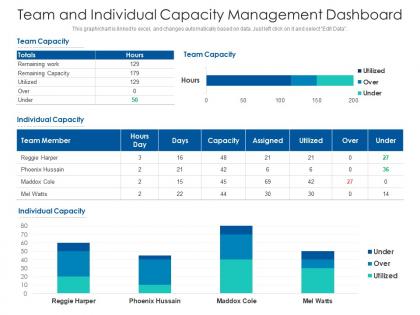
Team and individual capacity management dashboard




Try Before you Buy Download Free Sample Product
 Impress Your
 Audience
 100%
100% Editable
 Save Hours
 of Time


This graph or chart is linked to excel, and changes automatically based on data. Just left click on it and select Edit Data.
People who downloaded this PowerPoint presentation also viewed the following :
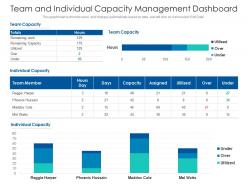
Team and individual capacity management dashboard with all 2 slides:
Use our Team And Individual Capacity Management Dashboard to effectively help you save your valuable time. They are readymade to fit into any presentation structure.
FAQs for Team and individual
So basically you want that sweet spot where nothing crashes but you're not throwing money at servers nobody's using. Start by checking your current usage patterns - when do you actually get slammed? Build in some buffer for growth, just don't go crazy with it. The whole point is avoiding those nightmare 3 AM calls when everything explodes because traffic spiked. I learned this the hard way lol. Performance matters, but so does your budget. Monitor peak times first, then figure out what you'll actually need.
Dig into your usage data from the past year or two first. Peak periods, growth trends, that kind of stuff. Map out what you're actually using now - systems, storage, bandwidth. Seasonal spikes will absolutely wreck you if you don't plan for them (learned that one the hard way). Talk to the business teams about what's coming up - new launches, big projects, whatever might hit your systems. Honestly, most people skip this step and regret it later. Combine that historical stuff with what's actually planned ahead. Set up quarterly reviews so you're not scrambling when things get tight.
So data analytics is honestly a game-changer for capacity planning. Look at your historical usage patterns to predict when demand will spike. You'll catch bottlenecks before they wreck everything - way smarter than just winging it. Set up automated alerts so you're not glued to dashboards all day (learned that one the hard way). Plus you can see which resources aren't pulling their weight and shuffle things around. I'd start simple though - pick your top 3 metrics and build predictive models from there.
Honestly, capacity management is like the backbone of your whole operation - get it wrong and you're either drowning or twiddling your thumbs. Map out what you actually need vs. what you've got right now. Build in some cushion for busy periods because peak times will hit harder than you expect. When it's dialed in right, you can spot bottlenecks coming from a mile away instead of scrambling last minute. No more expensive overstaffing or those nightmare moments where you're completely swamped. It's basically about finding that sweet spot where everything just... works.
Honestly, demand forecasting is going to kick your ass - nobody gets it right consistently. Capacity constraints pop up out of nowhere too. You're basically trying to balance resources while everything gets more expensive by the day. Different teams all want their projects prioritized, which becomes this whole political mess. Your data's probably spread across like 5 different systems making it impossible to see what's actually happening vs what you planned. Oh and the utilization rates? Start there first - you need to know where you actually stand before fixing anything else. It's a lot but totally manageable once you get visibility.
Monitoring tools will track your resource usage in real-time and alert you when things get dicey. Analytics platforms help predict future demand too - honestly way better than guessing. Cloud auto-scaling is a lifesaver since it adjusts resources automatically based on what you're actually using. You can connect this stuff to your ITSM tools so capacity data feeds right into change management and incidents. Pretty seamless once it's set up. I'd start by figuring out which manual capacity tasks are eating up your day. Those boring repetitive ones? Perfect for automating first.
Honestly, start with the basics - actual output divided by max capacity gives you your utilization percentage. Track throughput too (how many units you're cranking out per hour or whatever). Cycle time matters - that's how long each unit actually takes to process. Figure out where your bottlenecks are happening. Is it your team? Equipment? Systems being slow? Queue length shows you where things are backing up, which is super telling. Wait times reveal the same thing basically. Don't aim for 100% though - that's a recipe for disaster when demand spikes. Around 80-85% is the sweet spot most places hit.
Look, capacity management is basically making sure you've got enough people and resources when customers actually need them. Poor planning? Your customers end up waiting forever while your team scrambles. Nobody wants that mess. Track when you're busiest - maybe it's Monday mornings or whatever - then staff up accordingly. Customers won't know why things run smoother, but they'll definitely feel it. Response times get faster. Service stays consistent. It's one of those invisible things that only gets noticed when it breaks. Trust me, getting this right makes everyone's life easier.
Okay so first thing - map out when you're actually busy vs slow. Use that data plus market trends to predict your peak times. Cross-train your team so people can jump between roles when things get crazy. Honestly, dynamic pricing is a game changer if you can swing it - customers will pay more during busy periods. Also bring in temps during rush times, it's way cheaper than overstaffing year-round. Queue systems help too, people hate waiting but they hate uncertainty more. Don't put all your eggs in one basket though. Multiple approaches work better than going all-in on just scheduling or just pricing.
Honestly, most teams just slap on 10% more capacity everywhere and call it a day - total waste. You gotta connect your capacity planning to actual business forecasts first. Like if sales is projecting 30% growth, figure out what that really means for your servers, staffing, production, whatever. Don't just guess. Map your investments to specific initiatives and when they're happening. Yeah, build in some buffer for random spikes, but be smart about it. The secret sauce is actually talking to business folks regularly so you're scaling the right stuff at the right time instead of scrambling later.
So basically, reactive capacity management is when you're frantically throwing servers at a problem after your site's already melting down from traffic. Not fun. Proactive is way smarter - you actually watch your usage patterns and scale up before things go sideways. It's like getting your oil changed regularly vs waiting for your engine to seize up (learned that one the hard way). Way less stressful when you plan ahead, though it does mean more monitoring work upfront. Pro tip: set alerts when you hit 70-80% capacity instead of waiting for everything to catch fire.
Here's the thing - cloud scaling is a game changer because it adjusts automatically based on real demand. No more guessing what you'll need or watching expensive servers collect dust (seriously, such a waste of money). When traffic hits, auto-scaling spins up new instances. Traffic dies down? Those extra instances disappear. You only pay for what you're actually using, plus you get monitoring tools that'll show patterns you totally missed before. I'd start with something low-stakes to get the hang of it first.
Manufacturing, healthcare, and tech get the most out of good capacity management. Like, it literally saves these companies from disaster. You've got production lines in manufacturing that need perfect timing. Hospitals juggle staff schedules, bed availability, equipment - total nightmare if you mess it up. Tech companies? They're constantly watching server loads and cloud usage, especially when everyone's online at once. Here's the thing - when capacity goes wrong in these industries, money flies out the window fast. Either you're paying for stuff sitting unused or you're frantically trying to catch up. My advice? Figure out where your biggest bottlenecks are happening first.
Honestly, it's like having a crystal ball for your server needs. You can spot those nasty bottlenecks before they wreck your day and actually plan ahead instead of scrambling when everything crashes. Historical data shows you the patterns - seasonal spikes, growth trends, all that stuff. Way better than just throwing hardware at problems after they happen (guilty as charged on that one). Start tracking your current usage first though. That baseline data is what makes the forecasting actually work. Saves you from buying too much gear OR dealing with outages.
Dude, bad capacity planning is expensive as hell. You'll either waste money on resources just sitting there doing nothing, or you'll panic when demand spikes and pay crazy rates for last-minute fixes. Miss opportunities because you can't scale fast enough? There goes your revenue. Have too much capacity? You're literally burning cash on unused stuff and idle staff. I used to think this was boring operations stuff until I saw how it wrecked our quarterly numbers. Track your actual usage patterns each month - that's where you find the sweet spot between handling normal ups and downs without massive waste.
-
Colors used are bright and distinctive.
-
Best way of representation of the topic.
-
Unique design & color.
-
Great product with highly impressive and engaging designs.