


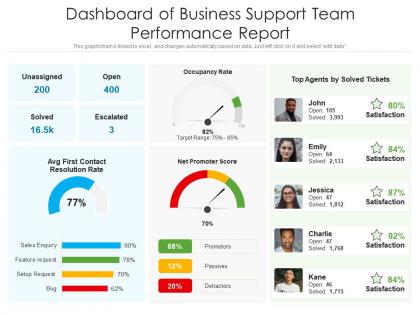
Dashboard Snapshot of business support team performance report




Try Before you Buy Download Free Sample Product
 Impress Your
 Audience
 100%
100% Editable
 Save Hours
 of Time


This graph or chart is linked to excel, and changes automatically based on data. Just left click on it and select edit data.
People who downloaded this PowerPoint presentation also viewed the following :
Dashboard Snapshot of business support team performance report with all 2 slides:
Use our Dashboard Snapshot Of Business Support Team Performance Report to effectively help you save your valuable time. They are readymade to fit into any presentation structure.
FAQs for Dashboard Snapshot of business support
Focus on metrics that actually matter for decisions - load times, engagement rates, bounce rates, conversions. Don't forget error rates and uptime because crashed dashboards help nobody! Track both technical stuff (speed) and business impact (are people using your insights?). User adoption is huge too. What's the point of gorgeous charts if everyone ignores them? I'd set up alerts for when things drop below your thresholds. Oh, and honestly? Sometimes the prettiest dashboard is the one that loads fast and doesn't confuse people.
Honestly, turning your performance data into visuals is a game-changer. Raw numbers in spreadsheets are just brutal to look at. Heat maps will show you problem spots right away, and line charts are perfect for spotting trends over time. The trick is picking the right chart type - bar charts work great for comparisons, pie charts for showing parts of a whole. I always start by figuring out what story the data's actually telling me first. Then it's way easier to choose visuals that make sense. Your dashboard should tell that story so clearly that anyone can get it immediately.
Dude, real-time data is a total game changer for dashboards. You'll catch problems while they're happening instead of finding out about them weeks later when you're screwed. Static reports? Honestly feels like reading yesterday's newspaper once you get hooked on live data. The best part is you can actually do something about issues right away - fix stuff before it gets worse, jump on trends while they're still hot. Oh, and definitely set up alerts for your biggest metrics. Trust me, you don't want to be glued to your screen all day watching numbers change.
Set up regular feedback loops with your users - surveys work, but honestly user interviews give you way better insights. Ask what metrics they actually care about for decisions and which visualizations are just confusing them. What we think users need vs what they actually use? Total disconnect most of the time. Figure out your key user personas first. Then create feedback touchpoints at different stages. Oh and here's the big thing - always circle back with users about how their feedback changed the dashboard. People love seeing their input actually mattered.
You gotta match what you show to what people actually need, you know? Executives want the bird's eye view - KPIs, trend arrows, those red/green status things. They're not diving deep into anything. Department heads need more detailed breakdowns so they can actually do something about problems. Tech teams? Give them all the raw data and let them go crazy with drill-downs. I've watched so many dashboards fail because they tried cramming everything together. Ask each group what decisions they're making first, then build around that. Way easier than guessing what they want.
Your dashboard colors and layout basically make or break how people read your data. I've totally seen dashboards where the most important stuff gets completely missed because of terrible visual choices. Don't use red/green together (colorblind users will hate you), and skip those awful low-contrast combos that make everything blend together. Put your biggest KPIs front and center - like, literally the first thing people see. Keep similar colors for related data so it actually makes sense. Your layout should flow naturally from the most critical info down to the nice-to-know stuff. Oh, and definitely test it with real users first!
Power BI is probably your best bet - most companies already have it anyway, and it's way easier to learn than Tableau. Though honestly, if you need really fancy visualizations, Tableau's still the king. Google Data Studio works great too if you want something free and don't mind it being web-only. Whatever you do, skip Excel for anything serious - I learned that the hard way when my computer froze trying to process like 50k rows lol. Power BI's integration with everything Microsoft is clutch though, especially if your team's already living in that ecosystem.
First things first - clean up your data sources and make sure they're actually tracking what you think they are. I learned this the hard way when our "customer satisfaction" metric was basically measuring something completely different for months. Set up automated quality checks because manually checking everything daily is soul-crushing. Keep your time periods and definitions consistent across metrics - otherwise you're just confusing yourself. Document how you built everything too. Trust me, future you will thank present you when someone asks "where'd this number come from?" Write down your calculations and data sources. Also, audit your dashboard regularly against the original systems to catch any weird disconnects.
Don't cram everything onto one screen - I've seen dashboards that look like NASA mission control lol. Pick maybe 5-7 metrics that actually matter for decisions. Skip the vanity stuff that just makes you feel good but doesn't help anyone. Your refresh rates should match how often data actually updates. Oh, and test on different devices because load times can be brutal on mobile. Here's what works: start with "what decisions are people trying to make?" then build around that. Way better than throwing charts at a wall.
So basically, you'll want to dig into your historical data and look for patterns - seasonal stuff, growth trends, that kind of thing. Most BI tools already have forecasting features built right in, which is pretty handy. You can usually tweak the forecast settings in real-time too. Just make sure you've got at least a year or two of solid data first, maybe more depending on your business cycles. Oh, and definitely set up some alerts for when things go way off from what you predicted. That way you'll catch problems (or wins) early. The whole thing works way better when your data's actually clean though.
Page load times are key - shoot for under 3 seconds. Most visualizations should respond in under a second, which honestly can be tough with complex data. You'll need benchmarks for how many concurrent users your system can handle based on your company size. Memory usage matters too (don't go over 2GB for dashboards). Track your data refresh rates against competitors and aim for 99.9% uptime - that's pretty standard now. Gartner reports have decent industry data, though finding good benchmarks is always annoying. I'd document what you're currently hitting first, then see how you stack up.
Dude, mobile compatibility isn't just nice to have anymore - it's mandatory. Your team's gonna want to pull up those metrics while they're in random meetings or scrolling through data from bed at 11pm (don't judge, we all do it). Without mobile support, you're basically telling half your users "sorry, come back when you're at your desk." Charts need to actually be readable on phones, buttons can't be tiny, and honestly? I've seen too many dashboards that look great on desktop but are completely unusable on mobile. Get someone to test yours on different devices ASAP.
Honestly, templates are your best bet most of the time. They're way cheaper and you can get them up fast since they follow UX patterns that actually work. Yeah, they look kinda generic, but whatever. Custom builds give you total control - which is cool if you're into that perfectionist thing - but man, they eat up so much time and money. Plus maintaining them later is a pain. I'd grab a decent template first, then tweak the important stuff your users actually care about. You get like 80% there without wanting to pull your hair out.
Dashboard reports are honestly a game-changer for getting everyone aligned. No more "wait, I had no idea we were struggling with that" moments. I'd set up weekly or bi-weekly meetings where you actually walk through the numbers together - sounds boring but it works. The transparency factor is huge since people can see who's crushing it and who might need help. Just make sure you're tracking stuff that actually moves the needle for your goals, not vanity metrics. Oh, and don't forget to celebrate the wins when you see them in the data!
Honestly, it comes down to what kind of data you're showing and who's looking at it. Real-time stuff like web traffic? Yeah, update that every few minutes. Monthly sales reports though - daily refreshes are way overkill and'll just bog everything down. Your database can only handle so much before it starts choking, especially during busy periods. Nobody wants their system crashing on a random Tuesday because you're refreshing too aggressively. Just think about how often people actually check the dashboard and whether they really need that data to be super fresh. Match your refresh rate to that.
-
Much better than the original! Thanks for the quick turnaround.
-
The content is very helpful from business point of view.
-
Appreciate the research and its presentable format.
-
I discovered this website through a google search, the services matched my needs perfectly and the pricing was very reasonable. I was thrilled with the product and the customer service. I will definitely use their slides again for my presentations and recommend them to other colleagues.
-
Excellent design and quick turnaround.